Movebot architecture: Scale past 270TB daily
Movebot migrates data across more than 30 platforms including AWS S3 and M365 (https://movebot.io/). The architecture enables automated file transformation while managing permission mapping between disparate storage types.
The platform handles both personal drives and shared team folders without manual reconfiguration. Legacy scripts crash under load; this solution scales automatically to move files and permissions at high speeds. It addresses structural incompatibilities by fixing naming rules and filetype issues before they corrupt the destination environment.
A web-based interface orchestrates these transfers without local server management. Detailed reporting tracks progress across cloud tenants and on-premises hybrids, ensuring mailbox migrations and bulk file moves complete with full fidelity.
The Role of Movebot in Modern Cloud Data Migration
Movebot as a Cloud-Native AWS S3 Migration Tool
Provisioning compute nodes or managing virtual machines adds friction to transfer operations. Movebot removes this requirement entirely as a fully hosted cloud-native solution. This architecture supports data migration across more than 30 distinct cloud and on-premise environments, including substantial providers like Google Workspace, Microsoft 365, and AWS. Legacy agents demand local infrastructure. This tool performs a pre-migration scan to identify potential incompatibilities before the actual data transfer begins, maintaining data integrity across heterogeneous systems.
Executing Delta Migration for Dropbox and M365 Transfers
Minimizing cutover windows requires isolating only modified files after an initial baseline copy. Delta migration achieves this. Operators connect Dropbox Business accounts via a web interface to migrate personal drives, team drives, and shared content without manual file selection. The approach supports Google Workspace users moving shared drives alongside individual my drive content to AWS S3 buckets.
Migration throughput varies notably by provider limitations. Lowend averages sit at approximately 3TB per day. Highend capacity reaches up to 270TB per day for block storage migrations. T he cloud-native architecture handles file transformation rules automatically, correcting naming conflicts that typically halt legacy scripts. Average daily migration speeds generally fall between several terabytes and 10TB per day, though performance depends on source and destination provider constraints. Running multiple transfers allows for improved management of large-scale jobs while maintaining visibility. Detailed reporting tracks every moved object so permission maps remain intact across the heterogeneous destination. Avoiding full re-transfers of unchanged datasets during the final cutover phase reduces total migration time.
Automated Movebot Transfers Versus Manual Data Movement
Error-prone manual copying fails to maintain access controls during movement. Automated replacements use permission-preserving workflows. Operators executing manual AWS S3 migrations often encounter filename sanitization errors and broken inheritance chains, requiring extensive post-migration auditing to correct. The tool handles file transformation rules natively to resolve conflicts before data reaches the destination bucket without human intervention.
Financial distinctions lie in the transparent per GB rate, which excludes extra charges for specific data types like mailboxes or complex folder hierarchies. This model eliminates the uncertainty of professional services quoting where final costs often exceed initial estimates due to discovered complexities. Security architecture further differentiates the approach since the system acts strictly as a conduit and does not store user files at any point during the transfer process. Manual methods offer granular control for tiny datasets, yet the operational overhead scales linearly with volume while automation maintains consistent velocity regardless of file count. Organizations prioritizing audit readiness benefit from the detailed reporting logs provided by cloud-native agents at all migration stages. Automation requires an initial setup to connect platforms, but this configuration enables superior long-term reliability for enterprise workloads.
Inside Movebot Architecture and Automated Data Flow
Native Agents for Windows, Mac, and SFTP Connectivity
Direct block storage connections require no intermediate infrastructure layers. Movebot deploys native agents for Windows 2016, 2019, and 2022 to establish these links. These on-premise agents eliminate the need for temporary staging servers during large-scale data transfers. Intel-based Mac environments apply a dedicated Apple OSX agent to maintain file system fidelity during extraction. Protocol flexibility extends to SFTP and FTP servers, enabling secure tunneling for legacy file shares that lack native cloud APIs.
| Agent Type | Supported Versions | Primary Connection Method |
|---|---|---|
| Windows Server | 2016, 2019, 2022 | Native Agent |
| Mac OSX | Intel Architectures | Native Agent |
| File Protocol | FTP, SFTP | Direct Tunnel |
Operators migrating massive datasets benefit from a copy-based architecture designed to prevent data loss. This architectural choice supports efficient movement of unstructured data from traditional file servers. The process avoids complex scripting requirements found in manual migrations. Unlike tools restricted to specific cloud pairs, this approach supports over 30 heterogeneous platforms including specialized engineering databases. Direct connectivity ensures that permission structures are migrated from the source disk to the final S3 bucket. The absence of intermediary hops reduces the attack surface during transit.
Scaling Block Storage Transfers to 270TB Daily Throughput
Parallelized data streams bypass manual fragmentation to resolve large dataset errors. High-throughput block storage migrations rely on this mechanism. Typical projects observe an average daily migration speed falling between several terabytes and 10TB per day during standard operations. This baseline throughput allows operators to calculate realistic cutover windows without inflating infrastructure budgets for temporary compute clusters. The platform scales automatically to handle petabytes of data, maintaining velocity even as file counts reach into the millions.
| Storage Type | Typical Daily Throughput | Operational Constraint |
|---|---|---|
| Standard Cloud | Several terabytes, 10TB | Provider limitations |
| Block Storage | Up to 270TB | Network bandwidth |
| Legacy On-Prem | Variable | Disk I/O bottlenecks |
Pushing block storage beyond network capacity impacts performance on legacy arrays. Operators migrating petabytes must balance aggressive parallelism against the risk of saturating upstream links, which often causes more delays than the transfer duration itself. Successful large-scale moves to AWS S3 require mechanisms that respect source limits while maintaining forward progress.
- Execute a pre-migration scan to identify potential issues or incompatibilities before data movement begins.
- Configure delta migration cycles to capture incremental changes while the bulk transfer completes in the background.
- Use detailed reporting at all migration stages to monitor progress and ensure data integrity.
Validating Full File and Modtime Preservation Across 30 Platforms
Verification begins by confirming that SharePoint On-prem instances retain exact modification timestamps during the transfer to cloud targets. The tool catches potential filename and structure issues automatically, fixing them to ensure files are moved properly. This step prevents silent data loss where folder structures collapse due to unsupported character encoding in legacy systems.
| Attribute | Legacy Manual Copy | Automated Validation |
|---|---|---|
| Modtime Accuracy | Often reset to copy date | Preserved exactly |
| Permission Mapping | Broken inheritance chains | Native migration of permissions |
| Error Handling | Post-facto auditing | Pre-scan detection |
The platform supports native migration of metadata including file versions to ensure the destination mirrors the source organizational logic metadata. Operators targeting regulatory compliance should prioritize integrity modes over raw velocity during the final cutover window. Teams can review current market positioning and pricing data tagged for 2026 on software advice platforms pricing data.
Executing Cross-Platform Migrations with Movebot
Defining Movebot Scope: From BIM 360 Docs to WebDAV Transfers

Platform boundaries dictate migration success by distinguishing between full bidirectional synchronization and limited one-way extraction. Movebot supports over 30 distinct cloud and on-premise platforms, yet operators must differentiate "full support" from legacy file extraction. Full support encompasses Google Workspace and Dropbox Business, preserving shared drives, personal content, and complex permission hierarchies natively. Legacy systems like Huddle and BoomSync offer only one-way file movement, requiring manual reconstruction of user access controls post-migration.
Attempting a lift-and-shift from BIM 360 Docs requires understanding its specific extraction capabilities to ensure complete project handovers. Organizations planning a transition from on-premise servers to cloud storage must verify that their specific legacy protocol, such as WebDAV, allows the necessary metadata throughput for their use case. Recognizing these platform-specific ceilings early prevents downstream identity management failures. Validating source API capabilities against destination requirements before initiating any large-scale transfer is necessary.
Configuring On-Premise to Azure and Tenant-to-Tenant Flows
Operators initiate on-premise to Azure flows by deploying native Windows agents that connect directly to the cloud. This fully hosted, secure, and scalable approach eliminates infrastructure overhead while maintaining secure data paths directly to Azure Blob or Files Storage. Pre-migration scanning identifies filename incompatibilities before transfer begins, preventing structural corruption in the destination tenant. The tool provides complete visibility into migrations with detailed scanning and reporting, allowing teams to validate permissions before cutover.
Tenant-to-tenant configurations use granular selection capabilities rather than forcing full environment replication. Administrators can execute migrations down to the specific folder level, enabling targeted moves for active projects while leaving legacy data intact. File transformation rules automatically sanitize illegal characters and adjust path lengths to match Azure constraints.
Migration throughput varies notably by provider limitations, with speeds ranging from approximately 3TB per day to as high as 270TB per day for block storage migrations. Relying on autoscaling capabilities mitigates local bottlenecks, though actual ingestion speeds depend on the specific source and destination platform constraints. Organizations should account for these variable throughput rates when planning migration windows. This configuration is ideal for datasets where preserving exact directory structures is vital for pipeline compatibility.
Pre-Migration Validation Checklist for AWS S3 and SharePoint Online
Operators must confirm access to configuration requirements for on-premise to cloud flows. These resources clarify how to configure file transformation rules that automatically sanitize incompatible characters during the move. Teams should apply the available free data scans to identify potential migration issues before committing to the paid migration process. This proactive step ensures the delta migration process only copies new or modified data, minimizing downtime during the final cutover.
The market is shifting away from complex projects toward simple browser-based SaaS solutions that reduce the need for deep specialized knowledge. Automated pre-scans catch potential issues that manual processes might miss, ensuring data integrity. Validating these controls early prevents structural corruption in the destination tenant.
Strategic Advantages of Movebot for Enterprise Scale
Movebot Enterprise Scale Definition: Cloud-Native Autoscaling Without Infrastructure
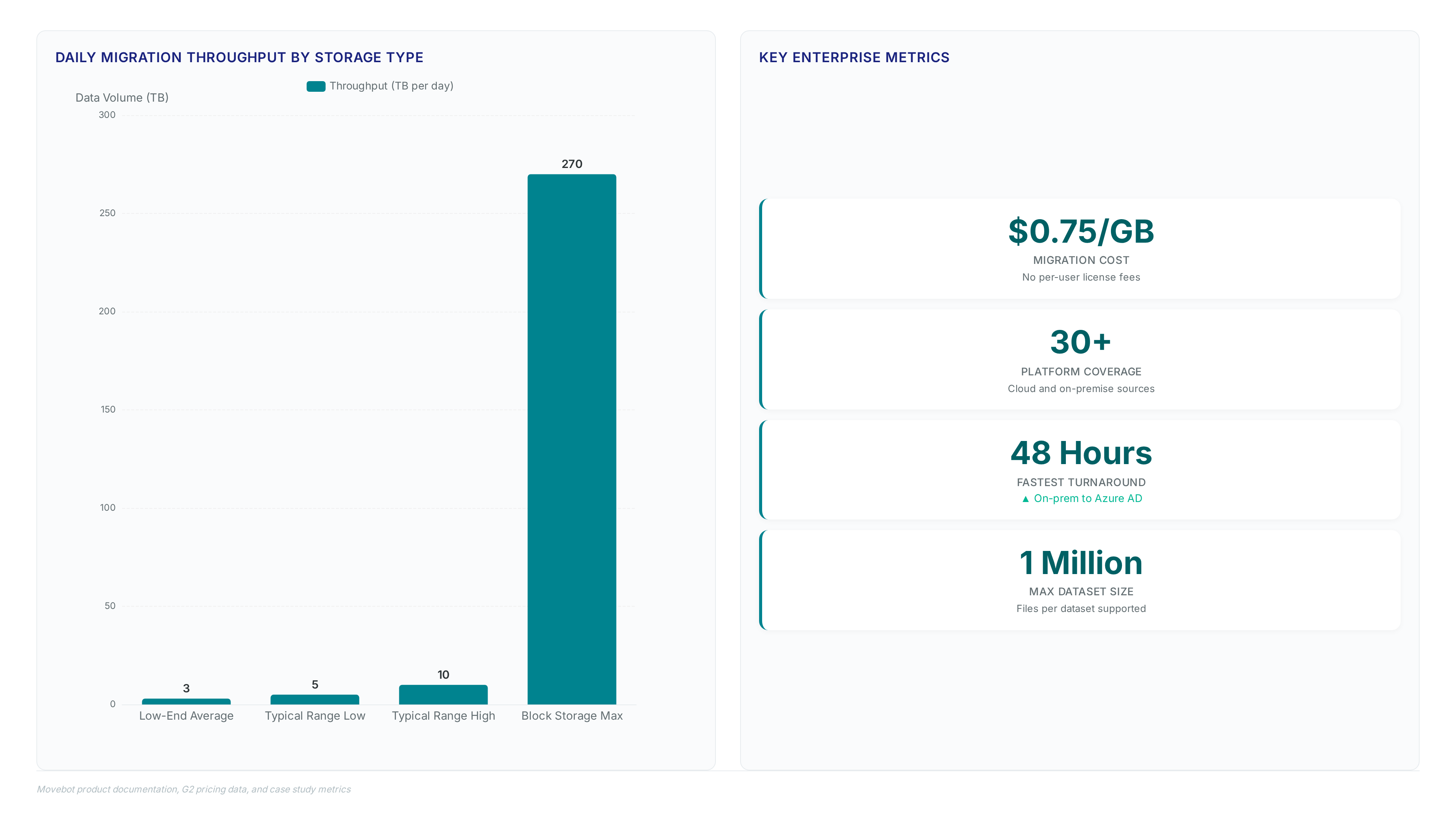
Movebot defines enterprise scale by eliminating infrastructure provisioning through fully hosted, cloud-native autoscaling. This architecture allows organizations to handle massive data volumes without managing servers or worrying about hardware limits. The solution scales horizontally to support complex migrations involving millions of files and folders. The system natively migrates standard file structures alongside other data types, ensuring thorough data portability across more than 30 platforms.
| Capability | Legacy Scripts | Movebot Architecture |
|---|---|---|
| Infrastructure | Manual provisioning | Fully hosted, zero setup |
| Data Types | Files only | Files and associated metadata |
| Scaling Logic | Fixed throughput | Automatic horizontal expansion |
Increasing throughput usually requires complex tuning in other systems. Here, the autoscaling mechanism abstracts this trade-off by dynamically allocating resources to handle large volumes of data. A critical limitation remains that source API rate limits still cap maximum velocity, regardless of the tool's internal capacity. Consequently, while the platform removes local bottlenecks, external provider constraints dictate the absolute ceiling for daily transfer volumes. Teams should use project-based migration management to monitor these external throttling events effectively. This approach ensures that large-scale moves remain predictable even when underlying cloud APIs fluctuate in performance. This model supports startups needing immediate elasticity without capital expenditure on temporary compute clusters.
Real-World Enterprise Migration: Completing Azure AD Transfers in 48 Hours
A high-priority client migrated from on-premise infrastructure to Azure AD in approximately 48 hours using Movebot. This rapid turnaround contrasts sharply with manual processes where administrators spend days sanitizing filenames or isolating corrupted items within massive datasets. Identifying even a small number of incompatible files out of 1 Million can typically halt progress, yet automation resolves these conflicts instantly. The cloud-native architecture eliminates the need for temporary staging servers, allowing direct data movement that preserves permissions without intermediate bottlenecks.
| Metric | Manual Migration | Movebot Automated |
|---|---|---|
| Completion Time | Several Days | ~48 Hours |
| Error Handling | Manual Fix Required | Automatic Sanitization |
| Dataset Limit | Limited by hardware | Scales to Petabytes |
Speed introduces risk if detailed logging does not validate every transferred object. Previous tools often failed to provide confidence when deleting source data after moving large sets, creating a dangerous window for data loss. Movebot addresses this by offering granular reports that confirm successful moves before source deletion occurs. Users seeking personalized assistance can access expert support to configure complex permission mappings correctly. The platform performs a pre-migration scan to identify potential issues or incompatibilities before the actual data transfer begins, ensuring data integrity. Enterprises should adopt this approach for hybrid scenarios where downtime windows remain critically short. It is recommended to validate scan reports thoroughly before initiating the final cutover phase.
This bottleneck forces teams to manually sanitize filenames or omit incompatible data, creating significant operational drag. Automating this process eliminates these failure points by catching potential issues and fixing them automatically before transfer begins.
| Feature | Manual Process | Movebot Automation |
|---|---|---|
| Error Detection | Reactive, post-failure discovery | Pre-transfer sanitization |
| Scale Limit | Limited by hardware | Horizontal cloud scaling |
| Remediation | Time-intensive manual fixing | Automatic transformation |
The primary risk of manual intervention is the inability to validate data integrity across massive volumes without exhaustive logging. Previous tools often struggled with large datasets, leaving operators without the confidence to delete source data. In contrast, high-performance scenarios demonstrate capacity reaching 270TB per day for block storage, ensuring that volume does not compromise accuracy. This architectural difference means organizations avoid the hidden cost of extended downtime during critical cutover windows.
Operators face a tension between maintaining strict control and achieving necessary speed. Automated transformation rules allow immediate progression by handling filename incompatibilities without manual review. The consequence of ignoring this shift is the accumulation of technical debt in the form of un-migrated orphan files. It is recommended to use cloud-native automation to ensure million-file migrations complete without data loss or corruption.
About
Alex Kumar, a Senior Platform Engineer and Infrastructure Architect at Rabata.io, brings deep technical expertise to the discussion of AWS S3 migration tools like Movebot. Specializing in Kubernetes storage architecture and cost optimization, Alex daily navigates the complexities of moving massive datasets for AI/ML startups and enterprise clients. His hands-on experience with infrastructure-as-code and persistent storage solutions directly informs his understanding of the critical need for smooth, high-speed data transfer between cloud tenants. At Rabata.io, a provider of high-performance S3-compatible object storage, Alex uses tools like Movebot to help organizations eliminate vendor lock-in while achieving significant cost savings. Because his work involves architecting resilient systems that demand true API compatibility and zero downtime, he recognizes the value of cloud-native solutions that require no infrastructure management. This practical background ensures the analysis of Movebot's capabilities is grounded in real-world DevOps challenges and the specific performance requirements of modern data-intensive applications.
Conclusion
Scaling data migration exposes a critical fracture point where manual oversight collapses under the sheer volume of file transformations. While basic transfers might suffice for smaller datasets, operating at the enterprise scale demanded by modern infrastructure requires a shift from reactive fixing to proactive automation. The operational cost of ignoring this is not merely slowed throughput but the accumulation of un-migrated orphan files that create long-term technical debt. Organizations relying on legacy methods often find their cutover windows consumed by manual sanitization rather than actual data movement. This bottleneck dictates that teams must adopt cloud-native tools capable of horizontal scaling to handle the variance between standard operations and peak capacity demands.
Transition to automated migration platforms immediately if your daily volume exceeds a substantial threshold or if your current process involves manual filename remediation. Waiting until a scheduled maintenance window approaches to test these limits invites failure. The industry trajectory clearly favors solutions that eliminate the need to manage underlying compute nodes or patching cycles. Start by running a single pilot migration of your most complex directory structure this week using an automated tool to benchmark error detection rates against your current manual logs. This specific test will reveal whether your existing workflow can sustain the required data integrity without human intervention.
Frequently Asked Questions
Typical projects move between 5TB and 10TB daily under normal conditions. This throughput allows teams to complete large transfers quickly while accounting for specific source and destination provider constraints that may impact speed.
Block storage migrations can reach speeds up to 270TB per day for high capacity needs. This maximum exceeds the standard operational range significantly when moving large volumes of structured data between compatible cloud environments.
Low-end average performance starts at approximately 3TB per day depending on limits. Users should plan for this baseline speed when dealing with restrictive provider APIs or complex legacy on-premise systems causing bottlenecks.
The service charges a flat rate of $0.75 per GB for data movement. This structure eliminates hidden fees for files or folders, allowing organizations to calculate total costs accurately before starting any transfer job.
The platform supports migration across more than 30 distinct cloud environments. This broad compatibility ensures users can connect major providers and specialist systems without needing custom scripts or additional infrastructure management tools.
References
