Multipart Upload Strategy for Unstable Networks
The provider Storage added S3 protocol support in April 2024, enabling standard object storage compatibility. This architectural shift allows developers to use established S3 protocol mechanics for managing data transfer limits and optimizing large file ingestion. Mastering multipart upload strategies is the only way to bypass the restrictive 24-hour completion window inherent to many cloud storage implementations.
The S3 protocol within the provider storage architecture aligns with broader industry benchmarks for compatibility. We need to look closely at PutObject actions and how parallel part streaming functions to maintain throughput during massive data transfers. These low-level operations explain why single-request uploads often fail under heavy load or unstable network conditions.
Strategic criteria for choosing between single-request and multipart approaches depend entirely on file size and reliability requirements. We must also apply the abort multipart upload action to clean up failed transactions and prevent storage bloat. By focusing on these technical specifics, developers can implement reliable file upload systems that handle edge cases without relying on proprietary vendor locks or opaque managed services.
The Role of the S3 Protocol in Storage Architecture
S3 Protocol Definition in Storage Architecture
Standard API calls manage buckets and objects through the S3 protocol. Smaller payloads apply single-request PutObject actions while larger datasets require multipart upload systems. Data travels in one continuous stream during single requests, creating efficiency for small files but exposing the transfer to total failure if the network interrupts. Multipart upload systems divide large files into discrete parts to allow parallel transmission and independent retry logic for failed segments. Technical documentation states that multipart uploads optimize performance by enabling horizontal scaling of transfer throughput.
Initiating a multipart session incurs additional handshake overhead compared to direct puts. Small files may suffer performance penalties if forced into a multipart workflow unnecessarily due to this latency cost. Developers must evaluate file size constraints against network reliability before selecting an upload strategy. Best practices suggest reserving multipart workflows for assets exceeding 100 MB or traversing unstable connections. Proper selection prevents wasted compute cycles on unnecessary part management while ensuring large transfers complete without full restarts.
Executing Single-Request and Multipart Upload Workflows
Payload dimensions determine whether developers select single-request PutObject actions or parallel multipart upload systems for file transfers. Users initiate uploads via a single request or through multiple requests using Multipart Upload to accommodate varying network reliability and file size constraints. A standard upload transmits data in one continuous stream, offering simplicity for smaller assets. Splitting a file into parts ranging from 5 MB to 5 GB enables parallel transmission and granular failure recovery. This segmentation allows the system to retry only specific failed components rather than restarting the entire transfer.
Operators should deploy single requests for low-latency requirements on stable networks where total payload size remains modest. Large-scale data ingestion benefits from the multipart approach, which mitigates the risk of timeouts during extended transmission windows. The architectural constraint involves increased client-side complexity to manage part coordination versus the durability gained against network volatility. Configuring upload clients to automatically switch strategies when file sizes exceed the 100 MB threshold helps balance overhead and reliability. This hybrid workflow ensures consistent throughput regardless of object scale.
Single-Request vs Multipart Upload Decision Framework
Files split into segments between 5 MB and 5 GB within the multipart upload system to optimize throughput. Parallel transmission occurs so a single failure requires retrying only the specific corrupted part rather than the whole file. Developers improve upload speed and handle failures more efficiently by using this granular retry mechanism described in technical guides for S3 file uploads. Single-request PutObject actions suit smaller payloads where network stability is high and latency matters most.
| Feature | Single-Request | Multipart |
|---|---|---|
| Max Size | 5 GB limit | Exceeds 5 GB |
| Failure Mode | Total restart | Partial retry |
| Network Use | Sequential | Parallel streams |
| Complexity | Low | High |
Managing multiple parts creates overhead that operators must weigh against the risk of total transfer failure on unstable links. Increased client-side complexity provides superior durability during long-duration transfers. Enterprises requiring consistent performance for large datasets should evaluate storage solutions that support these advanced S3 patterns. Selection depends entirely on whether the priority is implementation simplicity or transfer reliability.
Mechanics of PutObject Actions and Parallel Part Streaming
PutObject Action Mechanics for Single Request Uploads
The PutObject action executes an atomic file transfer where the entire payload travels in one HTTP request. This single-request handshake requires the client to specify the Bucket and Key before transmitting data, creating a strict all-or-nothing execution model. Developers on paid plans can apply this method for large files, though network instability often makes such large single transfers impractical. A dropped connection during this process causes the whole operation to fail, forcing a complete restart of the upload stream. Splitting files into parts ranging from 5 MB to 5 GB enables clients to improve upload speed and handle failures more efficiently than atomic requests. The primary limitation of the PutObject command is its inability to retry specific byte ranges, meaning transient network errors waste all previously transmitted bandwidth. Operators must weigh the simplicity of one API call against the risk of total retransmission on unreliable links.
| Feature | PutObject Single Request | Multipart System |
|---|---|---|
| Request Count | One | Multiple parallel parts |
| Failure Scope | Entire file | Specific failed part only |
| Best Use Case | Small files, stable networks | Large files, unstable networks |
| Retry Logic | Full restart required | Granular part retry |
Relying on atomic uploads for gigabyte-scale datasets introduces unacceptable latency variance during packet loss events.
Mechanics: Parallel Part Streaming in Multipart Upload Workflows
Multipart Upload mitigates transfer failures by breaking the object into smaller parts for parallel transmission. This architecture divides a single file into discrete segments, allowing the Upload class from `@aws-sdk/lib-storage` to manage concurrent streams that maximize throughput on stable networks. When a specific segment fails due to transient network noise, the system retries only that isolated fragment rather than restarting the entire payload. Granular error handling proves necessary when moving massive datasets where a total restart would be prohibitively expensive in time and bandwidth.
Developers can abort an in-progress multipart upload via the AbortMultipartUpload action if the client detects a fatal error or if the user cancels the operation. This command immediately releases server-side storage consumed by already-uploaded parts, preventing wasted capacity on incomplete objects.
Managing multiple connections adds overhead that operators must balance against reliability gains from parallelism. Parallel streams accelerate transfers yet consume more client-side resources, requiring careful tuning of part sizes to avoid overwhelming the network interface. Applications must track part ETags to finalize the assembly correctly. A failed finalization leaves orphaned parts consuming storage until a lifecycle policy or manual abort clears them.
Retry Overhead Risks in Single Request versus Multipart Strategies
A single network hiccup during a PutObject action forces a total restart, wasting bandwidth on large payloads. This all-or-nothing failure mode creates significant operational risk when transferring massive datasets over unstable connections. Multipart uploads isolate failures to specific segments, allowing the system to retry only the corrupted chunk. Data into smaller segments ranging from 5 MB to 5 GB allows systems to improve uploa d efficiency without restarting the entire stream. Smaller segments ranging from 5 MB to 5 GB allows systems to improve upload speed and handle failures more efficiently.
| Metric | Single Request | Multipart Strategy |
|---|---|---|
| Failure Scope | Entire Object | Individual Part |
| Retry Cost | All Data | Fractional Data |
| Best Use Case | Small, stable files | Large, unstable networks |
Implementation complexity competes with reliability assurance. Single-request uploads suit small, stable transfers where retry costs are negligible. File sizes grow, and the probability of a total transfer failure increases exponentially with network duration.
Developers must abort stalled multipart uploads manually or via lifecycle policies to avoid storage charges for incomplete parts.rabata.io recommends alongside part streaming for any workflow where network reliability cannot be guaranteed. The cost of a failed single request is time; the cost of a failed multipart strategy without cleanup is storage waste.
- Monitor active upload sessions to detect stalls early.
- Implement automatic AbortMultipartUpload logic for timed-out transfers.
- Configure client-side retry limits specifically for individual parts.
Granular control prevents a single bad node from halting an entire AI training data ingestion pipeline.
Strategic Criteria for Choosing Single-Request Versus Multipart Uploads
File Size Thresholds for Single Request versus Multipart Uploads
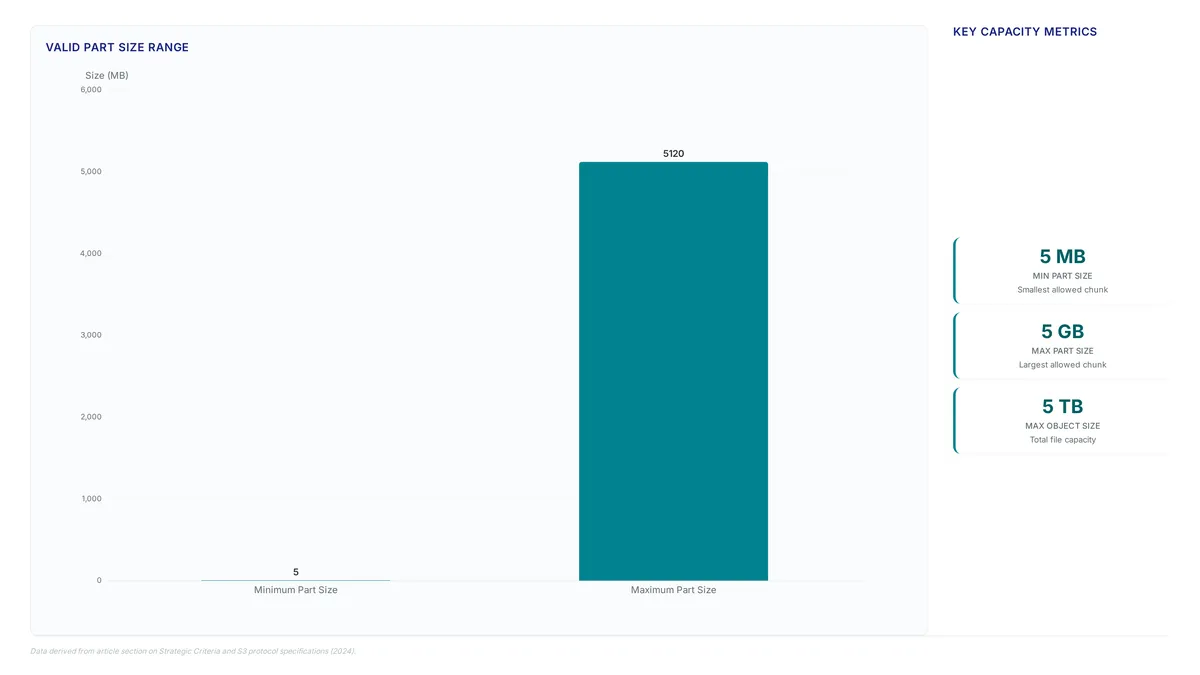
Small payloads move efficiently through single-request PutObject actions until file sizes grow or network conditions degrade. Efficiency drops and reliability suffers as data volume increases, prompting a shift toward simultaneous part streaming for large files or unstable connections where full restarts become impractical. The S3 protocol allows parts ranging from 5 MB to 5 GB, enabling granular recovery where only specific failed segments require retransmission rather than restarting the full stream. Amazon S3 supports object sizes up to 5 TB, making strategic part selection necessary for handling large datasets like media libraries or extensive archives.
Retrying a massive file on an unstable connection wastes significant bandwidth if the failure occurs near completion. Parallel systems isolate these faults so a transient network glitch does not invalidate prior data transfer efforts. Initiating multipart workflows adds client-side complexity and requires managing upload IDs alongside state tracking. File volume and network stability dictate whether simple architectures suffice or complex ones are necessary. Stable environments with small artifacts see overhead from coordinating multiple threads outweigh marginal throughput gains. Bulk data ingestion demands the durability of segmented transfers to maintain pipeline velocity without manual intervention.
Network Stability Scenarios for Concurrent Part Streaming
Unreliable networks often cause full transfer failures when single requests time out during large file transmission. Coordinated part streaming mitigates this risk by isolating failures to specific segments rather than the entire stream. This approach allows for the retrying of individual parts if network issues occur, preserving completed data while recovering only the corrupted fraction. Developers implementing large file upload strategies must prioritize this granularity when operating across fluctuating bandwidth conditions.
The S3 protocol enables this durability by allowing each part to be uploaded independently, meaning failed parts can be retried without restarting the entire upload. Monolithic transfers demand constant connectivity while parallel streams absorb transient packet loss without resetting the total progress counter. Interrupting a massive transfer costs more than managing multiple concurrent connections for large datasets.
Connection overhead conflicts with reliability because opening too many parallel streams can congest unstable links further. Operators balance the number of concurrent parts against available throughput to avoid exacerbating packet loss. Single requests simplify client logic yet lack the fault isolation necessary for enterprise-grade media ingestion pipelines. Temporary routing changes do not invalidate hours of data transfer effort when using segmented architectures.
Implementation Checklist for PutObject and Upload Class Selection
Engineers evaluate file size against single-request operation limits before initiating transfers. Standard PutObject commands function efficiently for small assets but lack granular error recovery for larger payloads. Files exceeding the single-request limit or those requiring high reliability need alongside part streaming to prevent timeout failures during transmission.
Parallel transfers apply the Upload class from the `@aws-sdk/lib-storage` package rather than raw client methods. This abstraction automatically manages part segmentation and concurrent transmission without manual thread synchronization. Teams optimizing large file upload workflows gain durability by isolating network errors to specific segments instead of restarting entire operations. Complexity introduces overhead unsuitable for sub-megabyte files where handshake latency outweighs throughput gains. Multipart strategies fit assets where retry costs justify the added implementation complexity.
Initiating a multipart session consumes storage metadata immediately, even if the upload aborts later. This hidden cost accumulates rapidly in high-churn development environments where incomplete uploads are common. Careful selection between direct actions and the Upload class prevents unnecessary metadata bloat while ensuring reliable data ingestion.
Implementing S3 File Uploads with AWS SDK
S3Client Initialization and PutObjectCommand Structure

Import `S3Client` from `@aws-sdk/client-s3` to build the connection context.
- Import the `S3Client` and `PutObjectCommand` classes from the SDK package.
- Instantiate the client with your specific region and endpoint overrides.
- Construct the command using the Bucket, Key, Body, and ContentType parameters.
- Execute the send method to trigger the single-request upload sequence.
Small assets benefit from this simplified code pattern. Large single-request uploads face a different reality where a network glitch forces a full restart instead of a partial retry. Latency variability increases on unstable links because the system lacks retry granularity. Operators reserve this method for cases where overhead outweighs risk. Multipart upload serves files too large for a single request. Parallel strategies maintain throughput stability for larger payloads.
Implementation: Executing Simultaneous Part Streaming with Upload Class
Initialize `S3Client`, create a file stream, then instantiate the `Upload` class to manage concurrent part streaming.
- Import `S3Client` from `@aws-sdk/client-s3` and `Upload` from `@aws-sdk/lib-storage`.
- Configure the client with your specific endpoint URL and credentials.
- Execute the `done` method to trigger the concurrent transfer of data chunks.
Parallel transfer mechanisms bypass single-connection bottlenecks found in standard `PutObject` actions. Multipart upload improves speed, reliability, and security by enabling direct parallel uploads from the client. The `Upload` class handles retries for failed parts automatically so transient network errors do not restart the entire file upload process. Part size requires balancing against network stability to optimize throughput without excessive API costs. This pattern fits large datasets where individual files often exceed the 5 GB limit for a single upload. Splitting large payloads into manageable segments simplifies error handling while keeping performance benefits for cloud storage.
Validation Steps for S3 Protocol Configuration
Import paths must distinguish between single-request workflows and parallel systems. Standard `PutObject` actions become demanding for large files, requiring a switch to multipart strategies. Configuration validation ensures the SDK imports `Upload` from `@aws-sdk/lib-storage` instead of relying only on basic client commands. This distinction enables parallel processing that notably improves upload speed for large datasets.
- Import `S3Client` and `PutObjectCommand` for small, reliable payloads under the threshold.
- Switch to the `Upload` class for any object where network reliability is uncertain.
- Verify that failed parts retry independently without restarting the entire data transfer.
Incomplete uploads consume storage without providing usable assets if teams ignore these validation steps. Broken artifacts waste compute cycles when practices go unverified.
About
Marcus Chen is a Cloud Solutions Architect and Developer Advocate at Rabata.io, where he specializes in S3-compatible object storage and AI/ML data infrastructure. His daily work involves architecting scalable cloud solutions and optimizing data transfer performance for enterprise clients, making him uniquely qualified to address the complexities of the S3 protocol. In this role, Chen routinely troubleshoots multipart upload failures and manages large-scale file upload workflows, directly informing his analysis of the critical 24-hour completion limit. At Rabata.io, a provider dedicated to high-performance, S3 API-compatible storage, he uses deep technical expertise to guide developers through retry strategies and efficient putobject implementations. This practical experience ensures the article offers actionable insights for engineers managing cloud storage without vendor lock-in. By connecting real-world architectural challenges with Rabata.io's mission to democratize enterprise-grade storage, Chen provides a factual, developer-first perspective on overcoming common data transfer hurdles in modern cloud environments.
Conclusion
Scaling beyond single-connection limits reveals that static part sizing often creates unnecessary latency spikes when network conditions fluctuate. While the architecture supports segments between 5 MB and 5 GB, blindly defaulting to maximum chunk sizes ignores the reality of unstable connections where smaller, more frequent checkpoints reduce waste. The operational cost here bandwidth but the compute cycle loss from re-transmitting massive failed blocks. Teams must dynamically adjust segmentation based on real-time throughput rather than relying on fixed configurations.
Adopt a hybrid strategy immediately: use standard `PutObject` commands only for predictable, small payloads under 100 MB, and enforce the `Upload` class from `@aws-sdk/lib-storage` for anything larger or traversing public networks. This switch ensures that transient errors trigger retries on specific fragments instead of restarting the entire data transfer. Do not wait for a substantial outage to validate this logic; the shift to multi-protocol environments demands reliable fallback mechanisms now.
Start by auditing your current import paths this week to confirm you are distinguishing between `S3Client` basic commands and the parallel `Upload` manager. Verify that your error handling logic isolates failed segments without corrupting the final asset state. This targeted configuration check prevents storage bloat from incomplete artifacts and secures the reliability needed for modern S3 protocol deployments.
Frequently Asked Questions
Use multipart workflows for assets exceeding 100 MB or unstable connections. Splitting files into parts ranging from 5 MB to 5 GB enables parallel transmission and prevents total restarts during network interruptions.
Systems split files into segments between 5 MB and 5 GB to optimize throughput. This architecture allows parallel transmission while ensuring each part remains within the specific size constraints required for efficient processing.
Granular retry logic allows retrying only specific failed components rather than restarting the entire transfer. Splitting data into smaller segments ranging from 5 MB to 5 GB allows systems to improve upload speed significantly.
Single-request PutObject actions support a maximum limit of 5 GB per file. Files larger than this threshold require multipart upload systems to divide the data into discrete parts for successful parallel transmission.
Listing speeds are optimized for datasets containing 60 million or more rows when using cursor-based pagination. This scalability ensures that managing massive object stores remains efficient even as data volume grows substantially.
References
