Laravel backup: Why single storage fails in 2026
Relying on single-destination backups is a calculated risk in 2026. Laravel Backup v2.0 forces a shift from local storage to simultaneous multi-destination replication. This isn't just an upgrade; it's a survival mechanism. North America sees over a majority of businesses operating in multi-cloud environments, according to 2024 adoption data. You cannot afford a single point of failure.
We are moving past local dumps. The new standard uses Backblaze B2, MinIO, and Google Drive in tandem. This hybrid approach optimizes cost while hardening performance. The architecture now supports parallel uploads to S3-compatible storage, eliminating the latency penalties of sequential processing.
Implementation requires precision. You will configure OAuth 2.0 flows and secure refresh tokens manually. The workflow automates daily snapshots via Laravel's scheduler and leverages the new Web UI for cross-platform cleanup. By integrating AI-driven predictive analytics trends noted in recent industry shifts, this strategy ensures data survives disk failures and entire provider outages.
The Role of Laravel Backup 2.0 in Modern Cloud-Native Infrastructure
Laravel Backup 2.0 Multi-Destination Architecture Laravel Backup 2.0 executes simultaneous multi-destination uploads across S3-compatible stores and Google Drive. This cloud-native strategy distributes risk across independent storage silos, addressing the reality that a significant share of North American businesses now operate in multi-cloud environments. The system generates a single zipfile containing database snapshots and file assets, replicating this artifact to configured endpoints before deleting the local source. Supported targets include MinIO, Backblaze B2, DigitalOcean Spaces, and AWS. Operators can utilize free tiers like the 10GB Backblaze allocation for testing without vendor lock-in.
| Feature | v1.0 Local Only | v2.0 Multi-Destination |
|---|---|---|
| Scope | Single disk write | Parallel cloud uploads |
| Providers | Local filesystem | S3, Google Drive, MinIO |
| Durability | Low ( | High (geographic distribution) |
| Auth Method | File permissions | OAuth 2.0, IAM keys |
Configuration demands distinct credentials for each target. The package relies on official SDKs rather than generic Flysystem adapters to ensure accurate error reporting during transfer failures. Be aware of the storage/framework directory; the system excludes it by default to prevent bloating archives with temporary cache data. Redundancy comes at a cost: increased complexity. Maintaining valid OAuth 2.0 refresh tokens for Google Drive alongside rotating S3 access keys requires stricter secrets management than simple local writes. Clock skew between application servers and storage endpoints causes signature mismatches, rejecting valid uploads to S3-compatible providers. Backup is no longer a passive disk operation. It is an active, network-dependent process requiring monitoring of external API rate limits and connectivity states.
Deploying Hybrid Backups with MinIO and Google Drive
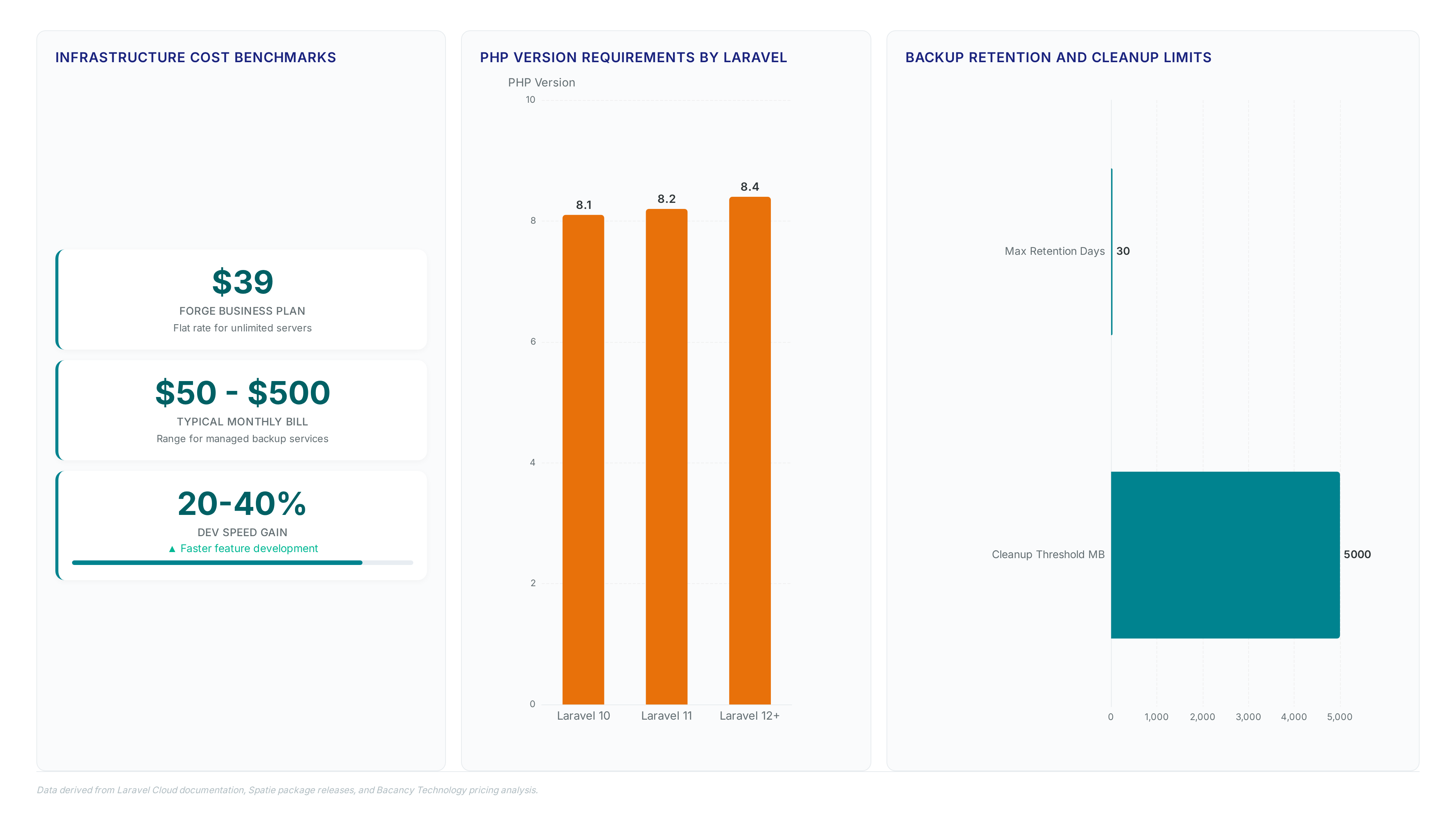
The `avcodewizard/laravel-backup` package enables simultaneous multi-destination uploads to on-premises MinIO instances and Google Drive via OAuth 2.0. This configuration addresses the industry shift toward hybrid cloud backup solutions by distributing artifacts across distinct storage silos rather than relying on a single local dump. Operators configure granular retention policies where cleanup logic deletes oldest files once usage exceeds 5000 MB, preventing unbounded growth on expensive tiers.
| Destination | Use Case | Auth Method |
|---|---|---|
| MinIO | Low-latency recovery | Access Keys |
| Google Drive | Off-site compliance | OAuth 2.0 |
| Local Disk | Immediate rollback | Filesystem |
Recovery speed fights against geographic redundancy. Local MinIO offers fast restores while Google Drive provides disaster durability at higher latency. Unlike managed services with fixed retention windows, this approach grants full control over retention periods without vendor lock-in. The drawback is operational complexity: maintaining OAuth refresh tokens and S3 credentials requires stricter secret rotation than single-target scripts. Teams must balance the cost of dual-storage egress against the risk of single-provider outages. Test failover paths quarterly to validate cross-cloud integrity.
Laravel Cloud restores to new clusters while `avcodewizard/laravel-backup` targets specific storage buckets. This distinction separates managed safety from architectural precision. Laravel Cloud bills usage-based backups separately from compute resources, allowing operators to scale recovery without provisioning extra servers. The platform enforces a safer methodology by restoring data to a fresh database cluster rather than overwriting the live production environment. This approach prevents accidental data loss during emergency recovery scenarios but removes direct control over the physical restoration target.
Conversely, the open-source package grants engineers granular authority over every destination endpoint. Configurations support simultaneous writes to MinIO, Backblaze B2, and Google Drive through explicit OAuth 2.0 flows. This flexibility suits teams requiring strict data sovereignty or those using free storage tiers across multiple vendors. The trade-off involves manual orchestration of retention policies and authentication tokens instead of relying on a unified dashboard.
Operators managing more than a vast number of Laravel sites globally face a binary choice between convenience and control. Managed services reduce operational overhead but lock restoration logic into vendor-specific workflows. Custom implementations demand higher engineering investment yet enable hybrid strategies that span on-premises hardware and diverse cloud providers. The decision ultimately hinges on whether an organization prioritizes rapid recovery speed or absolute destination flexibility.
Inside the Architecture of Multi-Destination Backup Flows
OAuth 2.0 Flow Mechanics for Google Drive Integration
Run `php artisan backup:google-auth` to start a CLI-driven OAuth 2.0 handshake. This swaps a temporary authorization code for a persistent refresh token. Paste the redirect URL containing that code into the terminal, prompting the package to request long-term credentials from Google. Success produces a `GOOGLE_DRIVE_REFRESH_TOKEN` string written directly to the `. Env` file for stateless authentication. This token lets the backup job access encrypted storage without recurring user interaction, protecting sensitive operational data against credential expiration.
Official SDK implementations support shared drives and custom endpoints where Flysystem adapters fall short, guaranteeing full API compatibility for enterprise audit logs. Manual token rotation remains the primary limitation; if the credential expires or gets revoked, the backup job fails silently until an administrator regenerates the token via the CLI. Treat this token as a high-value secret since possession grants unrestricted write access to the configured backup folder. Storing the artifact in a zipfile before upload minimizes API call volume, yet the initial authentication step remains a single point of failure for the Google Drive destination.
Configuring Laravel Scheduler for Automated Multi-Destination Runs
Automated execution demands a system cron job triggering the scheduler every minute via `* * * * * php artisan schedule:run`. This frequency ensures the application checks its task list often enough to catch daily windows without drifting. Configuration files differ by framework version. Laravel 11+ shifts logic to `routes/console. Php`, using `Illuminate\Support\Facades\Schedule` to wrap `Artisan::call('backup:run')` with `withoutOverlapping()` guards. Legacy installations retain the `$schedule->command()` syntax within `app/Console/Kernel. Php`. Both methods rely on the underlying ConsoleOutput mechanisms to stream status updates during zip creation and upload phases.
Scheduling backups during the 02:00 to 03:00 window introduces risk in regions observing daylight saving time, potentially causing duplicate runs or skipped cycles. Place jobs at 04:00 to avoid clock shifts entirely. S3 upload errors frequently stem from missing endpoint definitions when using non-AWS providers like Backblaze B2. The package prioritizes official SDKs over generic adapters to surface these clear error messages rather than opaque connection timeouts. Validate connectivity manually before enabling automation to prevent silent failures in production environments.
Official SDKs Versus Flysystem Adapters for Error Handling
Direct API calls via Official SDKs expose specific error codes that generic Flysystem adapters often mask as vague disk failures.
The package prioritizes Official SDKs to guarantee access to shared drives and custom endpoints that abstraction layers frequently omit. Operators gain clear error messages when authentication tokens expire, whereas adapters might simply report a write failure without context. Encryption configuration relies on precise failure states to trigger correct fallback routines. Debugging becomes trivial when the stack trace includes the raw HTTP response from Google or AWS instead of a sanitized boolean false.
Integrating multiple SDKs increases the dependency footprint compared to a single unified adapter. The package system splits features between the free core and paid centralized management tools, forcing teams to weigh cost against native protocol support. Relying on adapters simplifies installation but sacrifices the ability to handle OAuth 2.0 edge cases specific to enterprise Google Cloud Console setups. Accept the heavier library load to prevent silent data loss during complex multi-cloud transfers.
Step-by-Step Implementation of Multi-Cloud Backup Strategies
Composer Dependencies and PHP Version Constraints for Laravel Backup
Install the core `avcodewizard/laravel-backup` package alongside `google/apiclient` and `aws/aws-sdk-php` to enable multi-cloud destinations.
- Execute `composer require avcodewizard/laravel-backup` to pull the primary logic.
- Add `composer require google/apiclient` for Google Drive connectivity.
- Run `composer require aws/aws-sdk-php` to support S3-compatible endpoints.
Configuration files auto-publish immediately, removing the need for manual `vendor:publish` steps. Version selection dictates infrastructure compatibility notably. The broader Spatie system released Laravel Backup v10, which strictly enforces PHP 8.4+ and Laravel 12+. This constraint blocks adoption on legacy stacks still running PHP 8.1+ for Laravel 10 or PHP 8.2+ for Laravel 11. Operators maintaining older frameworks must intentionally pin older backup versions rather than upgrading blindly. Ignoring these version constraints causes immediate application failure during deployment pipelines. The free open-source core suffices for single projects, yet centralized management requires the paid Laravel Backup Server. Audit `composer. Json` before installation to prevent dependency hell between the backup tool and the framework core.
Configuring Backblaze B2 Environment Variables and S3 Endpoints
Backblaze B2 serves as an S3-compatible target requiring five specific environment variables for authentication and routing.
- Define `AWS_ACCESS_KEY_ID` and `AWS_SECRET_ACCESS_KEY` using credentials generated in the B2 console.
- Set `AWS_DEFAULT_REGION` to the specific bucket location, such as `us-east-005`.
- Assign `AWS_BUCKET` with the unique container name created for storage.
- Populate `AWS_ENDPOINT` with the full provider URL to override default AWS routing.
- Verify connectivity by executing a test upload before enabling production schedules.
The `config/laravelBackup. Php` file consumes these variables to populate the `s3` destination array. Operators must distinguish between local retention policies and cloud persistence strategies. Advanced cleanup logic can delete oldest files when usage exceeds 5,000 megabytes, yet setting `cleanup_scope` to `local` preserves remote copies indefinitely. This configuration prevents accidental data loss during aggressive pruning cycles.
| Parameter | Local Strategy | Cloud Strategy |
|---|---|---|
| Retention | Time-based deletion | Indefinite storage |
| Cost Impact | Disk space usage | API call fees |
| Recovery | Fast restore | Network dependent |
Hosting expenses fluctuate based on traffic, with typical monthly bills ranging from $50 to $500+ for standard instances. Using the free tier minimizes initial validation costs while maintaining architectural parity with production environments. Misconfiguring the endpoint URL results in immediate authentication failures rather than timeout errors, demanding precise syntax entry.
Scheduler Implementation Checklist for Laravel 11 and Legacy Kernel
Automating daily execution requires a system cron job triggering the scheduler every minute via `* * * * * php artisan schedule:run`.
- Verify the host OS accepts this cron job entry to prevent task drift during high-load periods.
- Select the correct definition file based on the framework release installed on the server.
- Insert the scheduling logic into `routes/console. Php` for modern stacks or `app/Console/Kernel. Php` for legacy ones.
- Wrap the `backup:run` command with `withoutOverlapping()` to block concurrent processes from corrupting archive files.
Isolate production credentials to prevent accidental remote writes during local development testing. This separation avoids polluting cloud buckets with incomplete or debug-specific data sets. Developers implementing similar strategies often check environment variables before executing remote upload tasks. The internal logging mechanism now uses a dedicated `backupLogger()` helper rather than the older `ConsoleOutput` singleton. This architectural shift improves logging flexibility when diagnosing silent failures in headless CI/CD pipelines. Ensure the minute-level trigger remains active, as missed cycles delay recovery points beyond acceptable RPO thresholds.
Strategic Best Practices for Enterprise Backup Reliability
Web UI Capabilities for Multi-Destination Backup Management
Accessing `/laravel-backup` renders a dashboard listing database backups, storage backups, file sizes, and storage locations without CLI access. The interface enables one-click downloads and delete functionality across all configured destinations simultaneously. Operators viewing file sizes can instantly identify bloated archives resulting from default inclusion rules that omit the `storage/framework` directory only in newer versions. This visual audit prevents storage exhaustion before it triggers disk-full failures on the host server.
| Action | Scope | Risk |
|---|---|---|
| Download | Single file | Network latency |
| Delete | All destinations | Irreversible data loss |
| View | Metadata only | None |
Centralized visibility contrasts with the fragmented approach required by the paid Laravel Backup Server which aggregates logs from multiple projects rather than managing destinations within one instance. The built-in UI simplifies operations for single applications but lacks the deduplication features found in enterprise-grade central managers. Deleting an archive via the web panel removes the file from every linked cloud provider immediately, creating a single point of failure for human error. Restrict UI access to senior engineers to mitigate accidental mass deletion. The ConsoleOutput replacement in recent updates improves logging separation, yet the web interface remains the primary interaction layer for routine maintenance tasks.
Resolving Google Drive Access Blocked Errors via Test User Configuration
Registering the operator email as a test user in Google Cloud Console immediately bypasses OAuth restrictions causing access blocked errors.
The package prioritizes Official SDKs over Flysystem adapters to guarantee a functional OAuth 2.0 flow with superior debugging capabilities. Authentication failures often stem from unverified identities attempting to access restricted API scopes during the initial integration phase. Development teams must explicitly whitelist their accounts within the cloud provider dashboard before the redirect URL returns a valid refresh token. This configuration step remains mandatory regardless of the correctness of client secrets or redirect URIs set in the environment file.
| Error Trigger | Required Action | Outcome |
|---|---|---|
| Unverified Email | Add to test users | Grant temporary access |
| Missing Scope | Update consent screen | Allow full API usage |
| Expired Token | Re-run auth command | Generate new string |
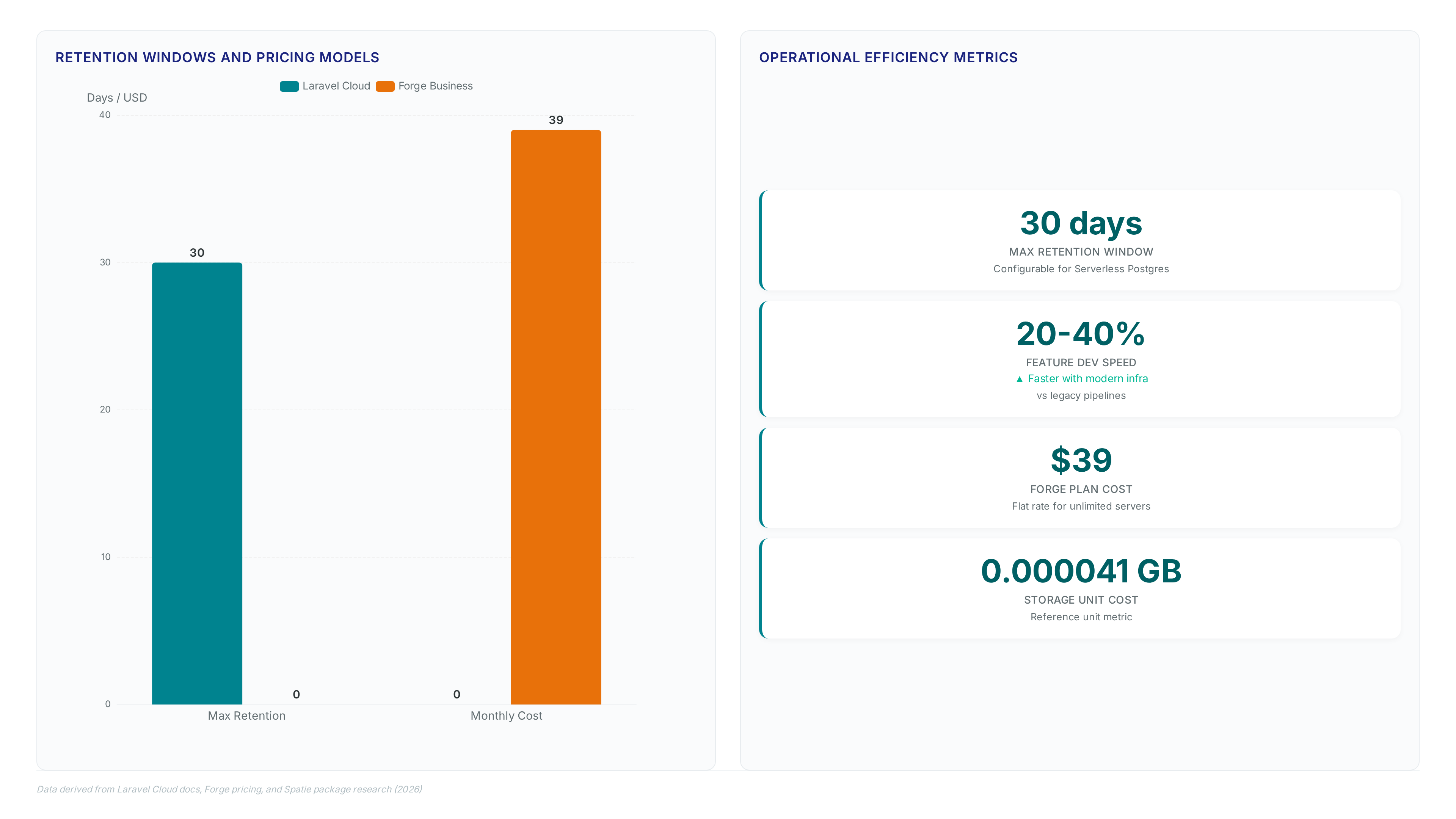
Neglecting this registration blocks the entire backup pipeline, leaving critical data vulnerable despite correct code implementation. Restoring from such incomplete archives forces administrators to create a new database cluster rather than overwriting existing instances, complicating disaster recovery procedures. Operators managing retention windows between 0 and 30 days for Serverless Postgres lose flexibility if the primary destination fails authentication checks. The limitation of test user status is its temporary nature; moving to production requires the verification by the platform provider to avoid service interruption. Failure to transition results in sudden connectivity loss once the development quota expires.
Built-in UI Versus Filament Integration and Paid Laravel Backup Server
The `/laravel-backup` endpoint renders local metrics but lacks central deduplication for multi-project fleets.
Operators managing single instances find the built-in dashboard sufficient for viewing file sizes and executing one-click downloads. However, scaling beyond one server exposes the limitation of isolated storage silos where redundant data consumes excess capacity. Teams requiring unified visibility often adopt the Filament admin panel integration updated 12 Jan 2026 to embed backup controls within existing management consoles. This approach standardizes operator workflows but still treats each project as a distinct backup source without cross-project optimization.
Enterprises running dozens of Laravel installations face higher storage costs due to repeated file blocks across separate archives. The paid Laravel Backup Server package updated 2 Jun 2026 addresses this by aggregating streams into a central repository with hard-link deduplication features. This architecture reduces total footprint notably when multiple projects share identical framework files or vendor dependencies.
| Feature | Built-in UI | Filament Plugin | Backup Server |
|---|---|---|---|
| Scope | Single Project | Single Project | Multi-Project |
| Deduplication | None | None | Hard Links |
| Interface | Standalone Route | Admin Panel | Central Dashboard |
| Cost | Free | Free | Paid |
Selecting the correct tier depends on whether the organization prioritizes immediate access or long-term storage efficiency. Adopt the central server model for fleets exceeding five active applications to prevent linear storage growth.
About
Marcus Chen serves as a Cloud Solutions Architect and Developer Advocate at Rabata. Io, where he specializes in S3-compatible object storage and AI/ML data infrastructure. His deep expertise in cloud architecture makes him uniquely qualified to analyze the shift toward multi-destination backups in Laravel Backup v2.0. In his daily work, Chen helps enterprises eliminate vendor lock-in by implementing reliable, S3-compatible storage solutions across hybrid environments. This article directly reflects his professional focus on optimizing data durability for modern applications. As Rabata. Io provides high-performance, cost-effective S3-compatible storage with GDPR-compliant data centers, Chen understands the critical need for smooth integration with providers like AWS and DigitalOcean Spaces. His insights bridge the gap between theoretical backup strategies and practical, enterprise-grade implementation, guiding developers through the transition from local storage to a truly cloud-native backup system.
Conclusion
Scaling backup strategies beyond five applications triggers a linear cost explosion that free tiers cannot absorb, as isolated silos duplicate identical framework blocks across every instance. The operational burden shifts from simple configuration to managing fragmented retention policies, where manual oversight inevitably leads to storage bloat and inconsistent recovery points. Hybrid architectures now dominate this space, demanding a move away from single-project dashboards toward centralized aggregation to maintain fiscal sanity. Organizations running more than five Laravel instances must migrate to a deduplicated central repository within the next two quarters to prevent unchecked expense growth. This transition is not merely about storage savings but establishing a unified recovery posture that scales with infrastructure complexity. Start by auditing your current vendor directory sizes across all active projects this week to quantify the potential reduction from hard-link deduplication. Use these metrics to justify the investment in a centralized solution before your next billing cycle locks in inefficient patterns. Prioritizing this consolidation now ensures your backup strategy remains an asset rather than a mounting liability as your fleet expands.
Frequently Asked Questions
You can utilize the Backblaze B2 free tier allocation for testing without vendor lock-in. This specific plan provides 10GB of storage space, allowing operators to validate their S3-compatible configurations before committing to paid enterprise plans.
The cleanup logic automatically deletes oldest files once your total usage exceeds the defined limit. This safeguard triggers specifically when storage consumption surpasses 5000 MB, ensuring you maintain control over costs while keeping recent snapshots available for recovery.
This cloud-native approach directly addresses the needs of the majority of North American companies operating today. Current adoption data indicates that 65% of these businesses now run within multi-cloud environments, necessitating distributed risk management across independent storage silos.
Relying on local dumps alone creates a calculated risk for the massive global ecosystem of applications. With over 1.5 million Laravel sites deployed worldwide, shifting to simultaneous multi-destination replication is essential for surviving provider outages and disk failures.
You must configure OAuth 2.0 flows and manage refresh tokens securely to enable Google Drive uploads. This industry-standard auth method replaces simple file permissions, requiring stricter secrets management practices than single-target scripts to maintain valid connectivity.