GCS MCP Server: Why Zero Infrastructure Fails
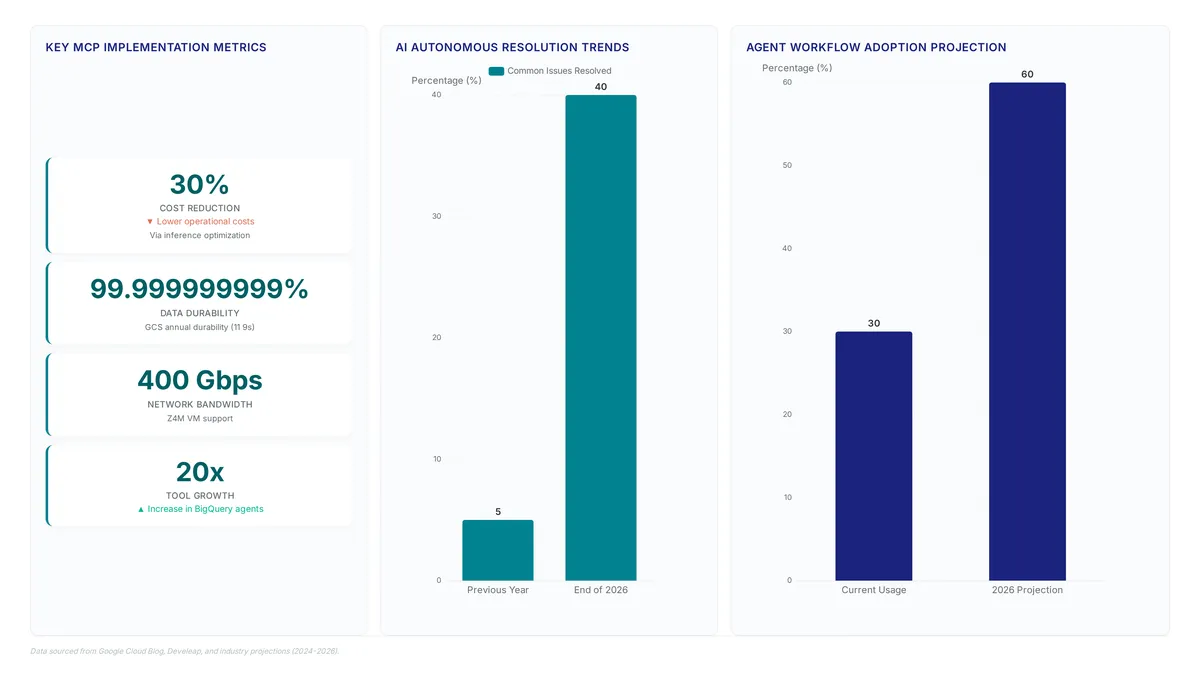
The Model Context Protocol saw a 20x surge in agent-building tools within BigQuery, proving AI system integration is no longer theoretical. The promise of "zero infrastructure" often masks the complexity required to securely connect AI agents to unstructured data.
Readers will learn how GCS Remote MCP and GCS Local MCP architectures differ in their exposure to threats. We examine the mechanics of MCP security scanning and why standard API server configurations fail under agentic loads. The discussion includes specific strategies for agent observability that prevent data leakage during high-volume transactions.
The analysis details how to operationalize custom tools while maintaining strict RBAC policies. We explore why edge servers and backend server distinctions matter when handling GCS metadata for workflows. Ignoring these architectural nuances turns smart storage into a liability rather than an asset.
The Role of GCS MCP Servers in Agentic Data Context
Defining GCS MCP Server and Smart Storage Architecture
Deploying Remote MCP Servers for Agent Data Access
This architecture moves agent context generation burdens from client applications to a dedicated, identity-aware service layer. Centralizing data retrieval helps organizations support expanding reliance on AI agents managing vast datasets, especially since unstructured content now constitutes 80% of global enterprise data. The deployme nt model relies on configuring custom connectors that map specific bucket policies to agent permissions. Operators define fine-grained IAM roles restricting access to only necessary objects so agents never possess broader privileges than their immediate tasks require.
| Feature | Remote MCP Model | Local MCP Model |
|---|---|---|
| Infrastructure | Fully Managed | Self-Hosted |
| Latency | Network Dependent | Local Disk Speed |
| Scaling | Automatic | Manual Provisioning |
Convenience in zero-infrastructure setups often reduces visibility into data access patterns. Organizations adopting frameworks for agent integration must implement external observability tools to capture these metadata streams separately. Pairing remote deployments with rigorous audit logging helps mitigate this blind spot. Independent verification layers prevent operators from creating opaque data pipelines where incident response teams cannot reconstruct agent behavior. Operational simplicity creates a cost in native transparency, requiring compensatory controls for production environments.
Remote vs Local GCS MCP Server Deployment Models
Selecting between Remote and Local GCS MCP servers determines whether an organization prioritizes deployment speed or data sovereignty. The Remote option offers a fully managed pathway requiring zero infrastructure deployment, effectively acting as a turnkey solution for connecting agents to unstructured data. Conversely, the Local model demands on-premises or VPC-hosted execution, granting teams absolute control over network egress and authentication flows.
Managed approaches accelerate time-to-value for unstructured data integration yet inherently limit the ability to inject proprietary security scanning middleware before the agent processes context. Teams handling highly sensitive intellectual property often find the loss of granular packet inspection unacceptable despite the operational convenience. This decision hinges on whether the organization views the MCP layer as a utility or a security perimeter. Security requirements will dictate the chosen path through 2026.
Architecture and Security Mechanics of Remote and Local MCP Deployments
Mechanics: Remote MCP Server Mechanics and Zero-Infrastructure Deployment
Managed endpoints handle the provisioning of underlying compute resources for Remote MCP servers. Deployment complexity trades off against customization depth in this architecture.
| Feature | Remote MCP Server | Local MCP Server |
|---|---|---|
| Infrastructure | Managed | Self-provisioned |
| Latency | Network-dependent | Localhost optimized |
| Customization | Configuration-based | Full code access |
| Scaling | Provider-managed | User-managed |
Administrators balance the ease of managed deployment with necessary runtime control. Remote servers speed up initial connections yet follow the provider's release schedule. Rapid iteration benefits enterprises by lowering administrative overhead. Strict data sovereignty requirements or specialized performance tuning needs might make these managed boundaries feel restrictive. Teams should evaluate long-term governance needs before picking a topology. An identity-first approach secures data access while the hosting platform guarantees availability.
Connecting Agents to GCS via Custom Connectors and ADK Frameworks
Connector configuration enables agent integration with Google Cloud Storage (GCS) using identity-first authentication flows native to the Model Context Protocol. Clients retrieve unstructured data by using object metadata and bucket permissions instead of manual configuration edits. Custom Connectors simplify the integration surface and reduce syntax errors during deployment through standardized protocol definitions.
Specific agents access historical context and unstructured data using this architecture. Connections to GCS allow agents to fetch prior interactions stored as objects, maintaining continuity across long tasks without reprocessing entire token sequences. This setup shows how historical memory acts as a persistent context layer for agentic workflows, enabling efficient retrieval of large data volumes. Choices between remote and local MCP servers determine the customization depth available for these connectors.
| Deployment Mode | Configuration Complexity | Extensibility |
|---|---|---|
| Remote | Low | Limited |
| Local | High | Full |
Remote deployment adopters may lose granular control over caching policies and compression algorithms to gain reduced operational overhead. Latency requirements and data lifecycle management needs require careful evaluation before selecting a production deployment mode for AI workloads.
Mitigating Development Overhead and Risks in Custom Server Construction
Constructing custom servers from scratch creates significant development overhead and risk for storage teams. Engineers spend substantial effort maintaining identity-based access controls while securing unstructured data retrieval for agents. Gaining granular control over data flows conflicts with the burden of patching security vulnerabilities as they appear. Tailored functionality from custom implementations demands continuous vigilance that diverts resources from core AI model training objectives.
Infrastructure management tolerance dictates the choice between Remote MCP and Local MCP architectures. Remote options cut initial setup time but can limit deep configuration capabilities required for specialized workflows. Local deployments provide full environmental control yet need dedicated compute resources and ongoing maintenance.
| Decision Factor | Custom Build | Managed Approach |
|---|---|---|
| Initial Setup | High effort | Low effort |
| Security Patching | Manual | Automated |
| Configuration Depth | Unlimited | Constrained |
This hidden cost often exceeds the theoretical benefits of a bespoke solution. Teams must evaluate if a specific use case truly demands a custom build, as a managed approach frequently improved serves the need for speed and reliability. Stability and proven security patterns take priority over unverified customization.
Operationalizing Agent Integration Through Custom Tools and ADK
Local MCP Server Role in Custom Tool Architecture
The GCS Local MCP serves as the primary conduit for engineers constructing custom tools that engage directly with local resources. This deployment model separates itself from remote configurations by granting agents immediate access to on-premise data lakes, removing the need for complex network tunneling. Teams select this architecture when high-throughput AI training jobs demand low-latency retrieval. Developers apply the Agent Development Kit to construct specific operators capable of parsing unstructured media files before entry into the broader cloud pipeline. Such a constraint ensures the local server excels in edge preprocessing, though performance may degrade if underlying hardware lacks capacity for concurrent model inference. Operators must balance the speed of local access against the scalability limits inherent to single-node deployments. Organizations aiming to democratize enterprise-grade storage access find this approach allows AI startups to prototype cost-effectively before scaling to a fully remote GCS Remote MCP topology. Responsibility shifts notably, turning the network edge into an active processing layer rather than a passive conduit.
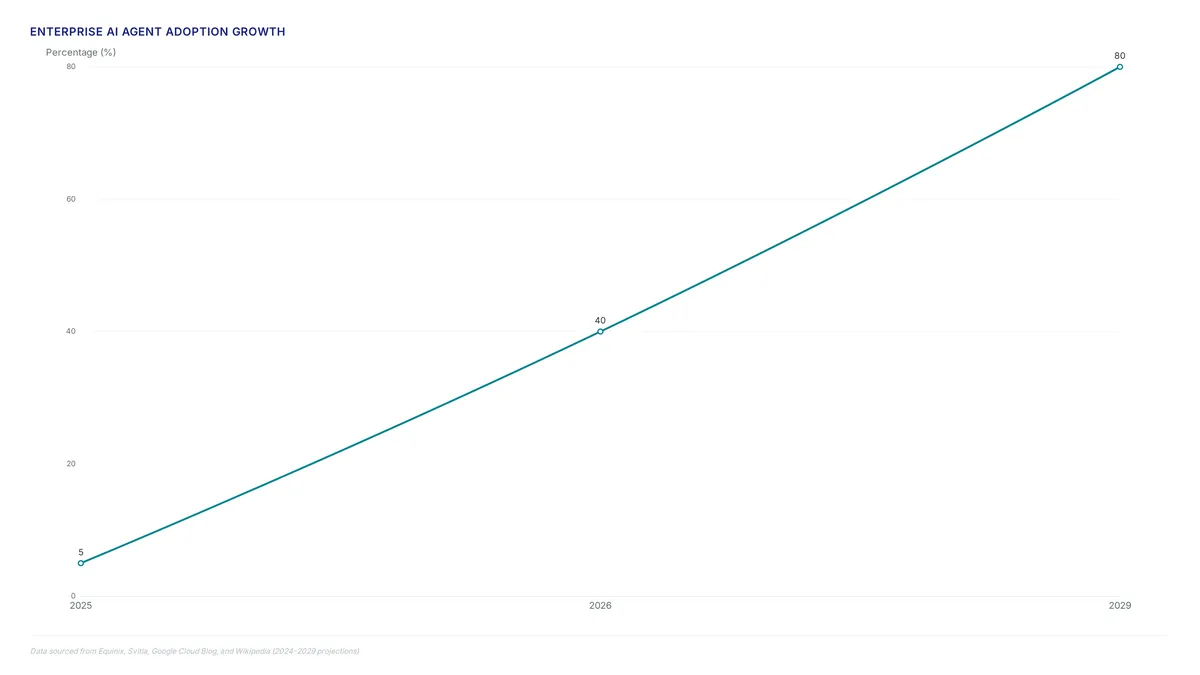
Enterprise Agent Integration with GCS and ADK
Airwallex demonstrates how agents require GCS metadata to execute complex financial workflows effectively. The fintech firm developed an AI Assistant analyzing expense policy documents to generate detailed approval sequences automatically. This implementation stores raw documents in object buckets while using extracted information as GCS metadata for rapid context retrieval. Such architecture allows the agent to understand user context and answer questions without re-processing massive text blocks. Engineers replicate this pattern by using the Agent Development Kit to build custom tools tailored to specific business logic. The GCS Local MCP repository provides the necessary foundation for connecting these agents directly to local resources. This approach transforms unstructured data into actionable context, enabling agents to perform multi-step reasoning tasks efficiently. Organizations create a standardized interface where identity governs every data access request by integrating MCP with ADK.
Coordination costs emerge when relying on local execution; distributed teams must manage version consistency across disparate host machines manually. If the host machine fails to sync tool definitions, the agent loses access to historical context required for decision making. Local tools offer performance benefits yet demand rigorous operational discipline to prevent context fragmentation. The limitation is clear: precise control over data flow arrives with the burden of lifecycle management for custom connectors.
Validating Agent Workflows via MCP Toolbox
Validation of context retention becomes mandatory before deploying custom tools within the MCP Toolbox. This checkpoint ensures agents correctly interpret GCS metadata during complex workflow execution without hallucinating permissions. The GCS Local MCP enables this verification by allowing direct testing of tool definitions against local resources. Teams build custom MCP tools when standard connectors fail to capture specific business logic required for agent data integration.
Use the following checklist to verify operational readiness:
- Confirm the tool preserves user intent across multiple conversation turns.
- Verify that RBAC policies restrict access to authorized buckets only.
- Ensure the Agent Development Kit correctly parses unstructured input streams.
- Test failure modes where missing metadata prevents workflow completion.
- Validate timeout behaviors under simulated network instability.
Local validation cannot fully replicate the latency characteristics of production remote servers. A tool passing local checks might still timeout under heavy cloud load.rabata.io advises pairing these local tests with staged remote trials to catch performance bottlenecks early. This approach prevents agents from stalling during critical data retrieval operations.
Step-by-Step Configuration of GCS MCP Endpoints and Model Armor
Implementation: GCS Remote MCP Server Zero-Infrastructure Architecture
Assigning an agent configuration to the managed endpoint permits direct retrieval of unstructured data on GCS without server provisioning. This method uses the open Model Context Protocol to standardize how AI agents fetch context from cloud buckets.
- Identify the target GCS bucket containing your training datasets or media assets.
- Configure the agent's MCP settings with the remote endpoint URL and required IAM roles.
- Validate connectivity by requesting a metadata list from the connected storage bucket.
Fast data delivery to compute nodes accelerates training time and lowers total cost of ownership. Network stability becomes the limiting factor because connectivity is mandatory for accessing cloud-stored data.
Configuring Custom Connectors for AI Clients
- Navigate to the agent settings menu and select the option to add a new Custom Connector.
- Input the managed GCS MCP endpoint URL and authorize the connection using the prompted OIDC flow.
- Verify access by requesting a simple file list from the target bucket to ensure policies apply correctly.
This strategy converts raw storage into secure context so governance functions as an intrinsic property of the data layer. Direct connector configuration speeds deployment yet demands strict monitoring of token lifespans. Decentralized connection strings often obscure visibility into which specific agent instance accessed sensitive buckets. Teams must balance this speed against the need for centralized audit logs.
Deployment Checklist: Remote Endpoints vs Local GitHub Tools
Operational speed conflicts with specialized development requirements in this choice.
- Assess whether your workflow requires standard access or unique custom tools. 2.3. Validate policies by requesting a metadata list from the target bucket.
| Feature | Remote Endpoint | Local GitHub Tools |
|---|---|---|
| Setup Time | Immediate | Variable |
| Customization | Standard | High |
| Maintenance | Managed | Self-Service |
Remote endpoints provide infrastructure convenience. Local deployments require code maintenance for unique logic. The constraint is clear: one path minimizes upkeep while the other supports custom behavior through direct code management.
About
Alex Kumar is a Senior Platform Engineer and Infrastructure Architect at Rabata.io, where he specializes in Kubernetes storage architecture and cost optimization for cloud-native applications. His daily work designing persistent storage solutions and managing CSI drivers gives him unique insight into the complexities of integrating AI agents with object storage. In this analysis of the GCS MCP Server, Alex uses his hands-on experience with S3-compatible infrastructure to explain why "zero infrastructure" claims often obscure critical gaps in security scanning and agent observability. At Rabata.io, a provider of high-performance, S3-compatible storage for AI/ML startups, Alex routinely addresses the challenges of connecting unstructured data to intelligent workflows. This article draws directly from his architectural decisions regarding RBAC enforcement and metadata utilization, offering a grounded perspective on avoiding vendor lock-in while ensuring reliable agent context integration. His expertise ensures this discussion moves beyond hype to address the real engineering trade-offs storage teams face when deploying Model Context Protocol servers.
Conclusion
Scaling unstructured data beyond pilot phases exposes a critical fracture: network instability becomes the primary bottleneck when connectivity is mandatory for access. While remote endpoints offer immediate setup, relying on them without reliable token lifecycle management creates significant governance blind spots. Decentralized connection strings allow agent instances to access sensitive buckets with little visibility, turning rapid deployment into a security liability. Teams often mistake the speed of direct connector configuration for operational maturity, ignoring the compounding cost of fragmented audit logs.
Organizations must adopt a hybrid governance model immediately. If your workflow demands unique logic, accept the maintenance burden of local tools; otherwise, strictly enforce centralized audit trails on remote configurations. Do not allow the convenience of managed services to erode your security posture. The window for reactive policy application closes as data volume grows, making proactive architecture necessary now.
Start by mapping every active agent instance to its specific GCS bucket access rights this week. Identify any connection strings lacking centralized logging and migrate them to a governed OIDC flow. This single step ensures that as you scale, your governance remains an intrinsic property of the data layer rather than an afterthought. Only by securing these fundamental links can you safely accelerate training times and lower total cost of ownership without compromising control.
Frequently Asked Questions
Zero-infrastructure setups often reduce visibility into data access patterns. Teams must deploy external observability tools because unstructured content now constitutes 80% of global enterprise data requiring protection.
Local deployments grant absolute control over network egress and authentication flows. This matters significantly since unstructured content now constitutes 80% of global enterprise data that requires strict residency governance.
Standard configurations fail because they lack rigorous infrastructure planning for high-volume transactions.
Operators must define fine-grained IAM roles restricting access to only necessary objects.
References