Distributed rclone cuts migration costs to $2k
Moving 2.7 PB of data for roughly $2,000 in compute costs proves that distributed rclone architectures drastically outperform traditional managed transfer services. The prevailing reliance on pay-as-you-go tools like AWS DataSync becomes financially prohibitive at petabyte scales, whereas a custom EC2 fleet offers predictable, minimal expenditure for massive LLM training datasets. You will examine how Amazon ECS and AWS Fargate automate the discovery layer to batch millions of objects without manual intervention, eliminating the data drift common in stalled transfers. We further dissect the execution flow where Amazon SQS dynamically scales rclone workers based on real-time queue depth, achieving aggregate throughput between 15 and 120 Gbps. Finally, the guide details deploying this entire resilient infrastructure via a single CloudFormation template, ensuring consistent configuration across heterogeneous storage providers like IBM Cloud Object Storage or Azure Blob Storage.
Stop accepting transfer stalls and opaque failure states as inevitable costs of doing business. By using Amazon CloudWatch for granular observability and decoupling enumeration from execution, teams can migrate media archives and AI datasets in weeks rather than months. The shift from brittle scripts to a reliable, distributed architecture is no longer optional for enterprises facing the exponential data growth of 2026.
The Role of Distributed Rclone in Modern Petabyte-Scale Migration
Distributed Rclone Architecture: ECS Discovery and SQS Job Queues
Distributed rclone replaces fragile single-machine transfers with a three-layer pipeline built for petabyte-scale cross-cloud moves. The discovery layer uses Amazon ECS running on Fargate to list source objects, a job that exceeds the 15-minute AWS Lambda timeout when handling billions of files. Lister containers group files into batches of 20, packaging each set as a self-contained transfer job message. This structure stops the data drift plaguing manual operations where teams lose count of copied or failed items. Amazon Simple Queue Service (Amazon SQS) holds these messages until workers pull them, acting as the decoupling glue. Queue depth signals the Auto Scaling group to spin up or shut down instances running rclone workers.
Petabyte-Scale Migration: Moving 2.7 PB from IBM Cloud to Amazon S3
A 2.7 PB dataset moved from IBM Cloud to Amazon S3 proves the distributed rclone architecture works for cross-cloud migration. The operation finished in two weeks with roughly $2,000 in total compute costs, showing fixed-price efficiency against pay-as-you-go models that swell at scale. Worker fleets held aggregate throughput between 15 and 120 Gbps by dynamically scaling instances running based on queue depth. Strong failure handling enables this performance through built-in retry logic and dead-letter queue management that removes manual intervention during transient errors. Throughput variance depends entirely on source API rate limits rather than local bandwidth capacity. The Amazon Web Services (AWS) Precise tuning of Auto Scaling policies prevents over-provisioning when queues run low. Teams should adopt this pattern for multi-petabyte volumes where managed service fees outweigh capital spending on temporary compute.
Single EC2 Instance vs Auto-Scaling Fleet: Throughput and Cost Analysis
A single rclone process caps throughput between 500 Mb and 6 Gb, creating a hard ceiling for petabyte transfers. Standard EC2 networking often bottlenecks before the disk subsystem reaches saturation, whereas 25 Gb enhanced networking removes this constraint. Relying on one machine forces operators to accept weeks of transfer time while an auto-scaling fleet parallelizes I/O across hundreds of streams. Cost disparities widen at scale as managed services charge premiums dwarfing the fixed expense of compute resources
| Metric | Single Instance | Auto-Scaling Fleet |
|---|---|---|
| Max Throughput | 6 Gb | 120 Gb |
| Network Mode | Standard | 25 Gb Enhanced |
| Failure Impact | Total Stall | Partial Degradation |
| Cost Model | Fixed Hourly | Flexible Scaling |
Distributed architectures change failure modes from catastrophic halts into manageable latency spikes. A single node crash stops the entire migration, requiring manual restart. A fleet absorbs individual instance losses without dropping aggregate throughput below operational thresholds. Operators must deploy fleet-based models once data volumes exceed the capacity of a single TCP connection to saturate the pipe. Coordination overhead remains the limitation since queue management introduces complexity absent in simple CLI scripts.
Inside the Architecture: Fargate Discovery and EC2 Execution Flow
SQS Visibility Timeouts as the Retry Mechanism
Amazon SQS enables automatic retries by hiding messages for a configurable visibility timeout period while workers process them. If an EC2 instance. This mechanism eliminates custom retry loops within the worker application code, shifting failure recovery to the infrastructure layer. The system tracks attempt counts internally, moving poison pills to a dead-letter queue only after two failed processing cycles. During stress tests involving 135,000 queued items, this approach maintained steady throughput despite sporadic network interruptions. Operators must tune the visibility window carefully; setting it too low triggers premature retries that waste compute cycles, while excessive durations delay failure detection. The trade-off is operational simplicity versus latency in identifying stuck jobs. Proper configuration ensures transient errors resolve automatically without human intervention.
| Parameter | Function | Risk if Misconfigured |
|---|---|---|
| Visibility Timeout | Hides message during work | Early re-processing or delayed failure alert |
| Max Receives | Threshold for dead-letter | Infinite loops or premature data loss |
| Batch Size | Items per job | Message size limits or inefficient parallelism |
Secure credential retrieval from AWS Secrets Manager prevents exposure during these automated retry cycles.
Scaling EC2 Workers to Maximize 25 Gbps Network Capacity
Auto Scaling targets 100 messages per instance, launching up to 5 instances within 10 minutes to saturate the 25 Gb enhanced networking limit. The scaling logic relies on queue depth rather than CPU utilization to drive capacity changes. Six rclone processes run concurrently on each node, ensuring the aggregate throughput matches the network interface capability without oversubscribing the bus. This configuration prevents the bottlenecks seen when fewer processes leave bandwidth idle during large file transfers. Operators must configure the Auto Scaling policy to react rapidly to queue accumulation, as slow ramp-up times delay the utilization of available network pipes.
| Parameter | Value | Purpose |
|---|---|---|
| Target Messages | 100 | Scaling trigger per instance |
| Max Instances | 5 | Upper bound for test fleet |
| Processes per Node | 6 | Saturation of 25 Gb link |
| Ramp Time | 10 minutes | Duration to full capacity |
Fargate remains the correct choice for the discovery layer because object listing operates sequentially and exceeds typical function timeouts. The execution layer demands the persistent network performance that only EC2 provides for heavy data movement. Credentials retrieved from AWS Secrets Manager The fan-out design described in AWS storage. Over-scaling introduces unnecessary cost without improving throughput once the network interface saturates. The 10-minute ramp time represents a tangible delay where the queue grows unchecked before the fleet reaches equilibrium. Network engineers must account for this lag when estimating total migration duration for time-sensitive workloads.
EC2 Versus Fargate: $0.05/hr Cost and 10 Gbps Network Limits
Execution economics favor EC2 at $0.05/hr against the $0.12 to $0.15/hr rate for Fargate tasks. Network physics dictates hardware selection because Fargate caps throughput at 10 Gb, while EC2 enhanced networking delivers 25 Gb. A single rclone process saturates a containerized link quickly, forcing operators to spin up excess tasks to match the bandwidth of one bare-metal instance. This inefficiency compounds costs when moving petabytes, as the pay-as-you-go pricing model of managed services becomes prohibitive compared to fixed compute expenses. The architectural fan-out described in scalable cross-cloud data migration Shifting execution to EC2 avoids the double penalty of higher hourly rates and lower network ceilings. The cost gap widens as fleet size increases, making serverless execution financially unsustainable for the transfer phase. Operators must decouple discovery from execution to optimize both latency and expense.
Deploying the Pipeline with CloudFormation and Flexible Configuration
CloudFormation Stack Resources: VPC, SQS, and Secrets Manager

The `cross-cloud-s3-migration. Yaml` template instantiates a VPC with three public subnets distributed across distinct Availability Zones.
- Deploy the VPC to isolate network traffic and prevent single-zone failures from halting the entire migration pipeline.
- Create main and dead-letter SQS queues that handle built-in retry logic
- Initialize three placeholder secrets in Secrets Manager for flexible credential retrieval at worker runtime.
Operators must replace placeholder values before stack completion to avoid authentication failures during the initial scaling event. This architecture retrieves credentials securely from Secrets Manager rather than storing them in plain text environment variables. The separation of queuing and execution layers ensures that transient network errors do not corrupt the object manifest. Native tools often apply pay-as-you-go pricing structures that become cost-prohibitive at petabyte scales compared to this fixed-cost model. A three-subnet design provides redundancy, yet operators face a tension between maximizing availability zones and minimizing inter-AZ data transfer costs. The dead-letter queue captures poison pills after two failed attempts, requiring manual inspection only for persistent source errors.
Configuring Rclone with Flexible Secrets and Fallback Paths
Workers retrieve credentials at startup from AWS Secrets Manager
- Assign IAM roles to EC2 instances permitting read access to specific secret ARNs.
- Inject source access keys, secret keys, and endpoints dynamically during container initialization.
- Configure the application to fallback to a `. Rclone. Conf` file relative to the working directory if the standard path fails.
This dual-mode approach ensures operability in restricted environments where root filesystem writes are prohibited. The configuration fallback mechanism prevents total pipeline failure when standard directories cannot be created. Security configurations mandate that workers use instance roles for AWS authentication instead of static keys. Operators must balance strict security postures against the complexity of flexible secret retrieval logic. Hardcoded credentials simplify deployment but introduce unacceptable exposure risks during long-running migrations. The trade-off involves increased initialization latency for every worker spin-up event. Mission and Vision recommends validating secret retrieval permissions before scaling the fleet to avoid mass authentication failures. This architecture supports high-throughput transfers without compromising the integrity of sensitive access data.
Deployment Validation: IAM Least-Privilege and Auto-Scaling Groups
The CloudFormation.
- Verify the attached policy denies `s3:PutObject` access to buckets outside the migration scope.
- Confirm the EC2 Auto Scaling group references the correct ECS cluster ARN in its user-data script.
- Validate that CloudWatch Log groups exist for both lister and worker streams before traffic ingestion.
| Check Item | Failure Symptom | Operational Impact |
|---|---|---|
| IAM Scope | AccessDenied on non-target buckets | Data drift into incorrect storage tiers |
| Cluster Link | Zero tasks scheduled on new nodes | Queue backlog increases indefinitely |
| Log Groups | No metrics in dashboard | Blind spots during transient network faults |
Operators must treat the Auto Scaling cooldown period as a variable constraint; setting it too low triggers thrashing, while setting it too high leaves bandwidth idle. The fan-out architecture relies on rapid capacity injection to maintain throughput during bursty enumeration phases. A common oversight involves neglecting the dead-letter queue visibility timeout, which causes premature message recycling before the rclone process completes its retry logic. This configuration error inflates the apparent failure rate without actual data loss.
Operational Excellence: Monitoring Metrics and Troubleshooting Failures
CloudWatch Log Groups for Lister and Worker Streams
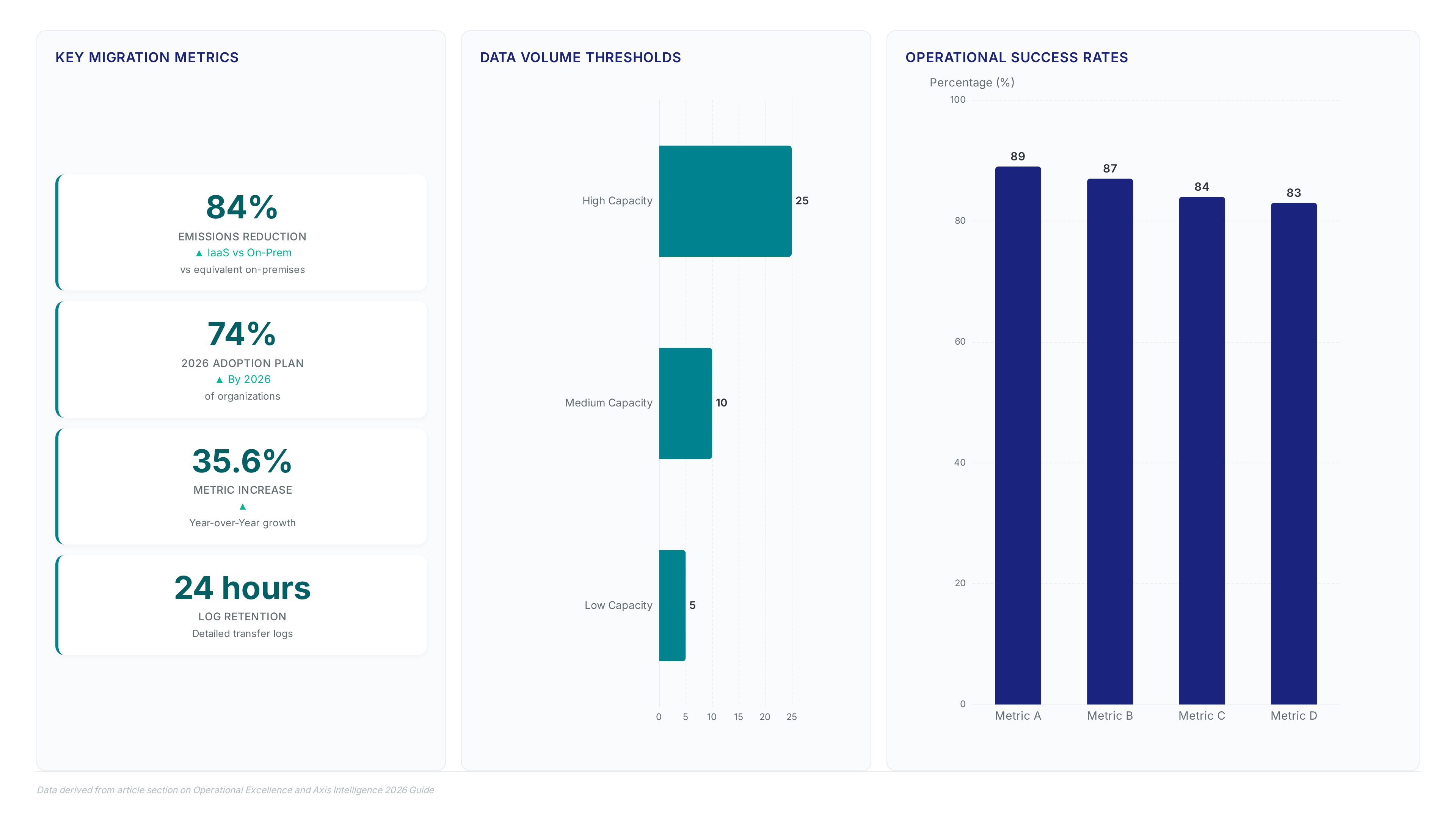
Distinct `/migration/lister` and `/migration/workers` paths in CloudWatch Logs keep enumeration bottlenecks separate from transfer crashes. The lister stream records discovery output and batching steps so slow API pagination does not hide worker stalls. Worker streams hold rclone transfer output plus health signals that let operators tell network saturation apart from authentication errors. This split supports the fan-out architecture High-volume transfer noise hides the root cause of queue depth spikes when log groups merge. Careful retention policies matter because verbose per-file logging drives storage costs quicker than compute expenses. Infrastructure fees stay low yet excessive log ingestion erodes margins gained by avoiding managed service premiums. The associated infrastructure costs A balanced approach retains detailed transfer logs for only 24 hours while archiving summary metrics indefinitely.
| Log Group | Primary Content | Operational Use |
|---|---|---|
| `/migration/lister` | Enumeration progress, batch counts | Detect source API throttling |
| `/migration/workers` | Transfer stderr, exit codes | Identify credential expiration |
Teams parsing gigabytes of successful transfer data to find one failed batch waste hours during mass migration events. Distinct groups allow targeted queries that cut mean-time-to-resolution sharply.
Troubleshooting Stalled Jobs with SQS Dead-Letter Queues
Messages reaching the dead-letter queue after two retries isolate specific rclone transfer failures without stopping the fleet. Operators inspect these failed batches to tell transient network glitches from permanent credential errors. The architecture incorporates built-in retry logic. This separation prevents a single corrupted file from blocking the entire 2.7 PB migration pipeline. Investigation focuses on the `/migration/workers` log group to extract exact error codes for the stalled job. This open-source approach lets rclone use multiple providers' bandwidth limits simultaneously though this complexity increases the surface area for configuration mismatches. A mismatched endpoint in Secrets Manager often triggers the immediate move to the dead-letter queue and bypasses standard backoff timers. Visibility competes with automation speed in this design. The system self-heals common faults yet operators must monitor queue depth actively to prevent backlog accumulation during widespread authentication failures. Targeted re-processing of only the failed messages restores throughput quicker than restarting the entire worker fleet.
| Failure Mode | Detection Signal | Remediation Action |
|---|---|---|
| Auth Error | Immediate DLQ entry | Update Secrets Manager value |
| Timeout | Retry limit reached | Increase batch size limit |
| Network Drop | Transient retry success | No action required |
Mission and Vision recommends setting alarms on FailedTransfers counts to trigger immediate PagerDuty incidents before queue depth spikes.
Validating Scaling Policies via ApproximateNumberOfMessagesVisible
Operational stability depends on binding Auto Scaling directly to ApproximateNumberOfMessagesVisible rather than CPU utilization. This metric drives the scale-from-zero alarm so the fleet expands before the queue saturates during the distributed rclone architecture enumeration phase. Operators must verify that InServiceInstances divides the visible backlog to maintain the target density of 100 messages per node.
| Signal Source | Scaling Action | Risk if Misconfigured |
|---|---|---|
| ApproximateNumberOfMessagesVisible | Add/Remove EC2 nodes | Queue saturation or idle spend |
| CPU Utilization | Add/Remove EC2 nodes | Lagged response to I/O bursts |
| Network In | Add/Remove EC2 nodes | False positives from noise |
The fan-out architecture Relying solely on queue depth ignores individual message processing time and potentially masks slow transfers behind high concurrency. Teams should cross-reference the FailedTransfers custom metric to distinguish between scaling needs and application errors. This validation prevents the built-in retry.
About
Marcus Chen serves as a Cloud Solutions Architect and Developer Advocate at Rabata. Io, where he specializes in S3-compatible object storage and AI/ML data infrastructure. His extensive background as a former Solutions Engineer at Wasabi Technologies and DevOps Engineer uniquely qualifies him to address the complexities of distributed rclone for petabyte-scale migrations. In his daily work, Chen designs high-performance storage architectures that directly confront the operational bottlenecks described in this article, such as stalled transfers and data drift. At Rabata. Io, a provider dedicated to eliminating vendor lock-in with true S3 API compatibility, he routinely engineers solutions for enterprises moving massive datasets between cloud providers. This practical experience allows him to offer actionable insights on building self-healing pipelines using Amazon ECS and SQS. Chen's expertise bridges the gap between theoretical scalability and the real-world demands of cost-effective, cross-cloud data migration for modern organizations.
Conclusion
Scaling distributed rclone beyond petabytes reveals a hidden fracture: per-instance throughput ceilings eventually choke aggregate velocity regardless of queue depth. As AI workloads in 2026 demand massive dataset relocations for LLM training, the operational cost shifts from compute spend to orchestration latency during enumeration phases. Static configurations fail when listing operations exceed Lambda timeouts, creating bottlenecks that flexible scaling alone cannot resolve without precise metric binding. Organizations must abandon CPU-based triggers immediately, as they lag behind I/O bursts and inflate costs during idle windows.
Adopt a strict policy by Q3 2026: bind all scaling groups exclusively to ApproximateNumberOfMessagesVisible with a hard target of 100 messages per node. This approach ensures the fleet expands proactively before saturation occurs, maintaining the substantial to 120 Gb throughput range required for modern AI data pipelines. Any architecture relying on network or CPU signals for storage migration invites unnecessary risk and budget leakage.
Start this week by auditing your current CloudWatch alarms to identify any scaling policies driven by CPU Utilization and replace them with queue-depth metrics before your next scheduled migration window. Verify that your FailedTransfers alarm triggers PagerDuty incidents instantly rather than waiting for retry exhaustion. This specific adjustment prevents connectivity faults from masquerading as capacity issues, securing both speed and reliability for future multi-petabyte moves.
Frequently Asked Questions
The distributed rclone approach achieves a migration cost of $0.00074 per GB. This efficiency allowed moving 2.7 PB of data with only $2,000 in total compute costs over two weeks.
The architecture scales aggregate throughput dynamically from 15 Gb up to 120 Gb. In contrast, a single rclone process caps throughput between 500 Mb and 6 Gb, creating a hard ceiling.
Listing billions of source objects exceeds the 15-minute AWS Lambda maximum timeout limit. Using Fargate containers ensures continuous enumeration without stalling, enabling the pipeline to handle massive file counts reliably.
Standard networking causes the disk subsystem to reach saturation during high-speed transfers. Implementing 25 Gb enhanced networking eliminates this constraint, allowing workers to sustain maximum throughput without local bottlenecks.
Building a custom synchronization solution saves an estimated $200 per month compared to managed AWS DataSync. This approach avoids pay-as-you-go pricing that becomes financially prohibitive at petabyte scales.