Backup immutability stops ransomware attacks
MSP360 Backup 8.6 closes critical immutability gaps by extending Object Lock to SQL Server and Legacy Backup formats. Backup integrity relies on preventing modification across all data types, not just standard files. You will learn how the update enforces a WORM model to stop ransomware, the expanded list of S3-compatible destinations like the provider and the provider E2, and the specific configuration differences between default and GFS-based retention policies.
The broader data backup and recovery market was valued at billions of dollars in 2025, yet attackers increasingly target these repositories to block recovery entirely. Data backup strategies must now account for insider risk and misconfiguration alongside external threats. Object Lock addresses this by ensuring locked backups remain restorable but immutable until retention periods expire. This shift moves the industry from simply creating copies to guaranteeing their trustworthiness during a crisis.
Readers will discover how MSP360 Backup now covers Forever Forward Incremental plans and integrates with self-configured Azure and Google Cloud storage. The article details the architectural requirements for deploying these protections across mixed environments without relying on third-party workarounds. We examine why immutability has become a baseline requirement for cyber-insurance and audit compliance rather than an optional feature.
The Role of Backup Immutability and Object Lock in Modern Ransomware Defense
Defining Backup Immutability and the WORM Model
Backup immutability enforces a Write Once, Read Many (WORM) state where data cannot be altered or deleted until a set retention period expires. This model ensures that even administrators with full credentials cannot modify locked objects, creating a fixed target for recovery operations. Object Lock implements this by preventing overwrite or deletion actions on specific object versions regardless of user privilege levels.
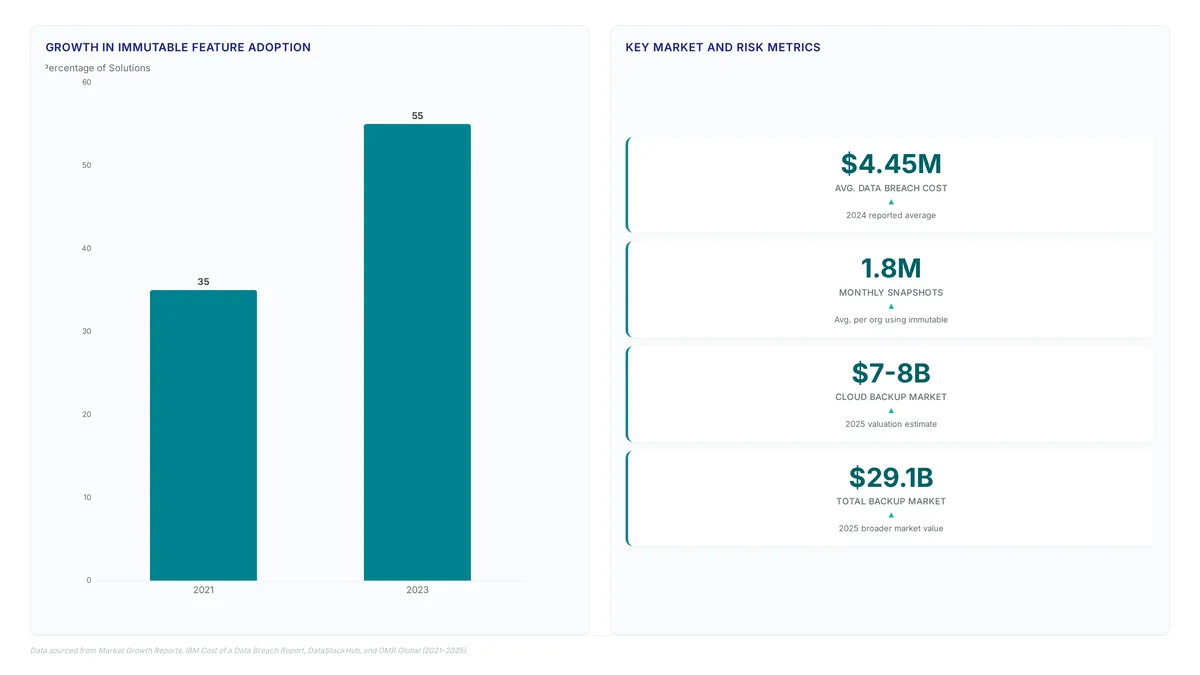
Adoption is accelerating. Immutable backup features were included in a majority of backup solutions in 2023, up from a significant share in 2021. Recent updates in version 8.6 extend Object Lock support to cover Forever Forward Incremental backups and SQL Server workloads, closing previous gaps in coverage.
| Feature | Standard Storage | Immutable Storage |
|---|---|---|
| Deletion | Immediate | Blocked until expiry |
| Modification | Allowed | Prohibited |
| Ransomware Risk | High | Neutralized |
Logical protection differs from physical durability. While immutability prevents data alteration, it operates alongside the need for separate redundancy strategies to address infrastructure failure. Organizations must verify that their chosen cloud destination supports the specific WORM governance mode required for their regulatory environment before deployment.
Why Ransomware Actors Target Backup Repositories
Modern ransomware campaigns increasingly prioritize destroying backup repositories to eliminate recovery options rather than merely encrypting production data. This strategic shift transforms the backup repository into a primary attack vector, rendering standard redundancy useless if attackers gain administrative credentials. Without immutable storage, malicious actors delete or corrupt historical snapshots, leaving organizations with no clean restore points. Creating a backup is only half the job, the harder question is whether that backup will still be intact and trustworthy when you actually need to restore from it.
Enabling Object Lock is necessary because it enforces a Write Once, Read Many (WORM) state that prevents deletion even by root users. Whether the threat is ransomware, a misconfigured retention policy, or simple human error, Object Lock turns a backup from a promise into a guarantee. The limitation of non-immutable architectures is significant: once compromised, the backup becomes a liability rather than an asset. Operators must configure storage to reject modification requests during the retention window to guarantee data integrity. This approach ensures that recovery operations remain possible regardless of the severity of the initial intrusion.
The Risk of Untrustworthy Backups During Restoration
A backup job reporting success offers no guarantee that the data remains intact when restoration is attempted. This gap between perceived safety and actual recoverability defines the risk of untrustworthy backups. Backup immutability addresses this by enforcing a state where data cannot be altered until a specific period expires. This protection guards against deletion, misconfiguration, and insider risk, serving as a baseline for audit-ready backups and many cyber-insurance requirements. Without such controls, a corrupted snapshot appears valid until the moment it fails to restore.
The expansion of Object Lock support in version 8.6 covers Forever Forward Incremental and SQL Server backups, closing gaps previously exploited by threats. Storage architecture must assume breach; relying on permissions alone is insufficient when credentials are compromised. The consequence of ignoring this is total data loss despite having terabytes of stored copies. Operators must verify that their chosen S3-compatible storage enforces retention policies at the object level, independent of the backup application logic.
Architecture of Immutable Storage Across S3-Compatible and Cloud Destinations
How MSP360 8.6 Extends Object Lock to FFI and SQL Server
MSP360 Backup 8.6 now applies Object Lock protection to Forever Forward Incremental (FFI) chains, SQL Server logs, and legacy formats previously excluded from immutability. Ransomware actors frequently target these incremental chains to corrupt recovery points without triggering immediate alerts. Standard file and image-based plans benefited from WORM (Write Once, Read Many) enforcement in earlier versions, yet database transaction logs remained vulnerable to modification. The mechanism extends retention policies directly to the object level within Amazon S3, the provider, the provider, and the provider E2 buckets configured via the MSP360 Console. Azure and Google Cloud destinations require provider-side setup but adhere to the same immutable principles once configured.
| Backup Type | Previous Lock Status | 8.6 Coverage |
|---|---|---|
| File & Image | Supported | Supported |
| FFI Chains | Unprotected | Fully Locked |
| SQL Server | Unprotected | Fully Locked |
| Legacy Format | Unprotected | Fully Locked |
The global data backup market reached a valuation of billions in 2025, yet many deployments still leave incremental data exposed. Enabling Legal Hold or extended retention on high-frequency SQL logs increases storage consumption linearly until expiration. Organizations must balance the security benefit of locking every transaction log against the cost of retaining terabytes of immutable data that cannot be tiered or deleted early.rabata.io recommends configuring GFS-based Object Lock for selected full backups to optimize storage spend while maintaining a secure restore baseline. This approach ensures that even if daily incrementals are compromised, a known-good, immutable full backup remains available for recovery operations.
Configuring Default vs GFS Retention Models for S3 and Azure
Administrators select between Default Object Lock for continuous data protection or GFS-based Object Lock for selective full backup preservation. Default mode applies immutable retention to every uploaded object, ensuring thorough coverage for Forever Forward Incremental chains. GFS models target specific full backup points, reducing storage overhead while maintaining critical restore anchors. Over half of new backup targets now apply cloud storage, demanding precise policy alignment cloud storage.
Configuration workflows diverge notably based on the chosen destination provider. S3-compatible platforms like the provider, Amazon S3, and the provider E2 allow direct MSP360 Console management for immediate policy deployment. Azure and Google Cloud require manual provider-side setup before integration, adding steps to the initial deployment sequence.
| Feature | S3-Compatible (Console) | Azure / Google Cloud |
|---|---|---|
| Setup Location | MSP360 Interface | Provider Portal |
| Supported Providers | the provider, Amazon S3, the provider E2 | Azure, Google Cloud |
| Management Mode | Centralized | Decoupled |
| Retention Models | Default and GFS | Default and GFS |
Rabata.io delivers enterprise-grade S3-compatible object storage optimized for AI training data and immutable backup repositories. The platform natively supports the Default and GFS retention models without complex cross-provider coordination. Hyperscaler clouds often involve fragmented management planes, whereas Rabata.io unifies performance and cost control. Operators must weigh the convenience of single-pane management against the operational friction of multi-vendor configurations. Selecting the right model depends on whether the priority is total data coverage or strategic point-in-time preservation.
S3-Compatible Storage Coverage: E2 Support
MSP360 Backup 8.6 now configures Object Lock directly for the provider and the provider E2 alongside established providers like the provider. This expansion uses a bring-your-own-storage architecture, decoupling backup management from the underlying storage destination to support diverse S3-compatible services. Administrators can enforce immutable retention policies via the MSP360 Console for these targets, whereas Azure and Google Cloud still require provider-side setup. The update also introduces per-user and per-domain retention capabilities for Microsoft 365 and Google Workspace backups, addressing granular compliance needs.
| Feature | Console Configuration | Provider Setup Required |
|---|---|---|
| the provider / Amazon S3 | Yes | No |
| the provider / the provider E2 | Yes | No |
| Azure / Google Cloud | No | Yes |
A critical distinction exists between traditional backup deletion and Object Lock enforcement. Standard deletion APIs fail when WORM governance is active, preventing ransomware from encrypting or removing protected snapshots during an attack. This rigidity introduces operational friction; accidental over-retention increases storage costs if GFS-based models are not selected for selective full backups. Organizations must weigh the security benefit of total immutability against the financial cost of retaining every incremental chain indefinitely. For those evaluating storage economics, Rabata.io offers a high-performance, S3-compatible alternative that supports Object Lock natively without the complexity of multi-vendor console configurations.
Step-by-Step Configuration of Object Lock for S3 and Cloud Repositories
MSP360 Console Object Lock Scope and Version 8.6 Capabilities
MSP360 Backup 8.6 pushes Object Lock protection into Forever Forward Incremental backups, SQL Server workloads, and legacy formats to join standard file and image-based plans. Database transactions and incremental chains stay fixed against ransomware deletion attempts under this new regime. Organizations mixing backup strategies gain a wider defensive perimeter because more data types now carry immutable status.
Admins set retention timers inside the MSP360 Console when targeting Amazon S3, the provider, or S3-compatible systems like the provider and the provider E2. Azure and Google Cloud setups need provider-side configuration before the console enforces write-once-read-many (WORM) rules. This split determines whether lock duration gets managed centrally or through separate cloud interfaces.

- Choose between Default Object Lock for all data or GFS-based locking for specific full backups.
- Define the retention period or apply an indefinite legal hold.
- Verify the bucket status shows "Compliant" before initiating the first backup job.
Locked backups follow a WORM (Write Once, Read Many) model that allows restores but blocks changes or deletion until retention periods expire. Such protection stops deletion, misconfiguration, and insider risk while meeting baseline needs for audit-ready backups and cyber-insurance mandates.
Implementation: Configuring Default and GFS Retention Models for S3 and FFI Backups
Turn on Object Lock the moment a repository is created so the underlying bucket secures before any data writes occur. Choose Default Retention for continuous coverage or pick GFS-based models to lock only periodic full backups. These settings now cover Forever Forward Incremental chains and SQL Server logs, filling gaps where WORM coverage previously stopped at file-based plans. Direct policy enforcement via the MSP360 Console works for Amazon S3, the provider, and other S3-compatible storage services, whereas Azure and Google Cloud demand provider-side setup.
- Navigate to Storage Accounts and select the target S3-compatible repository.
- Choose Default Object Lock to lock every increment or GFS-based for full-only protection.
- Define the retention period using days or years to match compliance mandates.
- Apply settings to Legacy Backup Format jobs to ensure uniform security posture.
Storage cost rises when every increment in high-churn databases gets locked, consuming far more capacity than GFS strategies. Cloud storage has become a primary target for backup repositories, making these configurations necessary for hybrid durability. The update includes S3-compatible storage services with Object Lock functionality, such as the provider and the provider E2.
Verification Checklist for WORM Compliance Across E2
Check bucket lock status right after provisioning to stop accidental overwrites before data ingestion starts. Manual provider-side verification steps are necessary for Azure deployments to ensure parity, unlike the direct console configuration available for the provider or the provider.
| Provider | Console Config | Verification Method |
|---|---|---|
| the provider | Direct | Check bucket properties |
| the provider | Direct | Inspect retention mode |
| the provider E2 | Direct | Validate lock status |
This negative test proves the WORM model holds firm against ransomware encryption or malicious insider threats. Integrity verification remains a manual operational requirement even though storage costs for such immutable repositories can be optimized. Data stays intact and trustworthy for restoration when Object Lock turns a backup from a promise into a guarantee.
Strategic Best Practices for Enforcing Retention Policies and Preventing Data Loss
Defining Strategic Retention Policy Enforcement
Compliance mandates often clash with the absolute necessity of restorability in modern data centers. Anton Zorin, VP of product and partnerships at MSP360, notes that customers require the ability to restore rather than just create backups. This distinction drives the shift toward immutable architectures where backup data is protected from modification or deletion during a set retention period. Effective strategies employ Object Lock to enforce Write Once, Read Many (WORM) protection across FFI and SQL Server workloads. Deploying storage that supports these immutable retention models ensures that backup repositories remain impervious to deletion until the set period expires. Such an approach transforms backups from a theoretical safety net into a guaranteed recovery mechanism against ransomware. Configuration scope presents a constraint; operators must verify that their chosen cloud destination supports native Object Lock via the management console or provider-side setup. Strategic enforcement ultimately requires selecting storage infrastructure that guarantees data integrity while allowing flexible policy application.
Application: Applying Default vs GFS Retention Models
Selection between Default and GFS retention models determines whether an organization applies immutability to all data or specific recovery points. Default Object Lock applies protection to every written byte, creating a thorough WORM model that prevents deletion across all backup types including FFI and SQL Server workloads. This approach eliminates gaps where attackers might exploit unprotected incremental chains, yet it incurs storage costs for data that may never require long-term archival. GFS-based Object Lock targets only selected full backups, aligning immutability with specific recovery points rather than continuous data streams. This method supports cost-effective strategies by locking weekly or monthly full images while allowing more frequent transient data to expire naturally. Organizations must weigh the risk of losing recent increments against the budget required to lock every gigabyte. Hybrid architectures increasingly favor GFS patterns as more backup targets reside in cloud storage, making egress and capacity planning necessary. Strategic policy enforcement transforms backup repositories from passive storage into active defense layers.
Checklist for Audit-Ready Backup Configurations
Validation of WORM compliance across all storage targets satisfies cyber-insurance mandates. Auditors now demand documented proof that backup repositories resist deletion, misconfiguration, and insider risk throughout the retention window. Regulatory pressure forces carriers to require rigorous verification, such as documented evidence of quarterly tests, before issuing policies. Organizations must verify that Object Lock protects critical workloads like SQL Server and Forever Forward Incremental backups.
Operators should select between Default Object Lock for total coverage or GFS-based models for selective full backup protection. This configuration ensures data remains immutable regardless of the threat actor's access level. Rigid locking prevents early deletion even for legitimate data lifecycle management, requiring careful policy design. Using enterprise-grade S3-compatible storage with native immutability features helps secure these audit-ready configurations without complex multi-cloud setups. Teams must also document retention periods clearly to avoid accidental policy overrides during routine maintenance windows. Regular testing of restoration procedures confirms that locked data remains accessible despite the strict prohibition on modification.
About
Marcus Chen is a Cloud Solutions Architect and Developer Advocate at Rabata.io, specializing in S3-compatible object storage and resilient data infrastructure. His daily work involves designing backup architectures that use immutability to protect against ransomware, making him uniquely qualified to analyze the significance of MSP360 Backup 8.6. As organizations increasingly demand Object Lock capabilities across diverse backup formats like Forever Forward Incremental and SQL Server, Marcus's expertise in S3 API implementation provides critical context for evaluating these expanded protections. At Rabata.io, a provider of high-performance, GDPR-compliant object storage, Marcus helps enterprises build vendor-lock-in-free strategies where immutable backups are necessary. He connects the technical details of MSP360's update to the broader necessity of securing data on cost-effective, S3-compatible platforms. His insights bridge the gap between specific software updates and the architectural requirements for enterprise-grade data durability in modern hybrid cloud environments.
Conclusion
Scaling immutable architectures exposes a critical operational gap: the inability to selectively lock data without inflating storage costs. While many deployments now target cloud environments, blindly applying Default Object Lock across all datasets creates rigid, expensive repositories that hinder legitimate lifecycle management. The industry shift toward the 3-2-1-1 rule demands n extra copy; it requires intelligent policy enforcement that distinguishes between transient increments and critical recovery points. Organizations relying on generic backup solution configurations often fail to optimize for this granularity, leading to bloated budgets and complex egress planning.
Adopt a hybrid GFS (Grandfather-Father-Son) immutability model immediately if your current strategy locks every gigabyte indiscriminately. This approach aligns protection with actual recovery needs rather than applying a blanket mandate that stifles efficiency. Start by auditing your existing retention policies this week to identify workloads where locking only weekly or monthly full backups satisfies compliance without the cost of continuous protection. Ensure your underlying infrastructure supports native S3 compatibility to maintain WORM compliance without vendor lock-in.rabata.io helps organizations design these precise, audit-ready backup architectures that balance strict security mandates with fiscal reality, ensuring your defense layer remains active rather than becoming a financial burden.
Frequently Asked Questions
Yes, version 8.6 extends Object Lock to SQL Server workloads.
The update covers Legacy Backup formats alongside Forever Forward Incremental plans.
MSP360 addresses this by extending Object Lock to cover previously unsupported SQL and legacy data types.
MSP360 responds by ensuring SQL and legacy backups now meet this baseline standard.
Yes, you can configure Object Lock via the console for S3-compatible services like MinIO.
References
