Storage insights datasets: Stop guessing access patterns
Google Cloud generated billions in revenue in 2025, a surge driven by the very data sprawl that storage insights datasets must now govern. Blindly migrating bytes without analyzing access patterns is a financial liability that modern observability stacks can no longer ignore. Effective cloud storage analytics demands querying metadata directly, bypassing opaque provider dashboards and guesswork.
Bucket activity analysis reveals the specific regions and users driving traffic, enabling precise storage cost optimization. This approach exposes data access patterns that dictate performance and pricing tiers, moving beyond simple inventory counts. Identifying error spikes, such as 429 throttling events, aligns storage lifecycle policies with actual usage frequency. By leveraging BigQuery storage metadata, teams validate whether storage class optimization efforts match real-world demand. Understanding regional bucket traffic flows ensures data residency requirements are met without paying premium rates for unnecessary cross-region transfers. This methodology turns passive data inventory into an active lever for operational efficiency.
The Role of Storage Insights Datasets in Modern Cloud Observability
Storage Insights Datasets as Automated Metadata Index
Manual metadata collection is dead. A Storage Insights dataset operates as an automated, query-ready index, replacing sporadic snapshots with continuous scanning. This shift enables immediate identification of cold data candidates and anomalous access patterns. However, granular visibility across thousands of buckets generates significant data volume. Without strict partition filters, queries inflate processing charges. Organizations must define precise scope limitations during configuration to avoid indexing ephemeral or low-value temporary objects. Performance benchmarks for AI/ML training data remain reproducible and cost-effective only when this balance is understood. The tool designed to optimize costs may inadvertently increase operational expenditure through inefficient query patterns unless disciplined scoping is applied.
Tracking Object-Level Activity and Bucket Aggregates
New Storage Insights views capture granular object-level activity, including access patterns and storage class distribution, to reveal operational blind spots. These datasets aggregate bucket-level metrics such as total operation counts, error breakdowns, and prefix heatmaps, transforming raw logs into actionable SQL targets. Identifying high-churn prefixes becomes necessary for performance tuning as unstructured model data drives enterprise footprints toward billions of objects. Administrators query these tables to isolate specific failure modes. Finding 429 errors indicates throttling before it impacts model training throughput. Continuous metadata ingestion provides organization-wide visibility into object storage usage and activity trends. Full object-level tracking increases the volume of indexed metadata which may require careful management of storage costs for extremely high-frequency buckets.
| Metric Category | Captured Data Points | Operational Value |
|---|---|---|
| Object Operations | Access patterns, storage class | Identify hot data for caching tiers |
| Error Analysis | 4xx and 5xx status codes | Detect application misconfigurations early |
| Aggregates | Total ops, active prefixes | Right-size bucket partitioning strategies |
Historical activity retention depth competes against the cost of maintaining a queryable index for billions of daily actions. This tension dictates whether teams store only recent aggregates or maintain a complete audit trail for forensic analysis. Specific activity signals help recommend precise storage class transitions that align with actual access velocity. Operators often over-provision performance tiers for data that is rarely accessed without this granular visibility. Detailed activity logs provide the evidence needed to enforce lifecycle policies confidently.
Configuring Scope and Verifying Activity Latency
Define the dataset scope to cover an entire organization, specific accounts, regions, or individual buckets before export begins. Boundaries are customized by administrators to isolate noisy workloads from critical AI training data. Queries target only the metadata streams through this customization. Granular scoping reduces compute costs yet overly narrow filters risk missing cross-project dependency patterns that drive latent egress charges. Activity insights populate with a latency allowing teams to detect throttling errors or unexpected write spikes before they derail batch processing windows. Aggregated views can hide object-level anomalies so operators must query raw activity logs to trace specific file contention issues. Cost models built on stale access frequency data fail when this lag remains unverified.
Inside the Architecture of Queryable Storage Metadata Indexing
Ingesting Session Logs and Error Rates into BigQuery Tables
Automated pipelines convert raw access events into structured BigQuery tables within Storage Insights datasets. Parsing session logs allows the system to capture object-level activity tracking by recording every read, write, and delete operation performed on stored objects. Timestamps, requester identities, and HTTP status codes within these logs enable precise reconstruction of access patterns.
The ingestion process follows a set sequence:
- Collection agents aggregate bucket activity data at regular intervals.
- Metadata schemas map raw log fields to query-ready columns within BigQuery.
- Regional traffic views populate automatically, showing which geographic zones generate requests.
- Error metrics, including HTTP 429 throttling events, become visible for immediate alerting.
Bucket-level regional traffic data appears in new views, allowing operators to identify hotspots without manual aggregation. The dataset refreshes with regular updates so analysis reflects current conditions rather than stale snapshots. This continuous indexing reduces the lag between an event occurring and an engineer detecting it.
| Data Type | Captured Metric | Analysis Utility |
|---|---|---|
| Session Logs | Requester IP, Operation Type | Identify unauthorized access attempts |
| Error Rates | HTTP 4xx/5xx counts | Detect application misconfigurations |
| Regional Traffic | Source continent, Region ID | Optimize bucket placement for latency |
Ingestion frequency competes directly with query cost because higher refresh rates increase data freshness while expanding the volume of processed bytes. Organizations balance the need for immediate visibility against the expense of scanning large, frequently updating tables. Aligning refresh intervals with specific operational requirements helps maintain cost efficiency while preserving situational awareness. Google Cloud generated billions in revenue in 2025, representing a surge of almost 36 percent over the previous year.
Querying Object Events View to Resolve 429 Too Many Requests Errors
Spikes in 429 errors often trigger automatic retries that inflate Class A operation costs without resolving the underlying throughput bottleneck. Client applications encountering rate limiting frequently implement exponential backoff logic that may increase traffic volume during recovery windows. This feedback loop transforms a transient performance hiccup into a sustained billing anomaly.
Operators isolate the specific objects driving this behavior by querying the object_events_view table. A targeted SQL statement filters the dataset where `responseStatus` equals 429, selecting critical fields including `requestOperation`, `errorReason`, `objectName`, `bucketName`, `requestCompletionTimestamp`, and `project`. Granular visibility allows teams to distinguish between legitimate high-velocity access patterns and misconfigured batch jobs. Identifying the offending prefix enables precise mitigation, such as redistributing load or adjusting client retry policies.
| Query Target | Operational Value |
|---|---|
| `objectName` | Identifies specific hot objects causing contention |
| `requestOperation` | Distinguishes read-heavy from write-heavy storms |
| `bucketName` | Isolates the affected storage namespace |
Ignoring these signals carries a measurable cost since unchecked retry storms can consume a significant portion of a monthly budget. Relying solely on error counts misses the nuance of near-threshold requests that succeed but degrade latency. Active monitoring remains necessary because evidence disappears once the spike passes unless archived. Establishing continuous alerts on 429 frequency rather than reacting to billing shocks is a recommended practice. This proactive stance prevents temporary access issues from becoming permanent financial drains.
Validating Object-Level Activity Data Points for Operational Hotspots
Effective validation begins by confirming that session logs capture write, update, and delete operations with high precision. Operators cannot distinguish between application bugs and genuine infrastructure throttling without this granular fidelity. The ingestion pipeline must parse HTTP status codes to flag 429 errors immediately, allowing teams to isolate specific objects causing rate-limiting cascades.
| Data Point | Operational Value | Validation Method |
|---|---|---|
| Request Operation | Identifies hot prefixes | SQL aggregation on `requestOperation` |
| Error Reason | Pinpoints failure mode | Filter `responseStatus` codes |
| Completion Timestamp | Reveals burst timing | Time-series window analysis |
| Bucket Name | Scopes impact radius | Group by `bucketName` |
Retry storms inflate Class A costs even after the initial spike subsides, a fact operators often overlook. Aggregating data too coarsely constitutes a common deployment error that hides the specific object keys driving the contention. Configuring alerts on error reason distributions rather than total request volume helps catch these anomalies early. Thorough logging increases metadata storage slightly, yet the cost pales in comparison to wasted compute cycles on futile retries. Verifying that schemas include requester identity fields allows teams to trace multi-tenant noise. Failure to validate these specific data points leaves organizations blind to the exact moment performance degrades into financial waste.
Measurable ROI from SQL-Driven Storage Cost and Performance Optimization
Defining SQL-Driven Storage Right-Sizing Logic
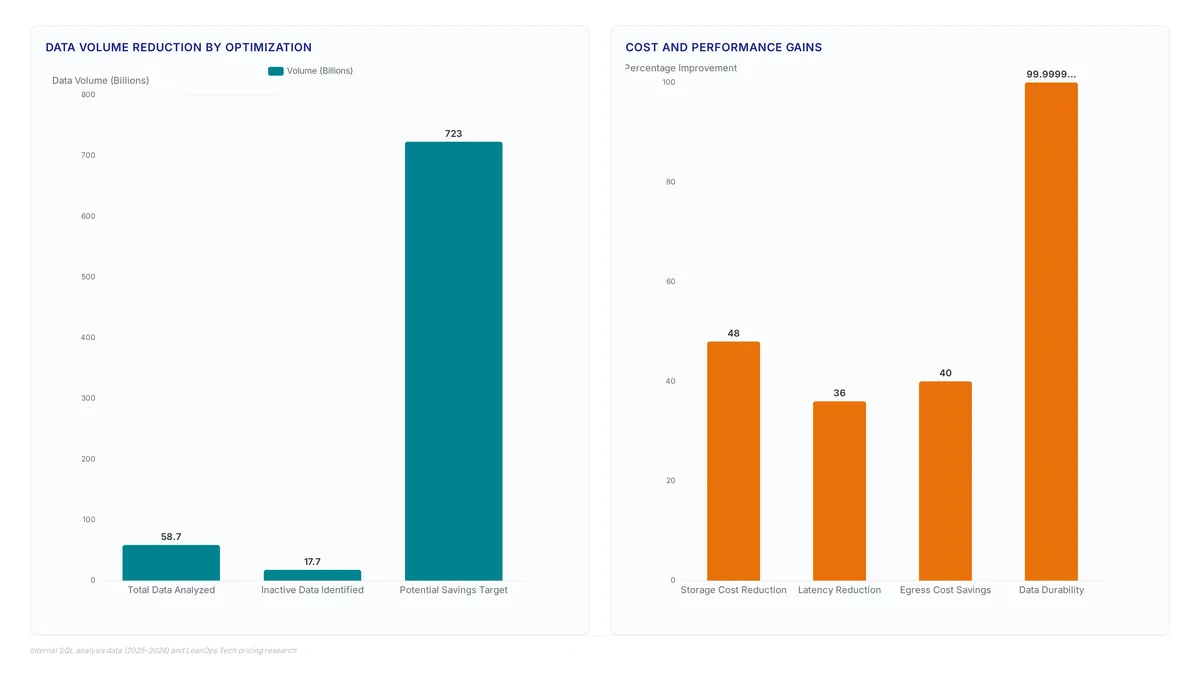
Operators transition data to cold tiers by querying the `bucket_activity_view` to isolate inactive storage. This process identifies buckets with minimal read or write operations over standard windows like 30, 60, or 90 days. Engineers select name, location, project, and total requests to flag candidates for Coldline or Archive classes. The mechanism relies on SQL filters that compare current timestamps against the last modification date recorded in the metadata index.
| Query Target | Metric Column | Action Threshold |
|---|---|---|
| Inactive Buckets | `totalRequests` | Zero activity > 30 days |
| Regional Traffic | `location` | High egress cost zone |
| Object Count | `name` | Exceeds lifecycle limit |
Immediate cost reduction often conflicts with data retrieval latency requirements. Moving data too aggressively to deep archive storage can impede application performance if access patterns shift unexpectedly. Unlike manual audits, SQL-driven logic prevents human error in categorizing petabytes of objects. This validation step confirms that rarely accessed data is truly dormant rather than sporadically active. Network operators shift from reactive cleanup to proactive, policy-based management. By defining precise inactivity windows, organizations avoid the penalty of storing warm data in cold tiers. This approach transforms opaque metadata into a queryable index for systematic cost control.
Applying Regional Traffic Analysis for Bucket Placement
Engineers analyze the `bucket_region_activity_view` to align bucket placement with actual request origins. This table exposes mismatches between requestLocation and bucketLocation that drive unnecessary latency costs. When read traffic concentrates in a single zone, moving data from multi-region to single-region storage reduces redundancy expenses without sacrificing performance. Globally distributed access patterns justify multi-region replication to maintain low-latency headers.
| Placement Strategy | Traffic Pattern | Cost Implication |
|---|---|---|
| Single-Region | Concentrated (>80% local) | Lowest storage cost |
| Multi-Region | Distributed Global | Higher storage, lower latency |
| Coldline Migration | Minimal activity | Up to significant savings |
Shipt, a retail technology platform, uses these insights to manage over two billion objects efficiently. Ron Cuirle, Director of Engineering at Shipt, notes that such intelligence delivers necessary cost and performance optimization. Data residency compliance sometimes clashes with egress pricing; placing a bucket in a low-cost region may violate sovereignty laws or incur steep cross-border transfer fees. Operators must weigh these regulatory constraints against raw compute proximity. For datasets with sporadic access, transitioning to Coldline storage after verifying low request counts via SQL queries captures significant value. Ignoring regional skew creates a permanent drag on marginal compute budgets. Static placement based on initial deployment assumptions often fails as application usage evolves geographically. Continuous monitoring ensures the storage tier matches the current access profile rather than historical intent. This method prevents over-provisioning while maintaining necessary throughput levels for active workloads.
Avoiding Unintended BigQuery Costs During Storage Analysis
Running broad SQL scans against full metadata indices accrues query charges proportional to the bytes processed. Operators connecting Looker to Storage Insights data must scope dashboards with strict filters to prevent billing surprises.
The mechanism involves BigQuery charging per byte processed, meaning unbounded queries on object-level logs rapidly escalate expenses. A common failure mode occurs when engineers attempt to find inactive buckets using `bucket_activity_view` without partition pruning.
| Risk Factor | Consequence | Mitigation Strategy |
|---|---|---|
| Full Table Scan | High query cost | Filter by `creation_time` |
| Unbounded Date Range | Excessive data processing | Limit to last 30 days |
| Missing Limits | Accidental full index scan | Add `LIMIT` clause |
Analysis costs can exceed savings from identified optimizations if queries lack partition filtering. Teams should sample datasets before executing full joins or complex aggregations on the entire inventory. Deep historical analysis requires careful budgeting of compute resources alongside storage fees.rabata.io recommends defining sample windows to validate logic before expanding scope to the full storage estate. This approach keeps the cost of discovery a fraction of the identified waste.
Implementing Storage Insights for Enterprise-Scale Operational Discovery
Enabling Storage Intelligence and Dataset Configuration Scope
Generating detailed reports captures object-level activity and usage trends for downstream analysis. Operators define the export scope by selecting a specific organization, account, region, storage class, bucket, or prefix to limit the dataset footprint.
The following configuration illustrates the scope definition required to activate the export:
Selecting broad organizational scopes without filtering legacy buckets inflates processing volumes, a common deployment error. This targeted approach allows teams to establish baseline metrics before expanding the analysis horizon to include cold storage tiers.
Implementation: Executing SQL Queries on Object Events View for 429 Errors
Precise identification of throttled prefixes causing application latency replaces manual log scanning. Operators filter the dataset where `responseStatus` equals 429 to reveal the exact `requestOperation` and `objectName` responsible for rate limit violations.
- Select the columns including `bucketName`, `project`, and `requestCompletionTimestamp` to establish a timeline of contention.
- Apply a `WHERE` clause matching `responseStatus` to 429, ensuring the query captures only failed attempts due to throughput caps.
- Group results by `objectName` to identify hotspots where concurrent read or write operations exceed bucket limits.
This diagnostic step exposes patterns where application logic inadvertently creates contention bottlenecks on single objects. Identifying these specific keys allows engineers to implement exponential backoff strategies or redistribute workloads across additional prefixes. Persistent throttling degrades user experience and stalls critical data pipelines until traffic patterns normalize. Correlating these error spikes with deployment events helps pinpoint code changes that introduced aggressive polling behaviors. Such correlation prevents recurring outages by addressing the root cause rather than simply expanding capacity.
This feedback loop converts transient throttling into permanent financial waste.
- Query the activity view table filtering where `responseStatus` equals 429 to isolate throttled prefixes.
- Analyze the `requestOperation` column to identify which specific actions drive the retry storm.
3.
Client-side retry logic directly multiplies billing events without adding data value, a fact operators often overlook. Maintaining application availability through aggressive retries conflicts with preserving budget efficiency during traffic bursts. Versioning provides data protection yet multiplies storage costs by retaining all object versions indefinitely by default. Purchasing committed use discounts can save notably on Standard storage costs over 1-3 year terms for predictable storage workloads. Addressing the root cause of rate limiting prevents the storage bill from reflecting failure rather than usage. Engineers must balance protection with cost efficiency to avoid unnecessary expenditure.
About
Marcus Chen is a Cloud Solutions Architect and Developer Advocate at Rabata.io, where he specializes in S3-compatible object storage and AI/ML data infrastructure. His daily work involves rigorous performance benchmarking and cloud cost optimization for enterprise clients, making him uniquely qualified to analyze storage insights datasets. At Rabata.io, an S3-compatible provider serving AI startups and enterprises, Marcus routinely helps engineers decode data access patterns to optimize storage classes and reduce egress fees. This article's focus on analyzing bucket activity views and object-level tracking directly mirrors the architectural challenges he solves when migrating workloads from AWS S3 to Rabata's high-performance environment. By using his hands-on experience with BigQuery storage metadata and regional traffic analysis, Marcus provides actionable strategies for monitoring storage activity without vendor lock-in. His expertise ensures that readers gain practical, production-tested methods for interpreting access logs to drive significant storage cost savings while maintaining optimal performance for demanding Gen-AI and media workloads.
Conclusion
Scaling storage infrastructure reveals that contention bottlenecks often stem from application logic rather than capacity limits. When teams rely on aggressive client-side retries to handle throttling, they convert transient network errors into permanent financial waste. This feedback loop inflates billing events without adding data value, a critical oversight as generative AI workloads drive enterprises to expand capacity rapidly. The operational cost here is not just storage volume but the compounding expense of processing redundant retry traffic.
Organizations must shift from reactive capacity expansion to proactive query optimization before scaling further. Start by auditing your activity views for HTTP 429 status codes this week to isolate specific prefixes driving retry storms. Do not simply increase throughput limits; instead, correlate these spikes with recent deployment events to identify aggressive polling behaviors introduced in code. Implement exponential backoff strategies immediately for any identified hotspots to break the cycle of self-inflicted throttling.
For predictable workloads, evaluate purchasing committed use discounts to lock in lower rates over one to three-year terms. This approach balances data protection needs with budget efficiency, ensuring your storage bill reflects actual usage rather than failure recovery. By addressing the root cause of rate limiting now, you prevent future cost spikes while maintaining system durability. Focus your immediate efforts on refining the data inventory to distinguish between necessary versions and redundant copies generated by error handling.
Frequently Asked Questions
Blindly migrating bytes creates a severe financial liability for modern stacks. Google Cloud generated billions in revenue recently, proving that unanalyzed data sprawl drives massive costs that teams must avoid.
These datasets replace manual collection with continuous scanning to stop cost inflation. Without disciplined scoping, the very tool meant to optimize costs can increase spending as revenue surges like the recent billions figure show.
Finding 429 errors signals throttling before it disrupts your critical AI model training workflows.
Administrators must customize boundaries to separate noisy workloads from critical AI training data.
Detailed activity logs provide evidence to enforce lifecycle policies and stop over-provisioning.
References