Server access logs: Stop paying for useless scans
Amazon S3 server access logs arrive with a mandatory 2 to 4 hour latency delay. This constraint fundamentally breaks real-time security monitoring.
Lifecycle policies move aging data to cheaper tiers without losing compliance value. Partition projection is the only viable method to prevent query costs from eclipsing storage bills. Structure your Athena queries to avoid scanning irrelevant terabytes of log data.
Third-party tools like S3stat translate raw logs into readable statistics, but the underlying mechanics of log delivery remain bound by AWS infrastructure limits. Amazon documents that logs are delivered to a dedicated bucket hours after the event occurs, rendering them useless for live incident response. Stop chasing impossible real-time metrics. Focus on the structured log key format to enable efficient filtering. Implement partition projection to skip irrelevant data scans and ensure your CloudTrail S3 data events analysis remains financially sustainable. The goal is not instant visibility, which the platform does not provide, but a rigorous, low-cost approach to access log analysis that satisfies SOX compliance retention requirements without bankrupting your analytics budget.
The Critical Role of S3 Server Access Logs in Cloud Auditing
S3 Server Access Logs as HTTP Request Auditors
S3 server access logs function as granular HTTP request auditors, recording detailed metadata for every bucket interaction. This structure enables precise reconstruction of traffic patterns without the overhead of full payload inspection. Traffic patterns emerge clearly from the data. CloudTrail data events focus on API-level actions and IAM context, yet server access logs provide a different scope of information by omitting specific session tokens found in management event logs. This distinction makes them ideal for performance auditing but requires correlation with other sources for complete user attribution. Engineers analyzing these records gain visibility into TLS versions and response codes.
Storage volume competes directly with query efficiency in this operational model. Raw log accumulation can quickly escalate costs if left unmanaged. Organizations have demonstrated that building a scalable pipeline for processing these logs across infrastructure overcomes traditional limitations of storage and querying. Without such optimization, the sheer density of HTTP records renders historical analysis prohibitively expensive.
| Feature | Server Access Logs | CloudTrail Data Events |
|---|---|---|
| Primary Focus | HTTP Request Metadata | API Action History |
| IAM Context | Limited | Detailed (Session Context) |
| Cost Driver | Storage Volume | Event Ingestion Count |
Partition projection helps minimize scan costs during analysis when paired with these logs. Raw data becomes a cost-effective alternative for high-volume auditing scenarios through this.
S3 Data Events vs Server Access Logs for Identity Context
Amazon S3 data events deliver thorough user identity context necessary for deep security investigations. Server access logs function as effective HTTP request auditors yet lack the session granularity found in AWS CloudTrail. This absence creates a blind spot when tracing federation paths during a breach. Federation paths remain obscure without that extra layer. Engineers relying solely on bucket logs for compliance may miss detailed access patterns involving temporary credentials. HTTP metadata cannot reconstruct the full authentication process.
This gap forces security teams to maintain dual logging strategies for complete coverage. Organizations often underestimate the storage volume required for full data event ingestion across all buckets. A hybrid approach mitigates this cost while preserving audit integrity. Teams can route high-volume traffic analysis to partitioned log tables while reserving data events for sensitive buckets. This strategy balances forensic readiness with operational efficiency. Architecture patterns that optimize both visibility and spend are necessary for configuring these distinct logging layers effectively.
Latency Delays and Schema Complexity in S3 Log Analysis
This delivery window creates a boundary for monitoring architectures that require immediate visibility into data access patterns. Operators relying on these logs for live anomaly detection face a gap between event occurrence and data availability. Time passes before the data arrives. The raw text format of these logs introduces parsing overhead that inflates query costs and complicates schema definition. Without this transformation, analysts must process verbose text lines containing multiple distinct fields, many of which remain irrelevant to specific compliance queries. Irrelevant fields clutter the view.
| Log Format | Parsing Overhead | Query Efficiency |
|---|---|---|
| Raw Text | High | Low |
| Columnar (e.g. Parquet) | Low | High |
The tension between immediate availability and analytical efficiency forces an architectural choice. Partition projection accelerates queries but cannot overcome the initial ingestion lag. Enterprises requiring sub-minute alerting must supplement native logging with alternative streaming mechanisms. Pairing these delayed logs with lifecycle policies that transition old data to cold storage ensures cost controls do not compromise long-term audit readiness. Cold storage holds the history.
Architecting Efficient Log Storage with Lifecycle Policies and Centralization
Centralized S3 Logging Bucket Architecture and Key Formats
Isolating audit trails within a dedicated logging account separates them from production data access controls. This separation prevents circular dependency risks where log consumption policies might inadvertently block log delivery.
The system enforces a strict log object key format to enable efficient querying later. Logs follow the pattern `DestinationPrefixSourceAccountId/SourceRegion/SourceBucket/[YYYY]/[MM]/[DD]/[YYYY]-[MM]-[DD]-[hh]`, which includes the source account, region, bucket, and timestamp details. Adhering to this structure allows partition projection to skip irrelevant data files during analysis.
| Component | Requirement | Purpose |
|---|---|---|
| Bucket Type | Standard S3 | Supports lifecycle transitions |
| Key Structure | Account/Region/Bucket/Date | Enables partition pruning |
| Isolation | Separate AWS Account | Prevents tampering and deletion |
Aggregating logs from multiple source buckets into a single prefix simplifies governance frameworks. High-velocity sources poured into one bucket can create hot partitions if the date-based hierarchy is ignored. Organizations have achieved significant reductions in storage costs by identifying cold data through this exact logging structure. Partition projection fails without the correct key format, causing query performance to degrade linearly as data volume grows.
Configuring S3 Lifecycle Transitions for Compliance and Cost Optimization
Regulatory mandates often dictate specific retention periods for financial and health data, requiring teams to evaluate data retention needs alongside storage classes. Operators define expiration policies to satisfy these legal windows, automatically deleting logs after the minimum period passes. This timeline forces a balance between immediate query performance and long-term archival costs.
| Regulation | Retention Focus | Transition Strategy |
|---|---|---|
| SOX | Long-term accessibility | Deep Archive for compliance |
| HIPAA | Data protection | Flexible Retrieval for audits |
| General | Cost efficiency | Standard-IA for infrequent access |
Implementing these rules requires a staged approach to lifecycle transitions that mirrors data access frequency.
- Transition logs to colder storage classes to reduce hot storage costs.
- Use Flexible Retrieval options for infrequent audits.
- Archive to Deep Archive tiers for long-term compliance.
- Expire objects automatically to meet retention requirements.
Tracking transition metrics prevents unnecessary costs from misaligned rules. Moving data to Deep Archive too aggressively saves money but incurs retrieval delays during sudden compliance audits. Teams using S3 analytics can identify cold data candidates to refine these windows dynamically. Premature archiving reduces investigation speed, whereas delayed transitions waste budget on unused Standard storage.
Athena Optimization and Partition Projection Setup
Optimizing query performance is necessary for lowering scan costs when analyzing server access logs. Operators should apply the latest engine capabilities available in workgroup settings to access performance improvements alongside standard partition projection capabilities.
Configuring projection eliminates the need for Glue crawlers by defining partition schemas within the table definition itself. This approach allows the query engine to mathematically infer partition locations rather than consulting a metadata store. Implementing partition projection in Amazon Athena for S3 logs can reduce query costs by up to 90% compared to non-partitioned or crawler-based approaches, a critical margin when auditing high-volume HTTP request streams.
| Feature | Crawler-Based | Partition Projection |
|---|---|---|
| Metadata Sync | Periodic delay | Real-time inference |
| Query Cost | High (full scan) | Low (pruned scan) |
| Maintenance | Manual schedule | Zero-touch |
Pairing this configuration with strict lifecycle policies helps transition aged logs to colder storage tiers. Projection relies entirely on consistent key formatting; any deviation in the source log delivery path breaks the inference logic. Teams enabling S3 server access logging must validate the destination prefix matches the projection template exactly. Failure to align these paths results in empty query results despite valid data presence.
Implementing Partition Projection to Optimize Athena Query Performance
How Partition Projection Eliminates AWS Glue Crawler Dependencies
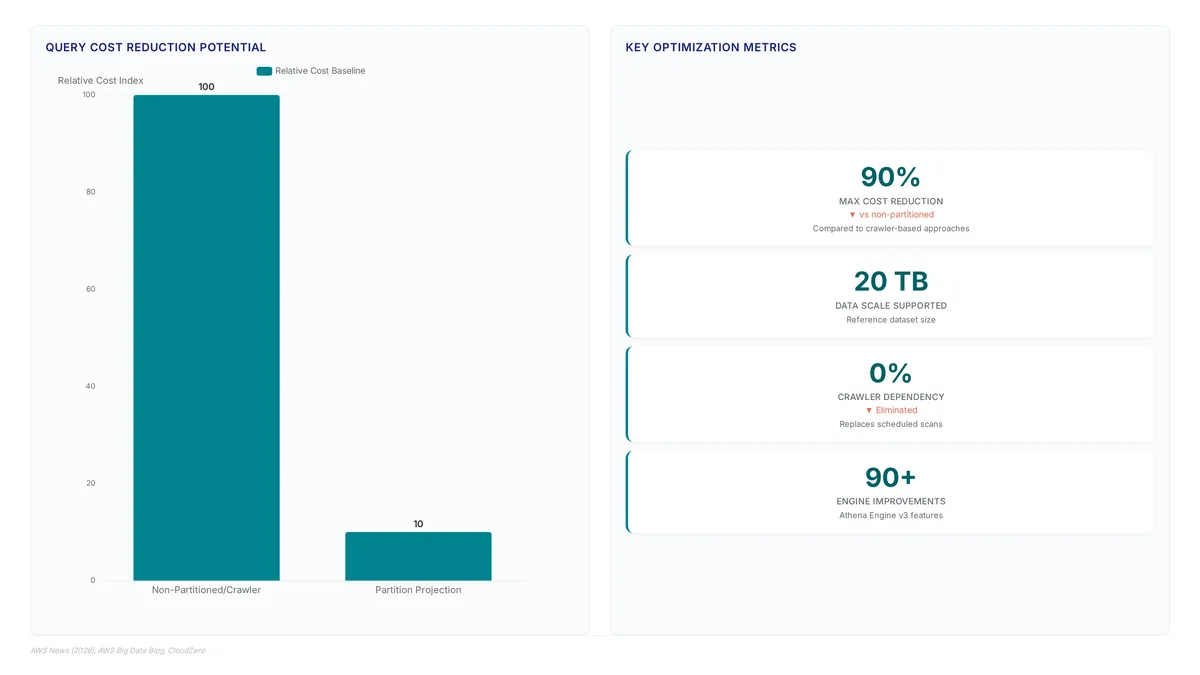
Metadata resolution shifts from external scheduled scans to on-demand calculations performed directly by the query engine.
- Declare the storage location and projection enabled status in the `TBLPROPERTIES` block.
- Define the partition keys and their corresponding integer or date formats.
- Specify the range or injection logic to bound the generated values.
Crawler logic adapts to storage changes by scanning object keys, yet this specific approach demands strict adherence to set naming conventions for log keys. High-frequency log ingestion benefits notably because audit visibility no longer waits for crawler cycles. Delays disappear when the system calculates partition locations dynamically during query execution rather than relying on periodic updates.
Constructing CREATE TABLE Statements with Injected Partition Keys
Define the external table schema with explicit columns for `bucketowner`, `bucket_name`, and `requestdatetime` to capture raw HTTP metadata accurately.
- Declare the storage location and enable projection within the `TBLPROPERTIES` block.
- Define the partition keys using integer or date formats matching the log key structure.
- Specify the injection logic to bound the generated partition range dynamically.
Strict syntactic discipline represents the primary constraint here. Queries must include partition keys like `account`, `region`, and `source_bucket` in the `WHERE` clause to trigger effective pruning. Integration with S3 Tables simplifies metric analysis without requiring a separate data pipeline. Predictable query patterns combined with high cardinality demands make this pattern particularly effective for efficient filtering. Static metadata definitions allow the engine to skip irrelevant data blocks instantly.
Mitigating UTC Boundary Risks in Best-Effort Log Delivery
Logs arrive on a best-effort basis, so requests near midnight UTC boundaries may land in adjacent partitions. Delivery latency creates gaps when queries filter strictly by the event timestamp rather than the ingestion window. Operators must structure log keys and query logic to account for this skew. Late-arriving data remains accessible only if partition projection configurations accommodate potential time drift.
- Define the partition schema using a date format that matches the key structure.
- Avoid exact equality checks on `requestdatetime` when auditing high-volume buckets.
Automated reports miss critical access events simply due to clock skew without this necessary adjustment. Broadening the time window slightly captures these edge cases effectively.
Deriving Performance Insights and Resolving Query Latency Issues
Mandatory Partition Filters for Injected Partition Projection
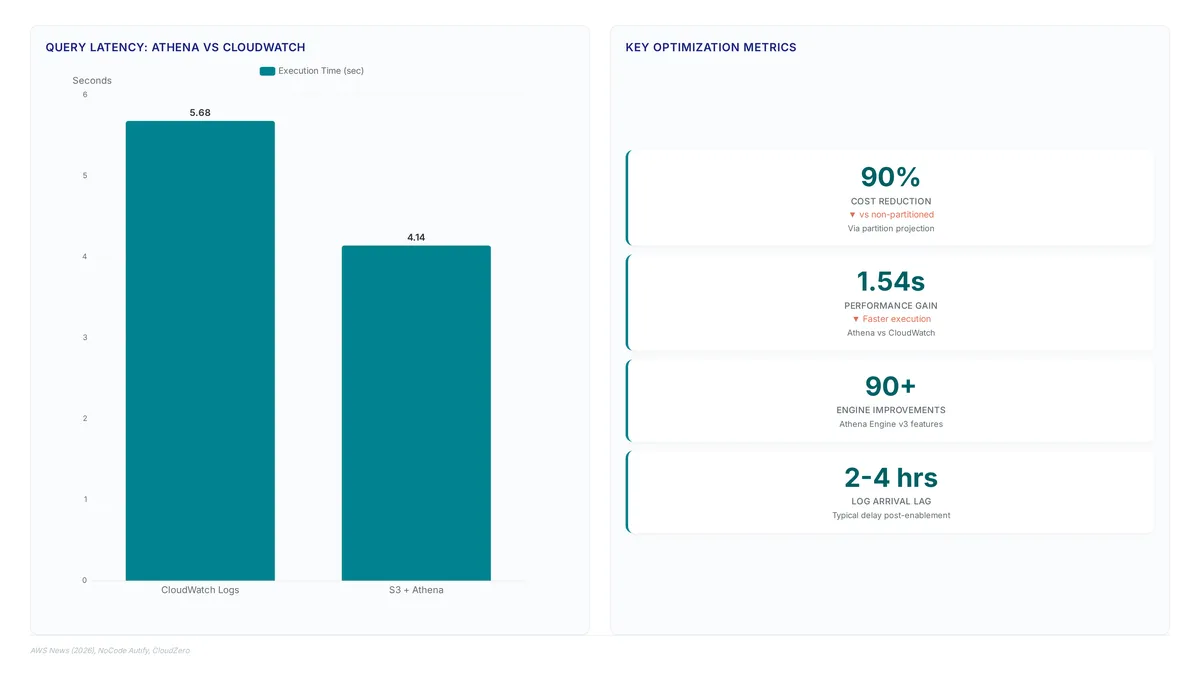
Targeted audits become expensive bulk operations when query predicates fail to match the physical directory structure. Engineers building scalable pipelines for processing Amazon S3 server-access logs must enforce these predicates in every WHERE clause. The mechanism functions by mapping query conditions directly to partition keys, allowing the engine to skip irrelevant data entirely. Rigid syntax requirements emerge as a direct consequence; ad-hoc exploration without these filters becomes prohibitively slow. Organizations using S3 Storage Lens for activity trends should align their analytical queries with these same partition keys to maintain consistency. Embedding these filters as a mandatory guardrail in all BI tools and custom dashboards helps prevent unpredictable billing and degraded latency during peak audit windows. Missed filters result in costs measured in scanned terabytes rather than milliseconds.
Constructing Daily Security Views and Access Pattern Queries
Noise isolation requires engineers to define a `daily_security_summary` view grouping data by account, region, source_bucket, year, month, and day. This schema calculates total requests, unique IPs, error counts, and total GB transferred per time bucket. Full table scans inflate costs and delay security incident response times notably. Omissions force the query engine to read irrelevant data blocks, turning a targeted audit into an expensive bulk operation. Visibility into specific file access patterns drives optimization by highlighting high-volume sources. Blind spots prevent effective tuning.
| Query Component | Function | Risk if Omitted |
|---|---|---|
| account/region | Prunes data scope | Full bucket scan |
| source_bucket | Isolates target | Cross-bucket noise |
| timestamp | Limits time range | Historical data scan |
Enforcing these predicates in every WHERE clause maintains cost efficiency. Strict query discipline replaces flexible exploration; ad-hoc analysis without fixed filters becomes prohibitively expensive. Teams should save these parameterized views to prevent accidental full scans during high-pressure incident response. Restricting access to raw logs and exposing only pre-filtered views mitigates human error. Performance auditing remains viable even as log volumes grow exponentially through this.
Diagnosing HIVE_PARTITION_SCHEMA_MISMATCH and Best-Effort Delivery Gaps
The HIVE_PARTITION_SCHEMA_MISMATCH error halts queries when the storage location template fails to match the actual S3 path structure. Schema divergence occurs if partition column types in the Athena definition do not align with the physical directory layout. Operators must verify that the storage.location.template string exactly mirrors the bucket hierarchy to prevent immediate query failure. A secondary gap arises because log delivery operates on a best-effort basis, with logs typically arriving 2, 4 hours after enabling the feature. Security teams expecting real-time visibility during an active incident will encounter missing data windows due to this inherent latency. Distinct operational playbooks are required for live response versus historical auditing given the tension between immediate forensic needs and asynchronous log availability.
| Failure Mode | Root Cause | Operational Impact |
|---|---|---|
| Schema Mismatch | Template path mismatch | Total query failure |
| Delivery Gap | Asynchronous processing | Missing recent events |
Engineers building scalable pipelines for processing Amazon S3 server-access logs must account for these delays to avoid false negatives in monitoring systems. Ignoring the delivery window creates a fragile dependency where security tools report clean status simply because data has not yet landed.
About
Marcus Chen is a Cloud Solutions Architect and Developer Advocate at Rabata.io, where he specializes in S3-compatible object storage and cloud cost optimization. His daily work involves architecting scalable data infrastructure for AI/ML startups, making him uniquely qualified to analyze server access logs. Because Rabata.io provides high-performance, S3-compatible storage as a cost-effective alternative to AWS, Marcus routinely engineers solutions where precise log analysis directly impacts financial efficiency. He understands that inefficient queries on access logs can negate the significant savings enterprises achieve by migrating to Rabata.io. This article connects his hands-on experience with partition projection and log cost optimization to help DevOps engineers and cloud architects maximize their storage ROI. By using his expertise in S3 audit logging and performance benchmarking, Marcus demonstrates how proper log management is critical for maintaining both SOX compliance and operational speed in modern, multi-cloud environments.
Conclusion
Scaling log analysis breaks when teams treat asynchronous data as real-time, creating dangerous blind spots during active incidents. The 2, 4 hour delivery gap inherent to S3 log arrival means relying on raw tables for immediate forensic work leads to false negatives and flawed security postures. While shifting to partitioned queries can reduce costs by up to 90%, this efficiency evaporates if engineers bypass pre-filtered views during high-pressure moments. The operational cost here compute spend but the cognitive load of manually reconciling missing data windows while fighting fires.
Organizations must enforce a strict separation between live response playbooks and historical auditing pipelines immediately. Do not attempt to force real-time visibility onto a system designed for eventual consistency; instead, build distinct workflows that account for latency. Start this week by auditing your current Athena saved queries to ensure they enforce rigid time-range predicates before any data scan occurs. This single step prevents accidental full-table scans that drain budgets and locks your team into a disciplined, cost-aware engineering culture. By hardening these access patterns now, you change log management from a reactive expense into a reliable, scalable asset for long-term security intelligence.
Frequently Asked Questions
No, the mandatory latency delay prevents immediate threat detection. Logs arrive two to four hours after events, so teams must use other tools for live incident response rather than relying on these delayed records.
Partition projection can reduce query costs by up to ninety percent. This optimization skips irrelevant data scans, ensuring that historical analysis remains financially sustainable compared to non-partitioned approaches that scan entire datasets.
These logs lack detailed session tokens found in management event logs. This gap makes tracing federation paths during a breach difficult, forcing security teams to maintain dual logging strategies for complete user attribution.
The raw text format introduces parsing overhead that inflates query costs. Without defining a structured log key format, queries scan irrelevant terabytes of data, causing analytics budgets to explode unnecessarily.
Storage volume acts as the main cost driver for these logs. Raw log accumulation escalates costs quickly if unmanaged, requiring lifecycle policies to move aging data to cheaper tiers for compliance.
References