CloudFront Distributions Need Dedicated S3 Storage
GitHub Pages chokes on large files. It wasn't built for them. You need dedicated cloud storage to serve static assets without tanking performance. Pairing Amazon S3 buckets with CloudFront distributions creates a stable architecture that general-purpose hosting simply cannot match.
Samir Talwar, a London-based developer, proved this by migrating image assets from his Tumblr blog to Amazon Web Services. The process involves configuring S3 buckets with globally unique names, selecting optimal regions, and establishing a secure link to a content delivery network. You will learn how global content caching mechanics work and how to manage permission systems that keep data secure while allowing public access.
This guide walks through the exact implementation of an image hosting pipeline, down to the URL structures required for retrieval. Talwar notes that while Rackspace Cloud, Google Cloud, and Microsoft Azure exist, sticking to substantial providers ensures long-term stability. Bypass the limitations of text-heavy platforms. Deploy a professional-grade delivery system for non-text data.
The Role of S3 Buckets and CloudFront Distributions in Static Asset Delivery
S3 Buckets as Globally Unique Storage Containers
AWS calls them "buckets," but think of them as folders with strict naming rules. These container names must be globally unique across the entire platform. If someone else claimed your desired domain name, you must get creative. This global namespace prevents address collisions when data traverses the internet. Files uploaded here remain private by default. Any direct request returns an 'Access Denied' error until you explicitly change permissions.
Administrators alter this behavior by applying a bucket policy that grants public read access. This configuration relies on an Amazon Resource Name (ARN) to define scope, typically formatted as `arn:aws:s3:::bucket_name/*` to cover all objects. The policy sets the Principal to `*` and allows the `s3:GetObject` action, effectively turning a private store into a public host. Without this explicit ARN definition, external attempts to retrieve images or scripts fail.
This rigid model creates operational friction. JSON structures for policies are notoriously complicated compared to simple file permissions. While this zero-trust approach prevents accidental data exposure, it demands precise configuration. Teams should use tools like the AWS Policy Generator to construct these documents accurately. Done right, this system provides the secure foundation high-volume static asset delivery requires.
Deploying CloudFront Distributions for Global Asset Caching
A Content Delivery Network (CDN) replicates files in data centers worldwide to slash transfer times. You deploy these when direct S3 access introduces unacceptable latency for distant users. Start by selecting the Web distribution type in the cloud console. Enter the specific Origin Domain Name from your storage bucket to establish the source of truth. During initialization, the system status displays a spinner while propagating configuration data across the edge network. Once the status changes to Deployed, files become accessible via the distribution's domain, such as 'd1ilac42nshdfi.cloudfront.net'. Content now flows through the cached edge layer rather than the origin server.
Serving assets from locations physically closer to the requester cuts round-trip time for repeated requests. However, this architecture introduces synchronization lag; updated files do not reflect immediately at the edge. Operators must manage cache invalidation routines to ensure users retrieve current content. You trade manageable complexity for notably improved download performance. The AWS model promotes this tightly integrated approach between S3 and CloudFront for serverless content hosting.
GitHub Pages Limitations for Large Static Assets
GitHub Pages exhibits higher latency for large files like images compared to dedicated object storage. This architectural constraint creates risks for image-heavy sites relying on standard HTTP serving paths. Substantial cloud providers like Amazon Web Services, Rackspace Cloud, Google Cloud, and Microsoft Azure offer alternative infrastructures designed for high-volume asset delivery. The performance gap widens as file sizes exceed typical text-based payloads.
Operators facing egress cost volatility should evaluate storage architectures that decouple compute from object retrieval. Traditional hosting bundles often lack the granular caching layers required for global media distribution without excessive expense. Emerging market trends indicate a shift toward zero egress fees to accommodate massive AI data and game asset transfers. This economic pressure challenges legacy revenue models dependent on per-gigabyte transfer charges.
| Feature | GitHub Pages | Object Storage + CDN |
|---|---|---|
| Large File Handling | Poor | Optimized |
| Global Caching | Limited | Native |
| Cost Model | Fixed Tier | Pay-per-use |
| Scalability | Moderate | Infinite |
Relying on origin servers for uncached assets introduces latency during traffic spikes. Migrate to dedicated object stores when static assets exceed simple text or small icon sets. This transition is mandatory for production systems requiring consistent throughput and global availability.
Architectural Mechanics of Global Content Caching and Permission Systems
How S3 Bucket Policies and ARNs Enforce Private Access by Default
An "Access Denied" error greets any direct request sent to a private Amazon S3 bucket. The service keeps files private by default. This stance protects sensitive data before any Content Delivery Network like CloudFront steps in to cache assets. Operators define permissions explicitly using Bucket Policies that depend on Amazon Resource Names (ARNs) to pinpoint specific objects. An ARN adheres to the strict format `arn:aws:s3:::bucket-name/*`, guaranteeing the policy targets only intended resources. Administrators grant the `s3:GetObject` action to a Principal of `*` to make files publicly readable via an origin. Precise syntax matters.
- Set the Principal element to `*` to allow global access.
- Define the Action as `s3:GetObject` to permit retrieval only.
- Target the Resource using the full ARN with a wildcard key.
| Component | Function | Scope |
|---|---|---|
| Principal | Identifies the user or entity | `*` (Everyone) |
| Action | Defines allowed operations | `s3:GetObject` |
| Resource | Specifies target objects | `arn:aws:s3:::bucket/*` |
Applying a broad `*` Principal lets anyone reach the bucket directly through its S3 URL, skipping edge caching entirely. Teams must integrate these policies with care. Enabling public reads via policy remains common, yet direct access patterns diverge sharply from CDN-mediated delivery.
Data Flow from S3 Origin to CloudFront Edge Distribution
A user query hitting the unique distribution domain, such as d1ilac42nshdfi.cloudfront.net, triggers an edge location lookup.
- The CloudFront edge node checks its local cache for the requested static asset.
- If the object is missing or stale, the edge server fetches the file from the S3 origin using the configured .s3.amazonaws.com address.
- Once retrieved, the content copies to edge servers globally while the console displays a spinner status.
Subsequent requests land directly on the edge rather than the origin bucket thanks to this propagation. Latency drops for repeated image and video requests because the system relies on this automatic caching. Content failing to update immediately often confuses operators; the edge distribution holds the cached version until the Time-To-Live (TTL) expires or someone issues an invalidation request. A spinner shows while content copies to servers; the status shifts to Deployed once finished.
| Component | Role in Data Flow |
|---|---|
| Distribution ID | Identifies the specific configuration for routing rules |
| Edge Location | Serves cached content to reduce origin load |
| Origin Domain | Provides the authoritative source for missing files |
Placing a Content Delivery Infrastructure in front of object storage creates an architecture that scales automatically with traffic demand. This separation lets the origin bucket stay private while the distribution manages public access logic.
Egress Fee Risks When Bypassing CDN for Direct S3 Access
Standard transfer costs apply to direct origin requests sent to .s3.amazonaws.com. Architects frequently configure CloudFront to cache content but forget to restrict direct bucket access, letting traffic skip the edge. This gap appears when applications or bad links pull data straight from the storage layer instead of the distribution endpoint. Amazon integrates tightly with its own delivery network, yet the object storage market moves toward zero egress fees to support huge AI datasets and media libraries without penalty. Competitors like Fastly now stand out by removing data exit charges completely, pushing traditional providers to rethink rigid pricing models. Default S3 permissions leave operators paying for traffic that a locked-down CDN could deliver more efficiently.
| Access Pattern | Cost Implication | Optimization Strategy |
|---|---|---|
| Direct Bucket URL | High egress charges | Restrict via Bucket Policy |
| CDN Edge URL | Reduced transfer costs | Enforce Origin Access Identity |
| Public Read Policy | Uncontrolled spend | Limit to specific IP ranges |
Ensure all application paths point only to the CDN domain to stop leakage. Unmanaged egress creates heavy financial strain as data volumes grow for video streaming or machine learning training sets.
Step-by-Step Implementation of an S3 and CloudFront Image Hosting Pipeline
S3 Bucket Naming Rules and Regional Selection Strategy

Operators must verify availability before creation because bucket names remain globally unique across the entire Amazon Web Offerings platform. Naming the bucket after an existing domain name reduces confusion during later configuration stages. Choosing a specific region feels critical at first glance. Traffic flows through a global CDN layer that stores file copies in data centers worldwide. This architecture effectively masks the physical distance between the origin bucket and end users.
Implementing this pipeline involves several configuration steps:
- Create the bucket, optionally using a domain-based name if available.
- Select a region closest to you or your primary audience.
- Apply a bucket policy to grant public read access for object retrieval.
- Configure the CloudFront origin to point at the new bucket domain.
- Create the S3 bucket with a unique name.
- Select a region close to primary write operations.
- Upload static assets to the new storage location.
- Configure bucket policies for public read access.
- Verify file accessibility via the S3 console.
Regional latency becomes negligible once traffic flows through the edge network. Strict geographic alignment proves unnecessary for most static assets. Placing the origin in an extremely distant region can increase the initial cache fill time. Direct management traffic also becomes more complicated with significant physical separation. Align the origin region with primary write operations to optimize update efficiency.
Configuring CloudFront Origins and Custom Domain CNAMEs
Enter the bucket's domain name, such as `bucket.s3.amazonaws.com`, into the Origin Domain Name field to establish the source for your distribution. This configuration step links the storage layer to the edge network. The resulting serverless content hosting model offloads traffic from origin servers. Operators must select the Web distribution type to ensure compatibility with standard HTTP and HTTPS image requests. The distribution status displays a spinner while content copies to global edge locations. Status eventually changes to Deployed when ready.
Map a custom subdomain to the distribution by editing the Alternate Domain Names (CNAMEs) field with a chosen identifier like `assets`. The source hostname should be this subdomain. The target must point to the generated distribution domain like `d1ilac42nshdfi.cloudfront.net`. Adding the corresponding CNAME record in your DNS provider completes the mapping. DNS propagation 'will probably take a bit of time.' This approach supports modern integration patterns seen in complex implementations requiring strong asset delivery.
DNS propagation introduces a measurable deployment lag that configuration tweaks cannot bypass. CNAME updates depend on external resolver caches honoring lower Time-To-Live values unlike direct IP mapping.
- Copy the distribution ID from the CloudFront console dashboard.
- Navigate to your DNS provider's management interface.
- Create a new CNAME record pointing the subdomain to the distribution URL.
Verifying the Principal policy in S3 before enabling the origin prevents access errors during the transition.
Validating S3-to-CloudFront Permission Handshakes
Confirm the distribution status has changed from spinner to Deployed before troubleshooting access errors. S3 files remain private by default. An immediate 'Access Denied' message appears when requests hit an uninitialized edge node or direct URL. Operators must verify that the bucket policy explicitly grants the Principal value of `*` permission to execute the `GetObject` action. This configuration ensures the Origin Domain Name can retrieve objects without authentication failures during the caching process.
Follow this validation sequence to isolate permission failures:
- Inspect the Permissions tab in the S3 console to confirm the active policy matches the generated JSON.
- Attempt a direct object URL request; a 403 error indicates missing Open/Download rights for everyone.
- Verify the CloudFront distribution ID resolves to the correct edge endpoints globally.
- Clear local browser caches to rule out stale negative responses from previous configuration states.
- Check the distribution status indicator.
- Review the S3 bucket policy JSON.
- Test direct S3 object URL access.
- Inspect CloudFront error logs for specific codes.
- Validate the Origin Domain Name setting.
Misconfigured policies lead to access errors and inefficient retries. Policy propagation can lag behind deployment status. A temporary window exists where deployed distributions return errors. Immediate post-deployment testing may yield false negatives requiring patience rather than reconfiguration. Alternatives with different pricing models exist if standard costs become prohibitive. Some providers offer zero egress fees.
Optimizing Costs and Performance with Custom Domains and Strategic Caching
AWS S3 Request and Transfer Pricing Mechanics
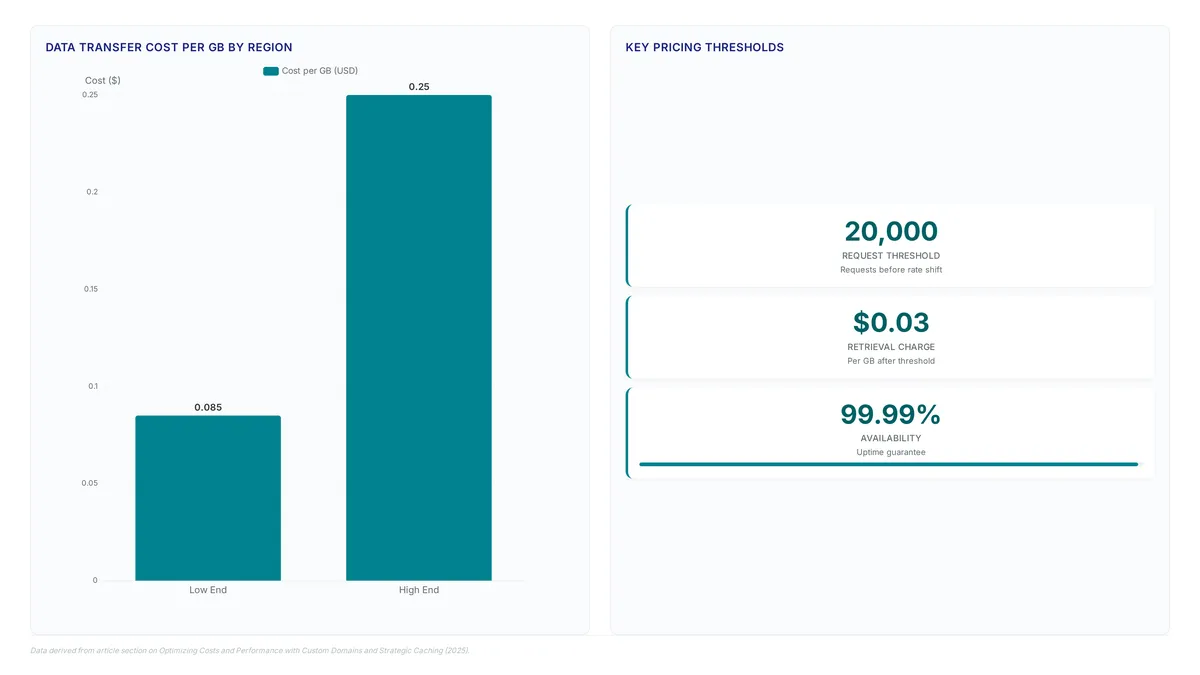
Storage fees sit apart from request counts and data egress volumes in current cost models. This separation allows operators to host images cheaply by isolating variable transfer costs from fixed storage overhead. Pricing in the Ireland region shifts after the first 20,000 requests, where subsequent data retrieval charges settle at $0.03 per GB. Low-traffic sites often pay negligible amounts under this structure. High-volume archives face costs driven primarily by access frequency rather than capacity.
Destination regions introduce significant variance to data transfer rates. Transferring a terabyte of data costs between $0.085 (8.5 cents) and $0.250 (25 cents) depending on the server region. Engineers evaluating cloud storage must calculate total egress against these tiered rates instead of comparing base storage prices alone. Competitors now offer zero egress fees to attract users managing large media libraries, a direct response to these traditional revenue models.
Granular pricing adds complexity to forecasting operations. A spike in global traffic can disproportionately increase the bill compared to static storage growth. Operators using CloudFront mitigate this risk by caching content at the edge, which reduces direct hits to the origin bucket. Industry analysis suggests modeling worst-case cache miss scenarios to prevent billing surprises when deploying S3-compatible backends for AI training data.
Application: Configuring Custom Domains via CloudFront CNAMEs
Edit the CloudFront distribution to insert your custom subdomain into the Alternate Domain Names (CNAMEs) field. This step binds the logical distribution ID to a human-readable asset hostname like `assets.example.com`. The mapping allows the edge network to correctly route requests arriving with specific Host headers to the appropriate distribution.
DNS propagation introduces a measurable delay before global resolution occurs. Patience is often required during initial deployment windows. Operators must add a CNAME record at their domain registrar pointing the subdomain to the distribution URL, such as `d123.cloudfront.net`. The CDN layer then caches static assets globally, reducing latency for remote users compared to direct storage access.
Operational complexity represents the primary constraint here. Managing certificate renewals across multiple distributions requires careful administrative oversight compared to using default domains. Custom domains enable consistent branding. They also simplify client-side firewall rules that might block generic cloud provider URLs.
S3 Cost Efficiency Versus Zero Egress Competitors
Traditional AWS S3 pricing models separate storage fees from variable data exit charges, creating unpredictable costs for large media libraries. The object storage market is shifting toward zero egress fees to address excessive costs for transferring AI data and game assets. Emerging competitors eliminate data exit charges entirely to support massive dataset movement, unlike the variable transfer rates found in standard cloud regions.
Simple pricing models come with limitations despite their appeal. Established hyperscalers like AWS promote a tightly integrated "match made in the cloud" between S3 and CloudFront for caching and delivery. Comparisons between substantial cloud providers reveal both still levy exit fees, whereas new entrants do not. Organizations should evaluate their specific solutions to balance performance needs against these evolving pricing models.
About
Alex Kumar is a Senior Platform Engineer and Infrastructure Architect at Rabata.io, where he specializes in Kubernetes storage architecture and cost optimization for cloud-native applications. His daily work involves designing high-performance persistent storage solutions and managing data migration strategies, making him uniquely qualified to discuss CloudFront distributions and object storage integration. At Rabata.io, an S3-compatible storage provider built as a quicker, more affordable alternative to AWS, Alex routinely engineers systems that pair scalable storage backends with global CDNs to accelerate content delivery. This article connects directly to his expertise in eliminating vendor lock-in while maximizing throughput for media assets and AI datasets. By using his hands-on experience with CSI drivers and infrastructure-as-code, Alex provides practical insights on optimizing image serving pipelines. His guidance reflects Rabata.io's mission to deliver enterprise-grade performance without hidden egress fees, ensuring developers can build reliable, cost-effective architectures that rival substantial cloud providers.
Conclusion
Scaling static asset delivery exposes a critical friction point where operational overhead begins to outweigh raw storage savings. While zero-egress competitors eliminate transfer fees for massive AI datasets, traditional architectures still rely on the tight integration between S3 and CloudFront to manage latency for general web traffic. The real cost driver shifts from per-gigabyte charges to the administrative burden of managing certificate renewals and DNS propagation delays across multiple distributions. Do not switch providers simply to avoid variable exit costs if your team lacks the bandwidth to rebuild deployment pipelines. The performance penalty of cold caches in newer networks can negate theoretical savings for interactive user experiences. Start by auditing your current CloudFront distribution logs this week to identify the ratio of cache hits to origin requests before considering a vendor change. This data reveals whether your architecture actually suffers from exit fees or merely needs improved caching rules. Prioritize stability for customer-facing assets while reserving zero-egress platforms for internal machine learning training jobs where bandwidth volume dwarfs latency sensitivity.
Frequently Asked Questions
GitHub Pages delivers large files slowly because it lacks dedicated object storage architecture. This latency issue forces developers to migrate assets to specialized cloud providers like Amazon S3 for better performance.
Every S3 bucket name must be globally unique across the entire platform to prevent address collisions. Users often need inventive naming conventions if their desired domain name is already claimed by another party.
S3 files remain private by default to protect sensitive data from unauthorized public access. Administrators must explicitly apply a bucket policy or change permissions to allow everyone to open or download specific assets.
The system stores file copies in global data centers to serve users from physically closer locations. This reduces round-trip time significantly compared to fetching every request directly from the original origin server.
Updated files face a synchronization delay before reflecting immediately at the global edge network locations. Operators must manage cache invalidation routines carefully to ensure users retrieve the most recent content versions.
References
