S3 Files for Lambda: Mount Buckets as NFS
Object storage costs have dropped 22% in five years, finally allowing Amazon S3 Files to merge cheap durability with interactive access. This launch kills the historical tradeoff between object storage economics and file system flexibility by presenting S3 buckets as native NFS v4.1+ mounts. For two decades, AWS forced architects to choose between library-style immutability and page-by-page editing. That distinction is now obsolete.
S3 Files acts as a central data hub, letting EC2 instances, ECS containers, and Lambda functions share data without duplication. It beats Amazon FSx and legacy on-premises NAS on cost efficiency for hybrid workloads.
Sébastien Stormacq notes that changes made on the file system automatically reflect in the underlying bucket, solving the synchronization nightmare that plagued previous hybrid attempts. As SQ Magazine reports, falling storage prices have accelerated the adoption of such solutions, making the 20-year-old S3 platform viable for agentic AI systems and production applications alike. The era of maintaining separate silos for compute and archive is effectively over.
The Role of Amazon S3 Files in Modern Cloud Storage Architecture
Amazon S3 Files as an NFS v4.2 Bridge for Object Storage
Exactly 20 years after the service launched on March 14, 2006, Amazon S3 Files transforms buckets into native file systems supporting NFS v4.2 operations. This architecture presents S3 objects as directories, enabling agentic AI agents to mutate enterprise data without separate storage layers or complex sync pipelines. The system acts as a caching layer connecting compute directly to object storage, distinct from managed file storage services that remain siloed from their each object stores.
Operators gain close-to-open consistency across clusters while avoiding data duplication. The high-performance storage layer incurs charges of $0.30/GB-month, applying strictly to cached data actively accessed via the file interface. Byte-range reads transfer only requested segments, minimizing movement costs for large datasets.
| Feature | S3 Files Model | Traditional Managed File |
|---|---|---|
| Data Location | Native S3 Bucket | Separate Storage Pool |
| Protocol | NFS v4.2 | SMB or NFS |
| Sync Mechanism | Automatic Reflection | Manual Replication |
Latency optimization fights cost control here. Intelligent pre-fetching anticipates access needs yet loads full file data only when configured, forcing architects to choose between metadata-only views or complete local caching. Direct S3 serving handles large sequential reads automatically, bypassing the cache to maximize throughput without incurring high-performance tier fees. The result eliminates the historical tradeoff between object storage durability and interactive file capabilities.
Mounting S3 Buckets on EC2, ECS, EKS, and AWS Lambda
Operators mount general purpose buckets as native file systems across EC2, ECS, EKS, and the expanded AWS Lambda support added April 21, 2026. This configuration exposes NFS v4.2 operations, allowing standard read-write access without data migration pipelines. Associated metadata and contents populate high-performance storage only when specific files are accessed, optimizing cache utilization for active datasets. The service enforces POSIX permissions by validating user and group IDs against object metadata stored within the bucket itself.
Direct integration with compute resources eliminates the synchronization lag typical of hybrid object-file architectures. However, this access model strictly excludes S3 Tables, S3 Vectors, and directory buckets, limiting scope to general purpose storage classes. Operators must install the latest `amazon-efs-utils` package to ensure protocol compatibility during the mount process.
The architectural consequence is a shift in failure domains: network latency now directly impacts file system responsiveness rather than just object retrieval times. High-frequency metadata operations can exhaust provisioned throughput if pre-fetching policies remain unconfigured for large directory traversals. Teams should treat the mounted path as a volatile cache layer where persistence relies on eventual consistency with the underlying object store.
Object Storage Books vs File System Directories in S3 Files
Sébastien Stormacq retired the library book analogy because Amazon S3 Files now permits in-place edits via NFS v4.2 rather than full object replacement. Traditional object storage treats data as immutable books where updating a single page requires rewriting the entire volume, a constraint that forced architects to maintain separate silos for compute and archive. The new architecture collapses this distinction by presenting buckets as mutable directories where operators can create, read, update, and delete files directly.
| Feature | Traditional S3 Objects | S3 Files Interface |
|---|---|---|
| Edit Granularity | Full object overwrite | Byte-range modification |
| Protocol | REST API | NFS v4.2 |
| Consistency Model | Eventual or strong (per op) | Close-to-open |
| Compute Attachment | Pre-download required | Direct mount |
Unlike Azure Files which provisions distinct managed shares separate from Blob Storage, this solution inherits the infinite scalability of the underlying object store without capacity limits tied to share configuration. Data movement costs drop because the system transfers only requested bytes during read operations instead of fetching entire objects for minor changes. The trade-off involves cache management; active files populate high-performance storage while cold data remains in the object tier, requiring operators to tune pre-fetching policies for latency-sensitive workloads. This hybrid approach eliminates the previous necessity to duplicate datasets between expensive block storage and durable object lakes.
Inside the High-Performance Cache and Data Synchronization Mechanism
IAM Integration and POSIX Permission Mapping in S3 Files
Access control relies on IAM roles with specific trust policies using EFS service principals rather than direct bucket policies. The system translates standard file ownership into object metadata, checking user ID and group ID values against stored permissions for every operation. This mapping creates a hard constraint where POSIX permission metadata exceeding 2 KB for a file prevents export to the file system interface entirely. Operators must manage this overhead carefully since oversized attribute blocks cause silent mount failures or inaccessible directories.
The architecture enforces identity verification through the managed policy `AmazonS3FilesClientFullAccess` attached to compute resources.
| Layer | Mechanism | Constraint |
|---|---|---|
| Identity | IAM roles | Requires EFS service principal trust |
| Metadata | UID/GID checks | Fails if attributes exceed 2 KB |
| Storage | Object tags | Must match NFS v4.2 ACLs |
Large reads streaming directly from the bucket bypass cache layers but still trigger these permission validations upstream. Granular access control battles metadata bloat; adding complex ACLs increases the risk of hitting the size limit. Teams should audit directory attributes before migration to avoid operational blockers. The AmazonS3FilesClientFullAccess policy simplifies initial deployment but may require scoping down for production least-privilege models. Failure to align IAM integration with local file ownership results in immediate access denials despite valid bucket permissions.
Configuring TLS 1.3 Encryption and KMS Keys for Data Protection
Data moves exclusively over TLS 1.3 tunnels while resting under SSE-KMS or default SSE-S3 protection. Operators must disable legacy SSE-C methods because AWS disabled this option by default on new buckets starting April 09, 2026. This constraint forces a shift toward managed key hierarchies where control planes validate every decryption request against active IAM policies.
Configuration requires enabling versioning before mounting to guarantee synchronization between the file interface and underlying objects.
- Create a customer-managed key within the AWS KMS console for granular audit trails.
- Apply the key to the target bucket using server-side encryption settings.
- Verify that the compute role possesses `kms:Decrypt` permissions for the specific alias. 4.
Clients must run the latest `amazon-efs-utils` package to negotiate NFS v4.2 operations without mount failures. Verification starts by confirming the driver version on EC2 instances before attempting to attach the file system interface. Operators should inspect CloudWatch metrics for latency spikes that indicate cache misses rather than protocol errors. Large sequential reads exceeding 1 MB This behavior lowers costs but alters expected performance profiles for backup jobs or data migration tasks.
| Metric | Cache Hit Path | Direct S3 Path |
|---|---|---|
| Latency | ~1 ms | Variable based on S3 |
| Cost Model | Read operations incur surcharge | Standard GET request pricing |
| Use Case | Random access, metadata heavy | Sequential streaming, archives |
Achieving the maximum per-client read throughput of 3 GiB/s requires workloads to stay within the cached dataset boundaries. Streaming large files triggers direct bucket access, which avoids the $0.03/GB read charge but sacrifices sub-millisecond latency guarantees. Write-heavy validation tests must account for the $0.06/GB write fee applied to the high-performance storage tier. Mission and Vision recommends isolating benchmark traffic to prevent cache pollution from skewing production latency measurements. Failure to separate these paths often leads to incorrect capacity planning for the underlying EFS infrastructure. This two-tier model charges operators only for data actively pulled into the low-latency layer, while cold data remains at object storage rates.
Agentic AI agents require native file system access to mutate datasets without separate storage layers or complex sync pipelines. Sébastien Stormacq demonstrated mounting buckets as file systems from ECS or EKS containers and from Lambda functions, enabling Python libraries to read and write collaboratively. The service uses Amazon Elastic File System infrastructure to connect compute directly to object storage, preserving the single source of truth while delivering sub-millisecond latency. Mission and Vision recommends this configuration for teams where multiple agents simultaneously edit shared state files, as the close-to-open consistency model prevents race conditions common in distributed training jobs. Avoid this pattern if workloads consist solely of immutable bulk reads, where direct S3 access remains more economical.
S3 Files Large Read Optimization vs FSx and On-Premises NAS Throughput Models
Reads exceeding 1 MB bypass the local cache to incur only standard object retrieval fees with no added surcharge. This architecture separates hot metadata from cold bulk data, forcing large sequential streams directly to the underlying bucket. The cost structure rewards sparse access patterns where most data remains untouched in the base layer. Fixed-capacity competitors like Amazon FSx charge for provisioned throughput regardless of actual utilization, creating waste during idle periods. On-premises NAS hardware hits physical spindle limits that cannot expand without purchasing new racks. S3 Files inherits the infinite scale of the object store, removing the need for capacity planning exercises.
| Feature | S3 Files | Amazon FSx | On-Premises NAS |
|---|---|---|---|
| Throughput Model | Elastic bucket speed | Provisioned caps | Physical disk limits |
| Large Read Cost | Standard GET rates | Included in provisioned fee | Power and cooling only |
| Scaling Action | Automatic | Manual resize | Hardware purchase |
Latency consistency suffers here; direct bucket streams lack the sub-millisecond guarantees of the cached layer. Batch processing jobs tolerate this variance, but interactive databases may suffer during cache misses. Azure Files Premium relies on provisioned capacity models that lock customers into fixed performance tiers unrelated to actual I/O demands. Google Cloud Filestore Enterprise costs significantly more per gigabyte than basic tiers, penalizing users who over-provision for peak events. S3 Files avoids these traps by charging strictly for the cache layer consumption rather than reserved bandwidth. Mission and Vision teams should route backup archives through the direct path to minimize monthly spend.
Deploying S3 Files Across EC2 and Containerized EKS Environments
Mounting S3 buckets on EC2 requires the `amazon-efs-utils` package to initiate the NFS v4.2 session with the gateway. Operators execute the mount command targeting the specific bucket ARN, which triggers the backend to map object keys to POSIX directory structures. By default, files benefiting from low-latency access are stored on the file system's high-performance storage, ensuring sub-millisecond response times for active datasets. This tiering mechanism places associated metadata and contents onto the optimized layer only when accessed, rather than pre-provisioning the entire dataset.
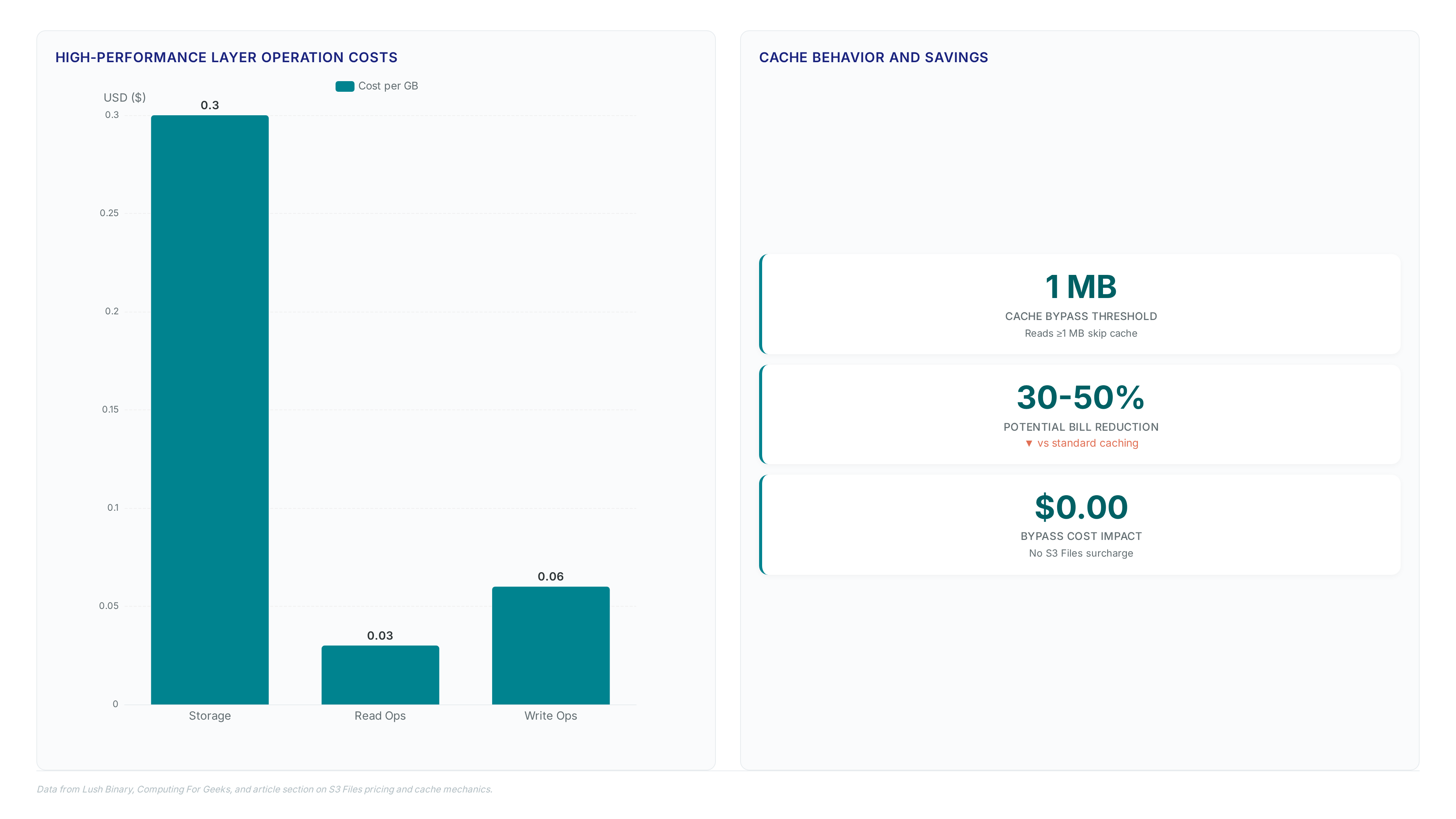
The architecture separates hot data from cold bulk objects to maximize efficiency. Reads streaming directly from the bucket bypass the cache layer entirely, incurring no additional surcharge beyond standard storage fees. This design contrasts with fixed-capacity systems where performance tiers often require over-provisioning to handle burst workloads. Operators gain infinite scalability inherited from the underlying object store while maintaining file semantics.
| Access Pattern | Storage Location | Latency Expectation |
|---|---|---|
| Random I/O | High-Performance Cache | ~1 ms |
| Sequential Stream | Direct S3 Bucket | Network Limited |
| Metadata Lookup | High-Performance Cache | ~1 ms |
Cache occupancy costs battle access speed. Keeping large datasets resident in the high-performance cache drives up monthly expenses, yet evicting them increases latency for re-accessed files. Mission and Vision recommends tuning prefetch policies to balance these competing operational goals based on specific workload recurrence rates.
Configuring S3 Files for EKS Clusters and Agentic AI Workloads
Deploying S3 Files on EKS requires installing the latest `amazon-efs-utils` driver on the node AMI to establish NFS v4.2 sessions. Agentic AI workloads demand this native file interface to mutate datasets without complex synchronization pipelines, a requirement highlighted in recent agentic AI analysis . The driver maps S3 object keys to POSIX directory structures, enabling Python libraries to perform standard read-write operations across distributed pods. Operators must balance the latency benefits of cached writes against the accumulating surcharge for mutable data. Large sequential reads exceeding 1 MB bypass this cache entirely, reverting to standard object retrieval fees.
| Configuration Parameter | Recommended Value | Rationale |
|---|---|---|
| `mountOptions` | `tls,rsize=1048576` | Enforces TLS 1.3 encryption and optimizes bulk throughput |
| `cachePolicy` | `metadata-only` | Reduces storage costs for read-heavy inference agents |
| `uidMapping` | `flexible` | Aligns container user IDs with S3 object metadata permissions |
Unlike Azure or Google competitors positioned for legacy migration, this architecture targets cloud storage feature comparisons where infinite scalability meets file mutability. The limitation remains strict dependency on IAM trust policies; misconfigured service principals deny mount requests instantly. Mission and Vision recommends validating these policies before scaling cluster size to prevent widespread pod startup failures.
Application: Validation Checklist for NFS v4.2 Operations and Cache Throughput
Validation begins by confirming the `amazon-efs-utils` package version on the target AMI before attempting to mount S3 buckets on EC2 instances. Operators must execute create and delete commands to verify full NFS v4.2 compliance, as partial protocol support breaks agentic AI workflows requiring file mutation.
| Operation Type | Path | Cost Implication |
|---|---|---|
| Small Read (1 MB) | Direct Bucket | Standard retrieval only |
| Metadata Update | Cache Layer | Triggers write charge |
Skipping the driver update causes mount failures because older versions lack the specific handshake required for S3 Files gateways. Operators should monitor CloudWatch metrics to ensure idle data does not persist in the expensive storage tier. Mission and Vision recommends validating these cost boundaries before promoting the file system to production workloads.
About
Alex Kumar, Senior Platform Engineer and Infrastructure Architect at Rabata. Io, brings deep practical expertise to the discussion of Amazon S3 Files. With a specialized focus on Kubernetes storage architecture and cost optimization for cloud-native applications, Alex daily navigates the complex trade-offs between object storage and traditional file systems. His background as a former SRE and DevOps Lead means he has spent years engineering solutions to bridge the gap between scalable S3-compatible storage and application file requirements. At Rabata. Io, a provider dedicated to high-performance, S3 API-compatible alternatives, Alex directly addresses the challenges AWS aims to solve with this new feature. His hands-on experience designing disaster recovery strategies and managing persistent storage for AI/ML startups provides a critical lens for evaluating how native file system access transforms data accessibility without sacrificing the scalability of object storage.
Conclusion
Scaling this architecture reveals that cache inefficiency becomes the primary financial bottleneck, not raw storage volume. As data volumes grow, the operational overhead of managing metadata-only policies outweighs the benefits of simplified mounting if read patterns remain unpredictable. The 22% decline in object storage costs invites broader adoption, yet mutable data surcharges will erode these savings unless teams strictly enforce read-through caching strategies. Organizations must treat the file interface as a transient acceleration layer rather than a permanent state holder.
Adopt S3 Files immediately for stateless AI inference clusters requiring sub-millisecond metadata access, but delay migration for heavy write-workloads until Q3 2026 when protocol maturity stabilizes. Do not attempt this transition without first establishing automated lifecycle rules that purge stale cache entries within 24 hours. This specific constraint prevents cost leakage from idle mutable data while maintaining low-latency access for active agents.
Start by auditing your current IAM trust policies against the latest service principal requirements before Friday's deployment window. Verify that your `amazon-efs-utils` package version matches the gateway handshake specification to avoid immediate mount failures. This single validation step ensures your cluster scales without encountering widespread pod startup errors caused by legacy driver incompatibilities.
Frequently Asked Questions
The high-performance storage layer charges $0.30 per gigabyte monthly for cached data. This fee applies strictly to data actively accessed via the file system interface rather than the entire bucket.
Object storage costs have dropped 22% over the last five years to enable this service. This reduction finally allows merging cheap durability with interactive file system access for modern workloads.
Large sequential reads bypass the high-performance cache to avoid additional surcharges entirely. Only the standard S3 GET request costs apply when streaming data directly from the underlying bucket storage.
EC2 instances, ECS containers, EKS clusters, and Lambda functions can all mount these buckets. Each resource gains native NFS access without requiring complex data migration pipelines or duplication.
Changes made on the file system automatically reflect in the underlying S3 bucket immediately. This eliminates the synchronization nightmare that previously plagued hybrid object and file storage architectures.