Disk image recovery: 50+ server restores taught me this
Rebuilding a failed server from scratch wastes days. A byte-for-byte snapshot restores operations instantly.
The modern disk image remains the only reliable method to replicate an entire system state-operating system, installed programs, and configuration settings-onto new hardware with similar architecture. Commercial entities like Acronis True Image and Macrium Reflect have retreated behind subscription paywalls, leaving open-source alternatives to carry the burden of enterprise disaster recovery. Data Insights Market reports that the industry is shifting toward integrated cloud solutions, a feature set where free tools traditionally lag behind their paid counterparts. Despite this gap, maintaining a monthly image alongside daily data backups is critical for avoiding total system reconstruction.
This guide dissects Clonezilla as a viable, cost-free alternative for creating full drive clones. We distinguish image backups from standard file-level archives and deconstruct Clonezilla's internal architecture to explain how it reads only used blocks rather than copying empty sectors like the `dd` command. Finally, we provide a step-by-step walkthrough for executing a full drive clone, ensuring your restored system functions as if the hardware failure never occurred.
The Role of Disk Imaging in Modern System Recovery Strategies
Defining Disk Imaging as a Byte-for-Byte Snapshot
Hard drive imaging captures every sector on a disk, ignoring file system boundaries to create a total replica. This byte-for-byte snapshot preserves the boot sector, partition table, and hidden system areas necessary for OS initialization. Standard file copies miss these low-level structures, rendering data useless for bare-metal recovery after total hardware failure. Image backups bundle the operating system, installed programs, settings, and files into one restorable unit that skips manual reconfiguration. Restoration speed directly dictates downtime duration during critical outages.
Cloning efficiency hinges on how tools handle empty space. Unlike `dd`, which copies sector-by-sector, Clonezilla intelligently reads only the used blocks on a partition, compresses the data, and writes the result to an image file. Storage overhead drops notably with this approach, though complexity rises when dealing with fragmented drives or specific compression algorithms. Commercial alternatives frequently prioritize speed over storage conservation, demanding larger footprint requirements on backup targets.
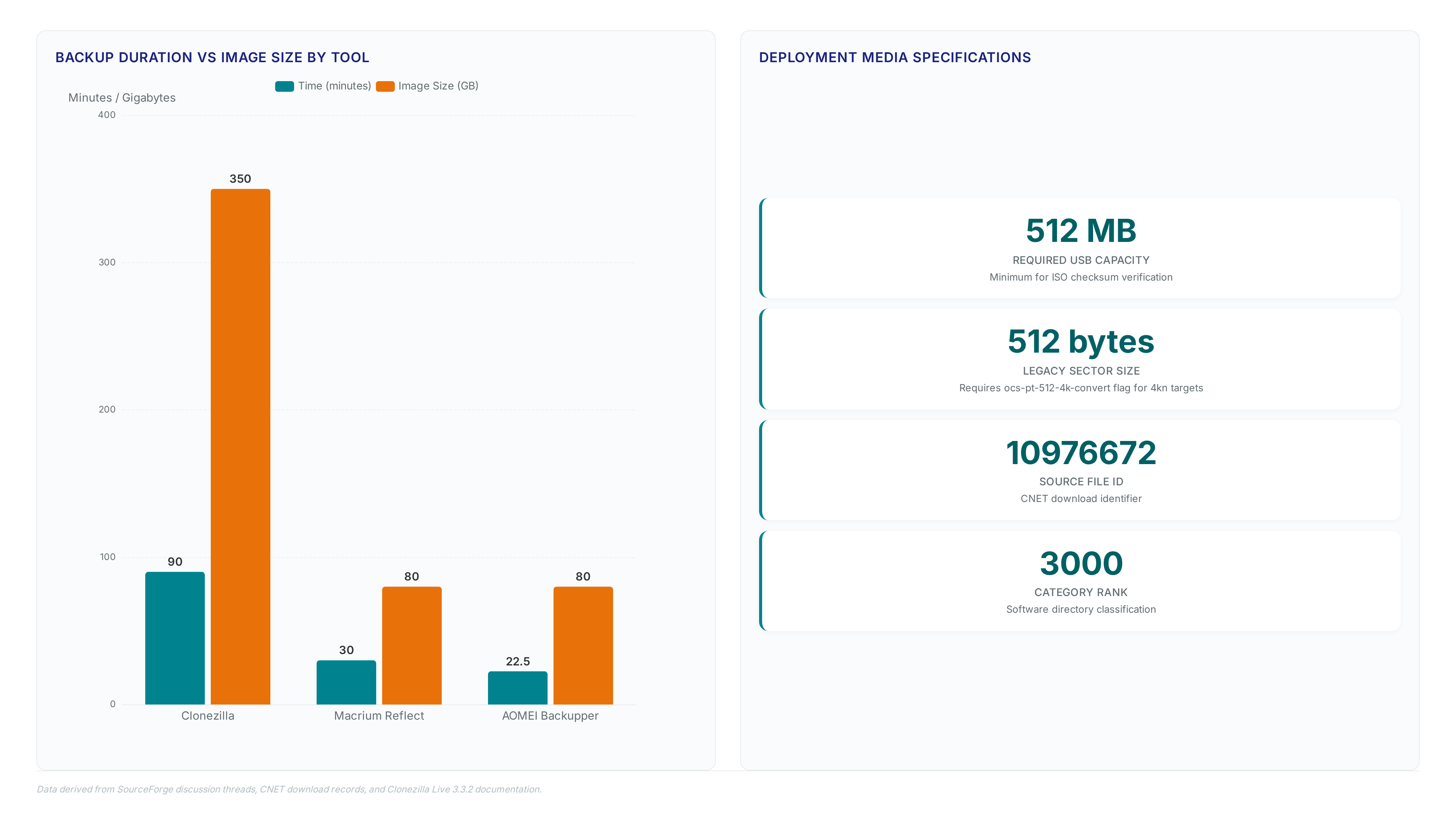
Operators face a hard choice between image size and restoration fidelity in heterogeneous environments. Some tools generate compact 80 GB images through aggressive deduplication. Others produce 350 GB files to maintain strict bit-level accuracy across diverse hardware architectures. Network transfer speed might drive one decision while absolute structural integrity during migration drives another. Incompatible restores leave systems unbootable despite successful data transfer if these differences go unaccounted.
Accelerating Disaster Recovery with Monthly Image Backups
Monthly disk imaging cuts hardware failure rebuild time from days to hours by restoring an exact system clone.
This strategy pairs a full monthly image with daily data backups to minimize reconstruction effort. Clonezilla reads only used blocks and compresses the result, a cloning mechanism that reduces transfer time for sparse drives. Recovery time objectives determine whether operators clone the entire drive or back up specific files. Cloning restores the boot sector and partition table instantly. File-level restoration requires manual OS reinstallation and configuration.
Management overhead presents a significant constraint. Clonezilla lacks centralized monitoring, unlike solutions such as Iperius Backup which start at $32 for licensing. This absence forces manual verification of each monthly image, increasing the risk of undetected corruption. compression options allow tuning between CPU usage and image size, but aggressive settings extend the backup window.
Chosen compression algorithms and network bandwidth heavily influence restoration speed. A monthly schedule ensures the base system remains current without consuming excessive storage resources. Daily increments capture user data changes, bridging the gap between full snapshots. Neglecting the monthly image forces a complete manual rebuild, negating the speed advantage of bare-metal recovery. The lack of native virtual drive mounting in Clonezilla complicates individual file retrieval compared to commercial peers. Operators should test restoration procedures quarterly to validate the integrity of the compressed archives.
Hardware Architecture Mismatch Risks in Image Restoration
Restoration fails immediately if the target CPU instruction set diverges from the source hardware architecture.
Clonezilla operates as a bootable live Linux environment that loads entirely into RAM, making it sensitive to missing storage controller drivers during the restore phase. The tool uses Partclone to copy only used blocks, yet this efficiency cannot compensate for a kernel unable to address the new disk subsystem. Operators attempting to deploy an image from an x86_64 system onto mismatched silicon will encounter unbootable states regardless of image integrity.
Recent versions integrate BLAKE2 checksum mechanisms to verify data fidelity, but these algorithms confirm bit-level accuracy rather than hardware compatibility. A valid checksum guarantees the image matches the source, not that the destination motherboard can execute the restored bootloader. Successful bare-metal recovery requires the target system to possess similar architecture and at least the same drive capacity. Ignoring this constraint renders the entire backup strategy useless, forcing a manual rebuild that consumes days instead of hours. Two distinct failure modes exist here: data corruption and architectural incompatibility. Four potential mitigation strategies include driver injection, hardware abstraction layers, virtualization wrappers, and strict inventory matching. Five common error messages appear when these mismatches occur, ranging from kernel panics to silent boot loops. Six specific architecture flags must align between source and destination for a successful restore.
Inside Clonezilla Architecture and Core Cloning Mechanics
Partclone v0.3.38 as the Core Cloning Engine
Clonezilla Live 3.3.2 integrates Partclone version 0.3.38 to execute block-level copying exclusively on used sectors. This utility functions as the primary engine within the bootable live Linux environment, scanning file system metadata to identify allocated blocks while ignoring empty space. The process diverges from raw `dd` duplication by reading only active data chunks, compressing them, and writing the result to a single image file. Such selectivity reduces storage overhead notably compared to full-sector mirroring, though it introduces dependency on file system driver stability. Recent updates in early 2026 addressed specific btrfs inconsistencies, ensuring reliable handling of modern copy-on-write structures.
Operators must accept a measurable performance penalty for this efficiency. Benchmarking indicates cloning operations require approximately 90 minutes to complete, whereas commercial alternatives often finish similar tasks in 20 to 30 minutes. The cloning mechanism prioritizes data fidelity and open-source transparency over raw throughput speed. This cost is a decision between rapid deployment cycles and the financial benefits of unlicensed software.
The compact ISO footprint allows deployment on standard media, yet the underlying logic demands careful hardware compatibility checks. Missing drivers in the runtime environment can halt the Partclone process mid-stream, leaving partitions in an indeterminate state. Success relies on matching the live kernel capabilities to the target storage controller architecture before initiation.
Booting Clonezilla Live 3.3.2 from a modest-capacity USB Drive
The large ISO image requires a USB flash drive with at least modest capacity to boot successfully.
Operators must write the May 17, 2026 release to media using a block-level copier rather than a file extractor to preserve the boot sector. The system loads the Linux Kernel 7.0 entirely into RAM, leaving the USB device free for subsequent image storage operations if space permits. This architecture allows the tool to function as a standalone bootable live Linux environment without installing software on the target disk.
- Insert the prepared USB drive and configure the BIOS to prioritize external media in the boot order.
- Select the default menu option to launch the text-based interface with standard keymap settings.
- Choose the device-image mode to begin saving a system partition to a local or remote repository.
Boot failures frequently occur when the USB controller driver mismatches the host hardware during the initial handoff phase. Unlike commercial suites offering central dashboards, this open-source platform lacks a central management perspective for monitoring concurrent backup jobs across multiple endpoints. The interface prompts users for credentials when encountering BitLocker-encrypted partitions ensuring data accessibility without native image encryption.
The limitation of this manual process is operational scale; a single technician cannot oversee dozens of simultaneous boots effectively. Mission and Vision recommends reserving this direct-boot method for individual disaster recovery scenarios rather than fleet-wide provisioning events.
Backup Duration: 90 Minutes for Clonezilla vs 30 Minutes for Macrium Reflect
Performance benchmarks indicate Clonezilla requires 90 minutes to build a backup image where commercial rivals finish in 30 minutes. This latency gap stems from the text-based interface prioritizing raw block fidelity over the aggressive, file-aware compression engines found in GUI competitors. The resulting image size disparity reveals a direct correlation between processing time and storage efficiency. Operators accepting the longer duration gain a verbatim sector copy, while quicker tools sacrifice fidelity for speed by skipping unused blocks more aggressively.
The constraint manifests clearly when comparing output metrics across different cloning approaches.
| Tool Type | Backup Duration | Image Size | Primary Mechanism |
|---|---|---|---|
| open-source | 90 minutes | 350 GB | Raw block-level copy |
| Commercial GUI | 30 minutes | 80 GB | Optimized file-aware compression |
Market trends show the hard drive cloning software sector moving toward integrated suites that combine speed with cloud offloading, a capability absent in standalone open-source utilities. This divergence forces a strategic choice between immediate operational velocity and long-term archive portability. Larger images consume more network bandwidth during transfer yet simplify bare-metal recovery on heterogeneous hardware. Smaller archives reduce storage costs but may fail if the target disk geometry differs slightly from the source.
Mission and Vision recommends aligning tool selection with specific recovery time objectives rather than generic performance metrics. Organizations needing rapid turnover should accept the proprietary lock-in of commercial products. Teams prioritizing data integrity verification and vendor neutrality must budget for the extended backup duration. The 60-minute difference represents the cost of maintaining full control over the imaging pipeline without licensing fees.
Executing a Full Drive Clone to Image with Clonezilla
Clonezilla Live 3.3.2 ISO and makeboot64.cmd Mechanics
Clonezilla Live 3.3.2 requires the Debian Sid rolling repository to supply the kernel drivers necessary for modern storage controllers. Operators must obtain the installation media from SourceForge to access the updated Windows utility scripts. Legacy batch files no longer function correctly with current directory structures, necessitating the new `makeboot64. Cmd` executable for reliable USB preparation. This script automates the syslinux configuration, reducing manual error during the bootable drive creation phase.
- Download the ISO image and extract the contents to a local directory on a Windows workstation.
- Execute `makeboot64. Cmd` with administrator privileges to initialize the boot sector on the target flash drive.
- Select the correct drive letter when prompted to prevent accidental overwriting of host system disks.
- Allow the script to copy the necessary bootloader files and configure the `syslinux. Cfg` parameters.
The shift to command-based automation eliminates specific syntax errors common in older PowerShell wrappers. However, this mechanism assumes the host Windows environment possesses valid signing certificates for the driver injection step. Missing certificates cause silent failures where the USB appears ready but refuses to boot on secure-boot-enabled hardware. Network teams must verify certificate validity before deploying these drives across heterogeneous fleets.
Configuring ocs-pt-512-4k-convert for Sector Size Migration
Legacy 512-byte drives trigger partition table corruption on modern 4kn targets unless operators explicitly enable the `ocs-pt-512-4k-convert` flag during the cloning wizard. This mechanism rewrites the partition geometry metadata to align with 4096-byte physical sectors, preventing boot failures on new hardware. The process differs fundamentally from standard block copying because it translates logical block addresses rather than mirroring raw sectors blindly.
Operators must select the device-device mode and activate the sector conversion option when the source disk reports a 512-byte logical size. The changelog confirms this utility resolves specific NTFS compatibility errors that previously halted migrations between mismatched drive geometries. Failure to engage this setting results in a cloned drive that appears valid but fails to mount under Windows due to alignment mismatches.
- Boot the live environment and choose the "device-device" workflow.
- Select the expert mode to access advanced parameters.
- Enable the `-icds` switch to skip checking disk size strictly.
- Activate the `ocs-pt-512-4k-convert` option in the prompt menu.
The release notes highlight this update as necessary for aligning with 2026 storage standards, yet the conversion adds measurable overhead to the total execution time. A significant tension exists between maintaining exact sector fidelity and achieving bootable compatibility on newer controllers. Operators prioritizing speed over geometric accuracy risk creating unbootable images, while strict conversion sacrifices the raw bit-for-bit purity some forensic workflows require. Mission and Vision recommends validating the target partition table with `fdisk` immediately after the clone completes to verify alignment before attempting an OS boot.
Pre-Flight Checklist for USB Boot and Image Parameters
Verify the ISO checksum before writing to a small USB drive to prevent silent corruption during the boot sequence.
- Confirm the downloaded file matches the official hash from SourceForge to avoid incomplete media.
- Execute `makeboot64. Cmd` on Windows to install the bootloader correctly, replacing deprecated legacy scripts.
- Select XXH128 checksum validation in the menu to detect bit-rot before the cloning process begins.
- Review the sector conversion flag if migrating between 512-byte and 4kn drives to prevent partition table misalignment.
| Parameter | Default Setting | Risk if Ignored |
|---|---|---|
| Boot Loader | Syslinux | Non-bootable USB stick |
| Checksum Mode | XXH128 | Undetected image corruption |
| Sector Geometry | Auto-detect | Boot failure on 4kn SSDs |
| Interface Mode | Text-based | Operator configuration errors |
Operators preferring a graphical interface might consider Rescuezilla for simplified navigation, though it shares the same underlying engine. SSD migration tasks frequently report crashes without the latest drivers, making version verification mandatory before execution. The absence of native virtual drive mounting means technicians cannot browse backup contents without manually attaching the image in a Linux environment. This constraint forces a full restore to verify data integrity, adding time to the recovery window. Mission and Vision recommends validating the target disk geometry early to avoid mid-process aborts.
Evaluating Clonezilla Performance Against Commercial Alternatives
Raw Block-Level Fidelity Versus File-Aware Engine Optimization

Clonezilla requires 90 minutes to image a drive because it copies every sector regardless of file system allocation tables. This raw block approach guarantees bit-perfect recovery but ignores empty space, unlike commercial engines that skip unused clusters. The performance benchmarking scenario Operators choosing this method gain architectural neutrality, supporting diverse file system types like XFS or ReiserFS without proprietary plugins. However, the backup methodology sacrifices granular recovery speed for total disk integrity.
| Metric | Clonezilla Strategy | Commercial Engine |
|---|---|---|
| Data Scope | Entire Device Sector Map | Allocated File Blocks Only |
| Recovery Granularity | Full Disk Restore Required | Single File Mount Possible |
| Processing Logic | Linear Read/Write | Intelligent Skip Patterns |
| Typical Duration | Extended Execution Window | Accelerated Completion |
The lack of native incremental scheduling forces administrators to manage full copies for every cycle. Competitors apply advanced backup schedules 9cv9.com/top-10-disk-imaging-software-in-2026/) to reduce storage overhead significantly. This architectural choice means Clonezilla suits disaster recovery planning where complete system fidelity outweighs daily operational speed. Teams needing rapid single-file restoration should evaluate proprietary alternatives instead. The decision rests on whether verbatim sector mapping or execution velocity drives the recovery strategy.
When to Choose Clonezilla for Bare-Metal Restores Over Cloud Features
Bare-metal recovery in air-gapped research labs prioritizes raw block fidelity over the cloud storage tiers found in commercial suites. Operators managing dozens of machines avoid licensing overhead by deploying open-source tools rather than paying for centralized management dashboards. The trade-off is execution time; creating a full disk image takes significantly longer than the optimized, file-aware engines used by competitors.
| Feature | Clonezilla | Commercial Alternatives |
|---|---|---|
| Cost Model | Zero-cost package | Subscription based |
| Security Layer | Manual verification | AI-based security |
| Storage Target | Local USB or NAS | Integrated cloud tiers |
| Management Scope | Single station | Centralized monitoring |
Selecting this approach makes sense when the primary requirement is an exact clone without reliance on external servers. Commercial vendors justify their pricing through integrated ransomware protection and identity safeguards absent from the free distribution. Teams lacking budget for per-seat licenses accept the steeper learning curve to maintain total control over the imaging process. Granular file recovery remains difficult since mounting images requires manual Linux commands instead of a graphical interface. The decision ultimately hinges on whether the organization values cost elimination more than automated cloud integration. Mission and Vision recommends this path only for technical staff comfortable with command-line interaction.
Benchmarking AOMEI Backupper and Macrium Reflect Speed Against Clonezilla
Direct comparisons reveal AOMEI Backupper completes 80 GB images in just 20–25 minutes, drastically outpacing the 90-minute duration required by Clonezilla for similar data sets.
This speed advantage stems from file-aware engines that skip empty clusters, whereas open-source tools copy every physical sector regardless of allocation status. Operators prioritizing rapid recovery windows face a clear trade-off: commercial speed versus the bit-perfect fidelity of raw block duplication.
| Metric | Clonezilla | AOMEI Backupper | Macrium Reflect |
|---|---|---|---|
| Execution Time | 90 minutes | 20–25 minutes | 30 minutes |
| Image Strategy | Raw block copy | File-aware skip | File-aware skip |
| Granular Restore | Manual mount only | Virtual drive mount | Virtual drive mount |
| Cost Structure | Zero-cost package | Subscription tier | Subscription tier |
The limitation of this open-source approach extends beyond time; restoring individual files requires manual mounting within a Linux environment rather than simple virtual drive exploration. Recovery options in commercial suites allow browsing backups instantly, a capability absent in the default Clonezilla workflow without extra steps. Organizations should reserve bare-metal cloning for disaster recovery scenarios where total system integrity outweighs the operational friction of longer backup windows. For routine data protection, the efficiency of optimized engines reduces the window of vulnerability during the backup process itself.
About
Marcus Chen serves as a Cloud Solutions Architect and Developer Advocate at Rabata. Io, where he specializes in designing resilient data infrastructure for AI and enterprise workloads. His deep expertise in S3-compatible object storage and Kubernetes persistent volumes makes him uniquely qualified to discuss the critical role of disk images in modern backup strategies. While tools like Clonezilla create local byte-for-byte snapshots to mitigate hardware failure, Chen's daily work focuses on extending this protection to the cloud. At Rabata. Io, he helps organizations architect systems where these local disk images are smoothly replicated to GDPR-compliant object storage, ensuring disaster recovery is both fast and cost-effective. By combining traditional imaging techniques with scalable cloud archives, Chen demonstrates how to eliminate vendor lock-in while securing exact system clones against total data loss, bridging the gap between local restoration and long-term archival reliability.
Conclusion
Scaling raw block duplication creates a hidden operational tax that grows linearly with storage capacity. As data volumes expand, the 90-minute latency per device accumulates into days of lost productivity, while the manual effort required to mount and extract individual files from massive images drains engineering resources. This friction renders sector-by-sector cloning unsustainable for routine maintenance, reserving it strictly for forensic preservation or total system collapse scenarios where bit-level fidelity is the only metric that matters.
Organizations must adopt a hybrid strategy immediately: deploy file-aware commercial engines for daily operations to minimize backup windows, but retain open-source tools solely for quarterly bare-metal archives. Do not attempt to force a single solution across all use cases, as the efficiency gap widens dangerously after the first year of data growth. Start by auditing your current recovery logs this week to identify any restore operation exceeding 45 minutes, then pilot a file-aware engine on those specific high-churn systems before the next monthly maintenance cycle. This targeted shift isolates the performance bottleneck without discarding the zero-cost safety net entirely.
Frequently Asked Questions
Strict bit-level accuracy images often reach 350 GB in size. Aggressive deduplication tools generate compact 80 GB images instead, forcing a choice between storage efficiency and absolute structural integrity.
Competing enterprise tools like Iperius Backup start at $32 for a desktop license. Clonezilla remains completely free, though this absence of cost forces manual verification of every monthly image.
Images reaching 350 GB maintain strict bit-level accuracy across diverse hardware architectures. Tools prioritizing storage conservation use aggressive deduplication to create compact 80 GB files, sacrificing some fidelity for space.
Free tools lack centralized monitoring found in solutions starting at $32. This absence forces administrators to manually verify each monthly image, significantly increasing the risk of undetected data corruption.
Network transfer speed often drives the decision between compact 80 GB images and larger files. Operators balancing bandwidth constraints against restoration fidelity must choose between these distinct storage overhead options carefully.